Summary
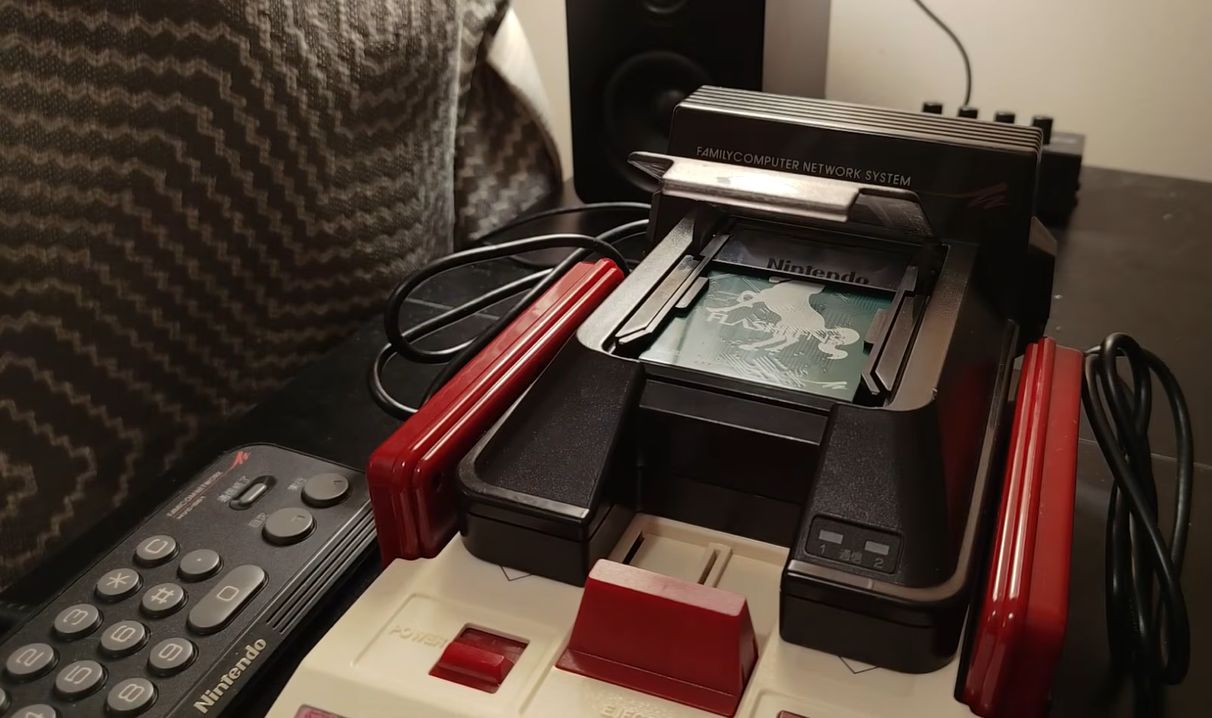
Usually, the name ‘Famicom’ and the associated Nintendo Entertainment System (NES) don’t exactly bring to mind downloadable content and online services. However, at least in Japan, a modem add-on for the Famicom offered those features. Released in 1988, the Family Computer Network System (FCNS) offered all that using its modem to dial into Nintendo’s servers. Recently, [Throaty Mumbo] got his mitts on one of these units to try and see what you can still do with it in 2026.
 Although only mildly successful in the Japanese market, Nintendo still sold 130,000 of these modem add-ons, with tens of thousands of users for the stock brokering, banking, and Super Mario Club services offered. The experiences with the FCNS would form the foundation for Nintendo’s Satellaview for the Super Famicom and from there into today’s Nintendo Online offerings.
Of course, the main challenge with reviving the FCNS in 2026 is that the remote servers were turned off decades ago, along with the minor detail that to do anything with it you need to insert a special card. This was missing in the used version that [Throaty Mumbo] bought, but fortunately he got a workable Super Mario Club card. The next struggle? He doesn’t speak Japanese, so it took a while to eke out the details.
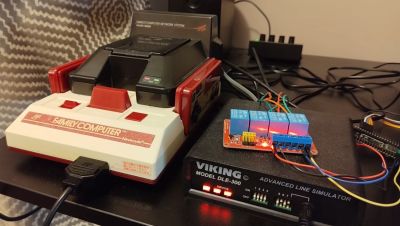
With a phone line simulator, it’s at least possible to try to have the FCNS try to dial, but that only throws another error. Ultimately it turned out that the FCNS uses NTT’s proprietary DDX-TP (in Japanese) protocol, which isn’t really documented outside of some Japanese sources. This is where the NES Dev site and its forum thread full of FCNS enthusiasts proved essential, as they had already done all the reverse-engineering.
Although only mildly successful in the Japanese market, Nintendo still sold 130,000 of these modem add-ons, with tens of thousands of users for the stock brokering, banking, and Super Mario Club services offered. The experiences with the FCNS would form the foundation for Nintendo’s Satellaview for the Super Famicom and from there into today’s Nintendo Online offerings.
Of course, the main challenge with reviving the FCNS in 2026 is that the remote servers were turned off decades ago, along with the minor detail that to do anything with it you need to insert a special card. This was missing in the used version that [Throaty Mumbo] bought, but fortunately he got a workable Super Mario Club card. The next struggle? He doesn’t speak Japanese, so it took a while to eke out the details.
With a phone line simulator, it’s at least possible to try to have the FCNS try to dial, but that only throws another error. Ultimately it turned out that the FCNS uses NTT’s proprietary DDX-TP (in Japanese) protocol, which isn’t really documented outside of some Japanese sources. This is where the NES Dev site and its forum thread full of FCNS enthusiasts proved essential, as they had already done all the reverse-engineering.
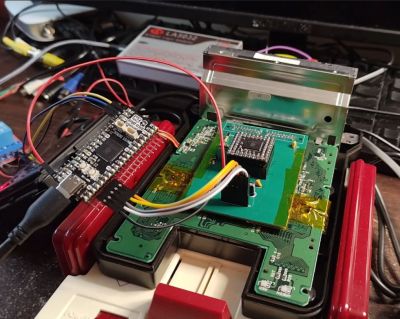
 NES Dev user [Ben Boldt], for example, made a DIY version of the FCNS access (tsuushin) card that lets you configure its details. For development, the PLCC-based CPLD was a bit of an annoyance, so the FCNS got somewhat modified along the way for more direct access.
After five months of work, he was finally able to connect the Famicom via the FCNS and a telephone line simulator for some Super Mario Club action. This connects to the SMC Server simulator on the PC, with the detailed manual that comes with the access card helping a lot.
After all this, the Super Mario Brothers game was graced with a game patch that allows for network-based SMB two-player action. This adds a ‘dial’ and ‘answer’ option so that the two Famicoms can connect and commence the two-player session. Although one can question the latency this would entail without a direct POTS connection as here, it is definitely a nifty demonstration of what ultimately would become the multiplayer gaming on Nintendo consoles today.
You can still do Famicom programming. There were even clones.
Other 1980s systems had dialup systems. Some were third party. Atari 2600’s GameLine is one.
To be annoying, the Atari 2600 is a 70’s machine.
Very interesting! 😃
I also like the idea that SMB1 now has a patch for this.
Something else makes me wonder though: Why do phone line simulators exist? Why are they a thing now?
I mean, back in the 90s, we simply had an ordinary PBX at home.
So each room could have a telephone plugged into the wall socket.
Our PBX was made in late 80s and used pulse dialing (older models were from the 1970s, even).
It was not just simulating a simple phone line, it was a miniature landline.
You could call all the phones in the house (up to four ?), each had a short number (31, 32 etc).
Another extra feature was a gate opener, I think.
To peripherals, it was an analog landline (POTS).
Modems and fac machines had no issues with it, the audio/line quality was excellent (no ADC/DAC conversion).
In fact, it was far better than the public phone network! 😉
There was a microcontroller that generated the busy tone, dial tone etc.
The tone for the internal landline was slightly different to the real thing (a few Hz),
so you could hear if you had left the internal network or not.
Pressing “0” often made the PBX connect to real landline.
But often via an opto coupler, which added an additional layer of safety.
There also were ISDN based PBXes which had some extra ports for analog phones, I remember.
(Just like DSL and cable routers used to have one or two analog phone sockets.)
So someone could still use an ordinary modem,
in order to call a BBS (mailbox) or another computer terminal that uses a modem.
ISDN also allowed peer-to-peer conections, though.
There were BBSes that had separate logins for modem and ISDN users.
That’s why I wonder why those line simulators do exist these days.
Wouldn’t it be more practical to simply make a modern, open hardware version of a fully functional “analog” PBX?
With proper analog circuit, real AC ringing, relays and opto couplers?
So that it’s possible to dial in-house, to use multiple modems and phones same time?
So that phone port A+B and C+D can do have a connection simultanously? Or A+D and B+C?
It’s not meant as a complaint, I do have a vintage PBX here. I’m happy.
I just think it would be an interesting project, maybe? 🙂
Dialing to the outside world isn’t needed more, perhaps.
Unless someone is a BBS fan and wants to hook the PBX up to some VOIP device (router modem etc).
SMB1.. Haha! I just realized it can mean both Super Mario Bros. 1 and Server Message Block v1! 🤣
NES Dev user [Ben Boldt], for example, made a DIY version of the FCNS access (tsuushin) card that lets you configure its details. For development, the PLCC-based CPLD was a bit of an annoyance, so the FCNS got somewhat modified along the way for more direct access.
After five months of work, he was finally able to connect the Famicom via the FCNS and a telephone line simulator for some Super Mario Club action. This connects to the SMC Server simulator on the PC, with the detailed manual that comes with the access card helping a lot.
After all this, the Super Mario Brothers game was graced with a game patch that allows for network-based SMB two-player action. This adds a ‘dial’ and ‘answer’ option so that the two Famicoms can connect and commence the two-player session. Although one can question the latency this would entail without a direct POTS connection as here, it is definitely a nifty demonstration of what ultimately would become the multiplayer gaming on Nintendo consoles today.
You can still do Famicom programming. There were even clones.
Other 1980s systems had dialup systems. Some were third party. Atari 2600’s GameLine is one.
To be annoying, the Atari 2600 is a 70’s machine.
Very interesting! 😃
I also like the idea that SMB1 now has a patch for this.
Something else makes me wonder though: Why do phone line simulators exist? Why are they a thing now?
I mean, back in the 90s, we simply had an ordinary PBX at home.
So each room could have a telephone plugged into the wall socket.
Our PBX was made in late 80s and used pulse dialing (older models were from the 1970s, even).
It was not just simulating a simple phone line, it was a miniature landline.
You could call all the phones in the house (up to four ?), each had a short number (31, 32 etc).
Another extra feature was a gate opener, I think.
To peripherals, it was an analog landline (POTS).
Modems and fac machines had no issues with it, the audio/line quality was excellent (no ADC/DAC conversion).
In fact, it was far better than the public phone network! 😉
There was a microcontroller that generated the busy tone, dial tone etc.
The tone for the internal landline was slightly different to the real thing (a few Hz),
so you could hear if you had left the internal network or not.
Pressing “0” often made the PBX connect to real landline.
But often via an opto coupler, which added an additional layer of safety.
There also were ISDN based PBXes which had some extra ports for analog phones, I remember.
(Just like DSL and cable routers used to have one or two analog phone sockets.)
So someone could still use an ordinary modem,
in order to call a BBS (mailbox) or another computer terminal that uses a modem.
ISDN also allowed peer-to-peer conections, though.
There were BBSes that had separate logins for modem and ISDN users.
That’s why I wonder why those line simulators do exist these days.
Wouldn’t it be more practical to simply make a modern, open hardware version of a fully functional “analog” PBX?
With proper analog circuit, real AC ringing, relays and opto couplers?
So that it’s possible to dial in-house, to use multiple modems and phones same time?
So that phone port A+B and C+D can do have a connection simultanously? Or A+D and B+C?
It’s not meant as a complaint, I do have a vintage PBX here. I’m happy.
I just think it would be an interesting project, maybe? 🙂
Dialing to the outside world isn’t needed more, perhaps.
Unless someone is a BBS fan and wants to hook the PBX up to some VOIP device (router modem etc).
SMB1.. Haha! I just realized it can mean both Super Mario Bros. 1 and Server Message Block v1! 🤣