
Summary
Most of us are guilty of romanticizing the past. Do you long to be the captain of a tall ship? Just as long as you don’t mind weevils in your food, vitamin deficiencies, and death from an infection when there were no antibiotics. Want to be a medieval knight? Even worse. But surely, retrocomputing is as fun as we remember, right? Turn your computer on, and it comes up with BASIC! Ready for you to write your own programs. None of this GUI foolishness. Of course, this is just another example of rosy retrospection.
Even if you like BASIC or a similar language today, things have changed. You have a nice text editor, a fast computer, debugging tools, along with things like named functions, no line numbers, and modern control structures. None of those things were very common in the 1980s. At least, not on a hobby-grade computer.
Why am I thinking about this? Well, the Hackaday Retrocomputing Challenge is on, and it occurred to me that I wanted to work with some young students in glorious MBASIC on a CP/M machine I built and modified from a Hackaday project. Perfect, right? Many of us started that way, so why shouldn’t they?
But it quickly got old. Even a simple program gets bogged down with GOTOs and GOSUBs to mysterious line numbers. It made me remember the time back in the early 1980s, or maybe even the late 1970s, that I wrote a BASIC preprocessor to scan BASIC with no line numbers and produce proper source, converting labels to line numbers in two passes.
Of course, that code is long gone or, at least, on a floppy I haven’t tried to read in a few decades. I decided to take another crack at it six years ago, but I still didn’t make it much more robust. For example:
PRINT: X=X+10
Is that two statements? Or a label? Hard to tell. My 2020 version used awk. Awk is great for this kind of thing because of the regular expressions and the input loop. But it still has some issues with things like comments and strings. Consider the code below.
PRINT “HELLO: IS IT ME YOU’RE LOOKING FOR?”
This would probably have made my awk preprocessor chew the string up and create a bogus label named HELLO.
History of Preprocessors
Preprocessing one language to another is nothing new. RATFOR and RATFIV by Brian Kernighan converted modern constructs to conventional FORTRAN IV. Even C++ started out as a program that emitted C code.
So the idea is good, but there are dozens of corner cases. As I anticipated having another go at the idea for BASIC, I realized my earlier versions had some design choices that made it harder than it should have been. So I started from scratch.
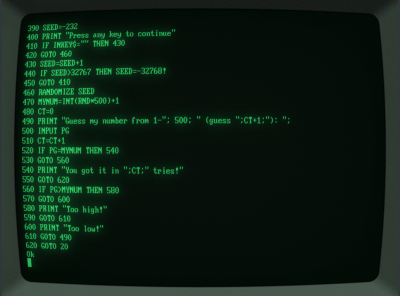 Cool-Retro-Terminal)
First, I gave up the idea of just having labels as you might in other languages. Instead, they’d be part of a comment and hard to mistake. This makes for easier parsing and also allows you to keep them around for reference. I also gave up on having labels magically expand. You need a way to make them unique, too. Here’s what I settled on:
‘:TOPLABEL GOTO @TOPLABEL
The plan was to go through the source once to assign line numbers. When a label occurs, it adds to the symbol table. Then a second pass actually writes output, replacing @TOPLABEL with the value from the symbol table. Of course, you still want this line to not trigger a label expansion:
PRINT “Send messages to @JTKIRK”
I decided to keep going in awk, but my eventual goal was to rewrite the whole thing in BASIC using the same syntax. Then you could convert the translator itself using the awk version once and then run it on an old computer using BASIC, even if you wanted to retranslate the translator itself. Perverse, huh? But that allows you to keep that authentic development experience. You don’t have to jump over to a PC to process your code, unless you just want to.
Awk as in Awkward
So I decided to do a better job on the awk part with this new scheme. At some point, though, you lose some of the advantages. Then feature creep set in.
I suppose I was subconsciously remembering RATFOR. I decided to add a small number of modern control structures. Again, I wanted something easy to pick out of the source file, so I went with this:
IF X=0 THEN! PRINT “There is no X!” X=10 ENDIF!
There’s also WHILE!, DO!, EXIT!, and CONTINUE!
Of course, it didn’t end there. I decided to add a way to include or exclude parts of the source (sort of like if in C but simpler), along with source code inclusion and a few other neat options such as numeric constants, conditional source blocks, compile-time errors, and even a small numeric stack with PUSH! and POP!.
The source code inclusion can be made to work with awk, but it is ugly. I decided it was better to proceed with another language, but since I didn’t feel like starting over, I just had an LLM convert my awk to Python, which it did with no trouble at all. I then did a little more feature development in Python, but I made sure not to use those new features in the translator itself so the awk version could still process an input file.
So while the original plan was to develop and test in awk and then implement similar code in MBASIC, I now had three versions: a frozen awk script, a Python version, and an MBASIC version.
This was getting a bit much to test. I had the LLM cook up some documentation, additional comments, and tests. It was especially nice to verify that all three versions — awk, Python, and BASIC — did the same things for their common features. The LLM was good at running tests and finding corner cases. It would even run tests in a RunCPM session on the MBASIC version.
BASIC
As you might expect, the BASIC version is a little more convoluted. However, the use of labels and control structures makes it much easier to write, read, and maintain.
Writing the translator in MBASIC imposed some very old-fashioned constraints. There are no dictionaries or dynamic lists, so labels and block state live in fixed-size arrays. Included files require an explicitly managed stack, and parsing strings and comments has to be done character by character. It is not as compact as the Python version, but it is ordinary MBASIC and can run on the target CP/M machine. The limitations also influenced some features that would have been feasible in Python but are nearly impossible in an MBASIC program.
Better yet, lblbasic.bal
stays within the subset the original awk translator understood. That provides a bootstrap path: awk produces the first lblbas.bas, after which the MBASIC translator can process its own BAL source.
A Few Samples
One project I had in mind was to drive an LED display module. I wrote a library and then wrote the test program below. It doesn’t matter, but I used .bal
as a file extension.
REM TM1637 TEST - PORT 3, BIT 2=DIO, BIT 3=CLK REM Uses the TM1637.BAL library with LBLBASIC STACK! 8 ’ Required by the library ’ Confirm that the library preserves I while initializing its data table. I=3141 gosub @init print “I is now:“;I PRINT “Starting number: ”; INPUT CT PRINT “1-Up, 0-Down: ”; INPUT UD OFFSET=-1 IF UD<>0 THEN OFFSET=1 ‘:CDLOOP WHILE! CT>=0 and CT⇐9999 NUM=CT GOSUB @sendnum4 CT=CT+OFFSET WEND! CT=0 IF OFFSET=-1 THEN CT=9999 GOTO @CDLOOP END ’ Include the library after the main program. ‘INCLUDE! TM1637.BAL
The BASIC code, including a few lines of the library, is much harder to read:
10 DIM LBLBSTACK#(8):LBLBSP=0 20 I=3141 30 gosub 230 40 print “I is now:“;I 50 PRINT “Starting number: ”; 60 INPUT CT 70 PRINT “1-Up, 0-Down: ”; 80 INPUT UD 90 OFFSET=-1 100 IF UD<>0 THEN OFFSET=1 110 ‘:CDLOOP 120 IF CT>=0 and CT⇐9999 THEN 140 130 GOTO 180 140 NUM=CT 150 GOSUB 330 160 CT=CT+OFFSET 170 GOTO 120 180 CT=0 190 IF OFFSET=-1 THEN CT=9999 200 GOTO 120 210 END 220 ‘:init 230 IF LBLBSP+1>64 THEN PRINT “BAL stack overflow”:STOP 240 LBLBSTACK#(LBLBSP+1)=I:LBLBSP=LBLBSP+1 250 DIM D(9) 260 FOR I=0 to 9: READ D(I): NEXT I 270 DATA 63,6,91,79,102,109,125,7,127,111 280 X=12:OUT 3,X 290 IF LBLBSP<1 THEN PRINT “BAL stack underflow”:STOP 300 I=LBLBSTACK#(LBLBSP):LBLBSP=LBLBSP-1 310 return 320 ‘:sendnum4 330 GOSUB 500 340 B=64:GOSUB 610
Cool-Retro-Terminal)
First, I gave up the idea of just having labels as you might in other languages. Instead, they’d be part of a comment and hard to mistake. This makes for easier parsing and also allows you to keep them around for reference. I also gave up on having labels magically expand. You need a way to make them unique, too. Here’s what I settled on:
‘:TOPLABEL GOTO @TOPLABEL
The plan was to go through the source once to assign line numbers. When a label occurs, it adds to the symbol table. Then a second pass actually writes output, replacing @TOPLABEL with the value from the symbol table. Of course, you still want this line to not trigger a label expansion:
PRINT “Send messages to @JTKIRK”
I decided to keep going in awk, but my eventual goal was to rewrite the whole thing in BASIC using the same syntax. Then you could convert the translator itself using the awk version once and then run it on an old computer using BASIC, even if you wanted to retranslate the translator itself. Perverse, huh? But that allows you to keep that authentic development experience. You don’t have to jump over to a PC to process your code, unless you just want to.
Awk as in Awkward
So I decided to do a better job on the awk part with this new scheme. At some point, though, you lose some of the advantages. Then feature creep set in.
I suppose I was subconsciously remembering RATFOR. I decided to add a small number of modern control structures. Again, I wanted something easy to pick out of the source file, so I went with this:
IF X=0 THEN! PRINT “There is no X!” X=10 ENDIF!
There’s also WHILE!, DO!, EXIT!, and CONTINUE!
Of course, it didn’t end there. I decided to add a way to include or exclude parts of the source (sort of like if in C but simpler), along with source code inclusion and a few other neat options such as numeric constants, conditional source blocks, compile-time errors, and even a small numeric stack with PUSH! and POP!.
The source code inclusion can be made to work with awk, but it is ugly. I decided it was better to proceed with another language, but since I didn’t feel like starting over, I just had an LLM convert my awk to Python, which it did with no trouble at all. I then did a little more feature development in Python, but I made sure not to use those new features in the translator itself so the awk version could still process an input file.
So while the original plan was to develop and test in awk and then implement similar code in MBASIC, I now had three versions: a frozen awk script, a Python version, and an MBASIC version.
This was getting a bit much to test. I had the LLM cook up some documentation, additional comments, and tests. It was especially nice to verify that all three versions — awk, Python, and BASIC — did the same things for their common features. The LLM was good at running tests and finding corner cases. It would even run tests in a RunCPM session on the MBASIC version.
BASIC
As you might expect, the BASIC version is a little more convoluted. However, the use of labels and control structures makes it much easier to write, read, and maintain.
Writing the translator in MBASIC imposed some very old-fashioned constraints. There are no dictionaries or dynamic lists, so labels and block state live in fixed-size arrays. Included files require an explicitly managed stack, and parsing strings and comments has to be done character by character. It is not as compact as the Python version, but it is ordinary MBASIC and can run on the target CP/M machine. The limitations also influenced some features that would have been feasible in Python but are nearly impossible in an MBASIC program.
Better yet, lblbasic.bal
stays within the subset the original awk translator understood. That provides a bootstrap path: awk produces the first lblbas.bas, after which the MBASIC translator can process its own BAL source.
A Few Samples
One project I had in mind was to drive an LED display module. I wrote a library and then wrote the test program below. It doesn’t matter, but I used .bal
as a file extension.
REM TM1637 TEST - PORT 3, BIT 2=DIO, BIT 3=CLK REM Uses the TM1637.BAL library with LBLBASIC STACK! 8 ’ Required by the library ’ Confirm that the library preserves I while initializing its data table. I=3141 gosub @init print “I is now:“;I PRINT “Starting number: ”; INPUT CT PRINT “1-Up, 0-Down: ”; INPUT UD OFFSET=-1 IF UD<>0 THEN OFFSET=1 ‘:CDLOOP WHILE! CT>=0 and CT⇐9999 NUM=CT GOSUB @sendnum4 CT=CT+OFFSET WEND! CT=0 IF OFFSET=-1 THEN CT=9999 GOTO @CDLOOP END ’ Include the library after the main program. ‘INCLUDE! TM1637.BAL
The BASIC code, including a few lines of the library, is much harder to read:
10 DIM LBLBSTACK#(8):LBLBSP=0 20 I=3141 30 gosub 230 40 print “I is now:“;I 50 PRINT “Starting number: ”; 60 INPUT CT 70 PRINT “1-Up, 0-Down: ”; 80 INPUT UD 90 OFFSET=-1 100 IF UD<>0 THEN OFFSET=1 110 ‘:CDLOOP 120 IF CT>=0 and CT⇐9999 THEN 140 130 GOTO 180 140 NUM=CT 150 GOSUB 330 160 CT=CT+OFFSET 170 GOTO 120 180 CT=0 190 IF OFFSET=-1 THEN CT=9999 200 GOTO 120 210 END 220 ‘:init 230 IF LBLBSP+1>64 THEN PRINT “BAL stack overflow”:STOP 240 LBLBSTACK#(LBLBSP+1)=I:LBLBSP=LBLBSP+1 250 DIM D(9) 260 FOR I=0 to 9: READ D(I): NEXT I 270 DATA 63,6,91,79,102,109,125,7,127,111 280 X=12:OUT 3,X 290 IF LBLBSP<1 THEN PRINT “BAL stack underflow”:STOP 300 I=LBLBSTACK#(LBLBSP):LBLBSP=LBLBSP-1 310 return 320 ‘:sendnum4 330 GOSUB 500 340 B=64:GOSUB 610
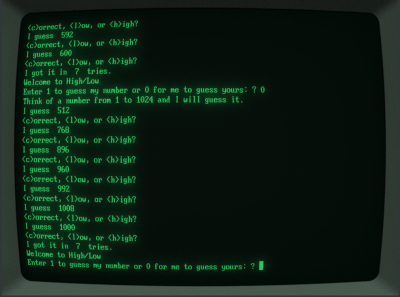 If you haven’t used the TM1637 before, it uses a serial protocol with a clock and data line and is very forgiving of timing. The display update speed is quite slow, partly because MBASIC isn’t that speedy and partly because the Z80 chip communicates to the outside world via another microcontroller talking over an I2C bus. But non-BAL code would be just as slow on the same computer. You’ll notice, though, that I took all the delays out and the code and it still works fine.
The bigger sample, though, is HILO.BAL. This lets you set a few compile-time constants that let you select what parts of the program get built. It also makes good use of the control loops. Of course, if you really want to dig in, lblbasic.bal uses quite a bit of the awk-compatible syntax and is a substantial program: around 1300 source lines of BAL which generate nearly 900 lines of regular BASIC due to comment and white-space stripping.
Conclusion
Does this turn MBASIC into a modern language? Of course not. The generated program still has line numbers, the machine is still tiny, and the implementation makes compromises that would horrify anyone writing a real compiler. But it removes enough friction that programming the old machine becomes enjoyable again, especially with WordStar as an editor.
More importantly, the translator can live on the machine it targets. The awk prototype can translate lblbasic.bal
once, producing ordinary MBASIC. From then on, the CP/M machine can translate BAL programs — including the translator itself — without help from Python or a modern computer.
So perhaps the lesson isn’t that retrocomputing was better than we remember. It’s that, with a little strategic cheating, it can be almost as much fun as we remember.
the fun was in my head. i looked at the computer differently. i certainly don’t want to deal with severe limitations anymore! even when i’m programming “to the metal” on an embedded chip, i like to have a full-featured computer to run my cross-compiler. 30 years ago, i decided i would never code for 8086 real mode segmented memory ever again and by golly i still mean it!
at one point in my life, i was anticipating C, and i didn’t even know what it was. i met ASIC, a compiler for a limited dialect of BASIC. ASIC used function calls for things that ‘real’ BASIC used magic syntax for. i thought to myself, “what if everything was a function call?” and i mulled that over for a while and then about a year later my dad brought home a giant cardboard box with a handful of floppies in it, “Borland Turbo C++ 3.0”. i set about to learn it, and there it was! A language where everything is a function call, just like my dream! huge moment in my life. shortly after, i “invented” recursive descent parsing too.
can’t have that back no matter how faithfully i rebuild an old PC or what-have-you. knowing you’re mucking around with a museum piece is totally different from believing for a year that you’ve dreamed up the first halfway decent programming language :)
“….language where everything is a function call…” You must be thinking of Forth or LISP, both of which predate the 1980s
I think he meant from a childlike view with experience only in BASIC, everything felt like a function call in C (If you squint hard). I blame BASIC for discouraging me from ever learning programming. A game or two from a book and from a magazine; never got them working. I didn’t grasp the idea of debugging as fundamental to programming. As a teen I took a summer course at Tufts U. Made one picture with moving parts in 16 colors 40 × 48 pixels:”low res”, another in “high res”. I remember the IIe had “double hi-res”, I have no idea what that resolution was. Nobody explained “sprites” or that the computer depended on artifact color -that might have sparked my interest. By the time LOGO came out for Apple, I knew the “kid’s” version of programming sucked and weren’t worth the frustration. I bet a lot of kids have the same reaction today to Microsoft MakeCode “Block Coding!” Python I suspect is a mixed blessing, I mean better to teach kids an actual programming language made for adults, excluding any “BASIC”. I once considered learning DrScheme, which is now Racket. I still think designing for children/teens/beginners somehow curses the language, and it’s IDE. I shudder to think how they’re trying to wedge AI into it now. Maybe I’ll try COBOL…
Even back then, it wasn’t fun. It was novel. It was interesting. But it was an extreme chore to do anything nontrivial. We knew it, we felt it, but we didn’t have any better.
Compiling C on an Apple ][ in 1985 required two floppies, a ramdisk, a printer, and a 20-minute coffee break. Thinking about that now is not nostalgic, does not bring back rosy memories, and I have no wish to relive it.
Now you have me questioning why I’m still holding onto that 1981 HP41C, 1986 TRS80 Model 100 and 1994 HP100LX. Misplaced nostalgia, I guess.
I bought a Fat Mac (i.e. original Macintosh upgraded to 1MB memory) so I could re-experience dicovering (in 1986) that OOP was the way forward.
Yes apple implemented Smalltalk 80 on a 68000. It was glacially slow, but lead to Jobs realising that Objective-C was the way forward for his next [sic] venture.
Actually, a Fat Mac was the original 128kB Mac upgraded to 512kB. That was possible, because the 16x 64kBit 6164 DRAM chips had a compatible pinout with 16x 256kBit 61256 DRAM chips. You just needed to replace the chips with the new ones and bridge a couple of pads to enable the extra CAS/RAS address line (A8/A17).
The Mac Plus, introduced in early 1986 had 1MB expandable to 4MB.
My first programming experience was BASIC and basic. The environment had no way to save or load a program from media of any sort. The system used two 12 key keypads as a keyboard. The system had only 128 bytes of RAM total, leaving around 64 bytes for user variables and program storage. Maybe 10-12 lines of BASIC code could be input.
Even having never seen code before, the limits smacked me in the face very quickly. The Atari 2600 Basic Programming cartridge was a pretty bad setup all the way around, except for one thing: it made me want more.
Even nostalgia doesn’t make me yearn for that environment again. But, it served its purpose. I eventually backed into coding professionally and that served me well for decades.
Still, knowing me, it’s a wonder that the experience didn’t put me off of programming. I guess seeing “HELLO” appear on my friend’s TV screen in the late 70’s, and knowing I put it there, was enough to get me hooked.
A sign of the times, we spent hours trying figuring out how to make it play the Close Encounters tune. Fun was had.
The only retro-programming I miss (and is in the process of restoring) is Borland’s Turbo-C++ in MS DOS (I think it was DOS 6 already). Aside from nostalgia, it was the first real-world job that paid more-or-less-decent salary for a junior programmer, so there, the reason. It was rather welcome upgrade from a command-line-only C compiling, but I get a chance to compare both, vi editor and all, and Borland’s IDE won easily.
Aside from that, machine-coding 8080 was fun, but I haven’t gotten very far with shared time on industrial computers that were almost always in the permanent state of “being maintained/repaired”, so my experience was rather too sporadic to deliver any tangible education value. Though, playing with machine code did make me think that some things are easier and simpler when done in Assembler, loops, etc, and Borland’s Turbo C++ had a nifty window into that. I’ll stand corrected if there exists better/simpler IDE that won’t require overbloated GUI, I ‘ve always preferred TUI where it simply makes sense.
Sigh. There are so many “wrongs” that I don’t even know where to start. 🙄
But being the good person I am (trying to be), I’ll try my best.
As a mediator between the generations, so to speak. 😉
a) “what kind of students”? Pupils or Uni students?
Anyway, kids at young age (10 or younger), before they enter puberty
or have smartphones can still be impressed by crystal radios,
tinkering with paper and scissors or vintage computers.
A lot of oldtimers make the mistake that they try to impress age 15+ children.
Because that’s when they started thenselves. That’s too late, though.
Unless the children in particular have a big heart and endure the show.
b) MBASIC. The fascinating thing about MBASIC was that it could run on any CP/M computer.
CP/M allowed working with files, provided hardware independence (i8080 compatible CPU was only requirement).
Give kids a real vintage computer from space age, let them work with museums pieces.
An Apple II with Z80 SoftCard, an IMSAI 8080 running CP/M off an 8″ floppy. Whatever.
That will get their attention and catch their interest.
Some Z80 SBC with modern parts is fascination to us, but not to them.
They want to see a full-size dinosaur, not some cute salamander.
c) try to get GSX running. It’s a graphical library for CP/M and DOS.
d) watch some sci-fi classics with them.
Wargames, DARYL, Runaway, Blue Thunder, Project Brainstorm, Hackers, Sneakers, The Net, etc whatever suits them.
So they get an idea of the world of yesterday.
e) use an MP/M setup. Install CP/Net, if possible.
Let them work with multiple terminals and real floppy drives or Fixed-Disks.
Something that moves, that makes sounds.
So they can see computers being in action! 😃
f) build a computer mailbox/BBS and recreate the POTS using an PBX or something.
Let the kids use an acoustic coupler or a softmodem for the real experience.
g) attach some robot arm or some lights to expansion port, so they can use MBASIC to open a port or make register writes.
Let them see that there programs can do fun stuff.
h) fractals. generate fractal using pixels or ASCII characters.
Maybe show them the “game of life” or let a copy of ELIZA running.
Or Hunt The Wumpus, Colossal Cave Adventure etc. Trigger their imagination! 🙂
IMHO. The core idea was not wrong, but the presentation wasn’t ideal, maybe.
Beef things up. Use cool-retro-term for the terminal computer.
Make it look cool, like out Matrix or Fallout.
That might impress the young people.
You have to be real about the upsides too. I can sit on my back porch without my glasses on an write letters to friends or play around on a TRS-80 Model 100 all day on a set of AA rechargeable batteries, which is something I can’t do on a recent laptop. I can run a C program on an HP nnn that truly fits in my pocket on two AA batteries, and it’s nowhere as easy to do that on a current Android device without Termux. Neither device tracks me or requires apps. The definition of whatever I programmed in on those devices is stable and is something I can remember as opposed to large, ever-changing specs and forced obsolescence in the name of computer science.
Unfortunately, WordPress has eaten the indentation in the Sample code… there’s always GitHub… I am going to try to fix it again, but WP has a habit of chewing up code for some reason.
My first programming experience was a small game I wrote in assembler (actually, diligently handcrafted machine code) after some reading of IBM’s superb documentation in its three-ring binders (a bit of a novelty around where I lived back then). It was executed on one of those newfangled computers called IBM S/360 Model 30 with a whopping 16kB core memory. I actually entered the program through the front panel, which was a bit of a bother … a very slow process, requiring a discipline my very young self found somewhat challenging, but it worked.
I’ve been writing about what retro computers can be.
Too me there are 6 or more levels
If you haven’t used the TM1637 before, it uses a serial protocol with a clock and data line and is very forgiving of timing. The display update speed is quite slow, partly because MBASIC isn’t that speedy and partly because the Z80 chip communicates to the outside world via another microcontroller talking over an I2C bus. But non-BAL code would be just as slow on the same computer. You’ll notice, though, that I took all the delays out and the code and it still works fine.
The bigger sample, though, is HILO.BAL. This lets you set a few compile-time constants that let you select what parts of the program get built. It also makes good use of the control loops. Of course, if you really want to dig in, lblbasic.bal uses quite a bit of the awk-compatible syntax and is a substantial program: around 1300 source lines of BAL which generate nearly 900 lines of regular BASIC due to comment and white-space stripping.
Conclusion
Does this turn MBASIC into a modern language? Of course not. The generated program still has line numbers, the machine is still tiny, and the implementation makes compromises that would horrify anyone writing a real compiler. But it removes enough friction that programming the old machine becomes enjoyable again, especially with WordStar as an editor.
More importantly, the translator can live on the machine it targets. The awk prototype can translate lblbasic.bal
once, producing ordinary MBASIC. From then on, the CP/M machine can translate BAL programs — including the translator itself — without help from Python or a modern computer.
So perhaps the lesson isn’t that retrocomputing was better than we remember. It’s that, with a little strategic cheating, it can be almost as much fun as we remember.
the fun was in my head. i looked at the computer differently. i certainly don’t want to deal with severe limitations anymore! even when i’m programming “to the metal” on an embedded chip, i like to have a full-featured computer to run my cross-compiler. 30 years ago, i decided i would never code for 8086 real mode segmented memory ever again and by golly i still mean it!
at one point in my life, i was anticipating C, and i didn’t even know what it was. i met ASIC, a compiler for a limited dialect of BASIC. ASIC used function calls for things that ‘real’ BASIC used magic syntax for. i thought to myself, “what if everything was a function call?” and i mulled that over for a while and then about a year later my dad brought home a giant cardboard box with a handful of floppies in it, “Borland Turbo C++ 3.0”. i set about to learn it, and there it was! A language where everything is a function call, just like my dream! huge moment in my life. shortly after, i “invented” recursive descent parsing too.
can’t have that back no matter how faithfully i rebuild an old PC or what-have-you. knowing you’re mucking around with a museum piece is totally different from believing for a year that you’ve dreamed up the first halfway decent programming language :)
“….language where everything is a function call…” You must be thinking of Forth or LISP, both of which predate the 1980s
I think he meant from a childlike view with experience only in BASIC, everything felt like a function call in C (If you squint hard). I blame BASIC for discouraging me from ever learning programming. A game or two from a book and from a magazine; never got them working. I didn’t grasp the idea of debugging as fundamental to programming. As a teen I took a summer course at Tufts U. Made one picture with moving parts in 16 colors 40 × 48 pixels:”low res”, another in “high res”. I remember the IIe had “double hi-res”, I have no idea what that resolution was. Nobody explained “sprites” or that the computer depended on artifact color -that might have sparked my interest. By the time LOGO came out for Apple, I knew the “kid’s” version of programming sucked and weren’t worth the frustration. I bet a lot of kids have the same reaction today to Microsoft MakeCode “Block Coding!” Python I suspect is a mixed blessing, I mean better to teach kids an actual programming language made for adults, excluding any “BASIC”. I once considered learning DrScheme, which is now Racket. I still think designing for children/teens/beginners somehow curses the language, and it’s IDE. I shudder to think how they’re trying to wedge AI into it now. Maybe I’ll try COBOL…
Even back then, it wasn’t fun. It was novel. It was interesting. But it was an extreme chore to do anything nontrivial. We knew it, we felt it, but we didn’t have any better.
Compiling C on an Apple ][ in 1985 required two floppies, a ramdisk, a printer, and a 20-minute coffee break. Thinking about that now is not nostalgic, does not bring back rosy memories, and I have no wish to relive it.
Now you have me questioning why I’m still holding onto that 1981 HP41C, 1986 TRS80 Model 100 and 1994 HP100LX. Misplaced nostalgia, I guess.
I bought a Fat Mac (i.e. original Macintosh upgraded to 1MB memory) so I could re-experience dicovering (in 1986) that OOP was the way forward.
Yes apple implemented Smalltalk 80 on a 68000. It was glacially slow, but lead to Jobs realising that Objective-C was the way forward for his next [sic] venture.
Actually, a Fat Mac was the original 128kB Mac upgraded to 512kB. That was possible, because the 16x 64kBit 6164 DRAM chips had a compatible pinout with 16x 256kBit 61256 DRAM chips. You just needed to replace the chips with the new ones and bridge a couple of pads to enable the extra CAS/RAS address line (A8/A17).
The Mac Plus, introduced in early 1986 had 1MB expandable to 4MB.
My first programming experience was BASIC and basic. The environment had no way to save or load a program from media of any sort. The system used two 12 key keypads as a keyboard. The system had only 128 bytes of RAM total, leaving around 64 bytes for user variables and program storage. Maybe 10-12 lines of BASIC code could be input.
Even having never seen code before, the limits smacked me in the face very quickly. The Atari 2600 Basic Programming cartridge was a pretty bad setup all the way around, except for one thing: it made me want more.
Even nostalgia doesn’t make me yearn for that environment again. But, it served its purpose. I eventually backed into coding professionally and that served me well for decades.
Still, knowing me, it’s a wonder that the experience didn’t put me off of programming. I guess seeing “HELLO” appear on my friend’s TV screen in the late 70’s, and knowing I put it there, was enough to get me hooked.
A sign of the times, we spent hours trying figuring out how to make it play the Close Encounters tune. Fun was had.
The only retro-programming I miss (and is in the process of restoring) is Borland’s Turbo-C++ in MS DOS (I think it was DOS 6 already). Aside from nostalgia, it was the first real-world job that paid more-or-less-decent salary for a junior programmer, so there, the reason. It was rather welcome upgrade from a command-line-only C compiling, but I get a chance to compare both, vi editor and all, and Borland’s IDE won easily.
Aside from that, machine-coding 8080 was fun, but I haven’t gotten very far with shared time on industrial computers that were almost always in the permanent state of “being maintained/repaired”, so my experience was rather too sporadic to deliver any tangible education value. Though, playing with machine code did make me think that some things are easier and simpler when done in Assembler, loops, etc, and Borland’s Turbo C++ had a nifty window into that. I’ll stand corrected if there exists better/simpler IDE that won’t require overbloated GUI, I ‘ve always preferred TUI where it simply makes sense.
Sigh. There are so many “wrongs” that I don’t even know where to start. 🙄
But being the good person I am (trying to be), I’ll try my best.
As a mediator between the generations, so to speak. 😉
a) “what kind of students”? Pupils or Uni students?
Anyway, kids at young age (10 or younger), before they enter puberty
or have smartphones can still be impressed by crystal radios,
tinkering with paper and scissors or vintage computers.
A lot of oldtimers make the mistake that they try to impress age 15+ children.
Because that’s when they started thenselves. That’s too late, though.
Unless the children in particular have a big heart and endure the show.
b) MBASIC. The fascinating thing about MBASIC was that it could run on any CP/M computer.
CP/M allowed working with files, provided hardware independence (i8080 compatible CPU was only requirement).
Give kids a real vintage computer from space age, let them work with museums pieces.
An Apple II with Z80 SoftCard, an IMSAI 8080 running CP/M off an 8″ floppy. Whatever.
That will get their attention and catch their interest.
Some Z80 SBC with modern parts is fascination to us, but not to them.
They want to see a full-size dinosaur, not some cute salamander.
c) try to get GSX running. It’s a graphical library for CP/M and DOS.
d) watch some sci-fi classics with them.
Wargames, DARYL, Runaway, Blue Thunder, Project Brainstorm, Hackers, Sneakers, The Net, etc whatever suits them.
So they get an idea of the world of yesterday.
e) use an MP/M setup. Install CP/Net, if possible.
Let them work with multiple terminals and real floppy drives or Fixed-Disks.
Something that moves, that makes sounds.
So they can see computers being in action! 😃
f) build a computer mailbox/BBS and recreate the POTS using an PBX or something.
Let the kids use an acoustic coupler or a softmodem for the real experience.
g) attach some robot arm or some lights to expansion port, so they can use MBASIC to open a port or make register writes.
Let them see that there programs can do fun stuff.
h) fractals. generate fractal using pixels or ASCII characters.
Maybe show them the “game of life” or let a copy of ELIZA running.
Or Hunt The Wumpus, Colossal Cave Adventure etc. Trigger their imagination! 🙂
IMHO. The core idea was not wrong, but the presentation wasn’t ideal, maybe.
Beef things up. Use cool-retro-term for the terminal computer.
Make it look cool, like out Matrix or Fallout.
That might impress the young people.
You have to be real about the upsides too. I can sit on my back porch without my glasses on an write letters to friends or play around on a TRS-80 Model 100 all day on a set of AA rechargeable batteries, which is something I can’t do on a recent laptop. I can run a C program on an HP nnn that truly fits in my pocket on two AA batteries, and it’s nowhere as easy to do that on a current Android device without Termux. Neither device tracks me or requires apps. The definition of whatever I programmed in on those devices is stable and is something I can remember as opposed to large, ever-changing specs and forced obsolescence in the name of computer science.
Unfortunately, WordPress has eaten the indentation in the Sample code… there’s always GitHub… I am going to try to fix it again, but WP has a habit of chewing up code for some reason.
My first programming experience was a small game I wrote in assembler (actually, diligently handcrafted machine code) after some reading of IBM’s superb documentation in its three-ring binders (a bit of a novelty around where I lived back then). It was executed on one of those newfangled computers called IBM S/360 Model 30 with a whopping 16kB core memory. I actually entered the program through the front panel, which was a bit of a bother … a very slow process, requiring a discipline my very young self found somewhat challenging, but it worked.
I’ve been writing about what retro computers can be.
Too me there are 6 or more levels
- A simulator, something running on a more powerful computer, approximating the original experience.
- A reproduction computer using more powerful chips to emulate the original experience.
- A restoration of an original computer with the same experience.
- A working original, maybe in a beat up case (yellowed, cracking, etc).
- An original or reproduction, non functioning model that presents the milestone memory.
- A fantasy machine, something that could have been (i.e. 6502 with a100MB hard drive with a multitasking os and 1mb of RAM. os/65u may match this)