Summary
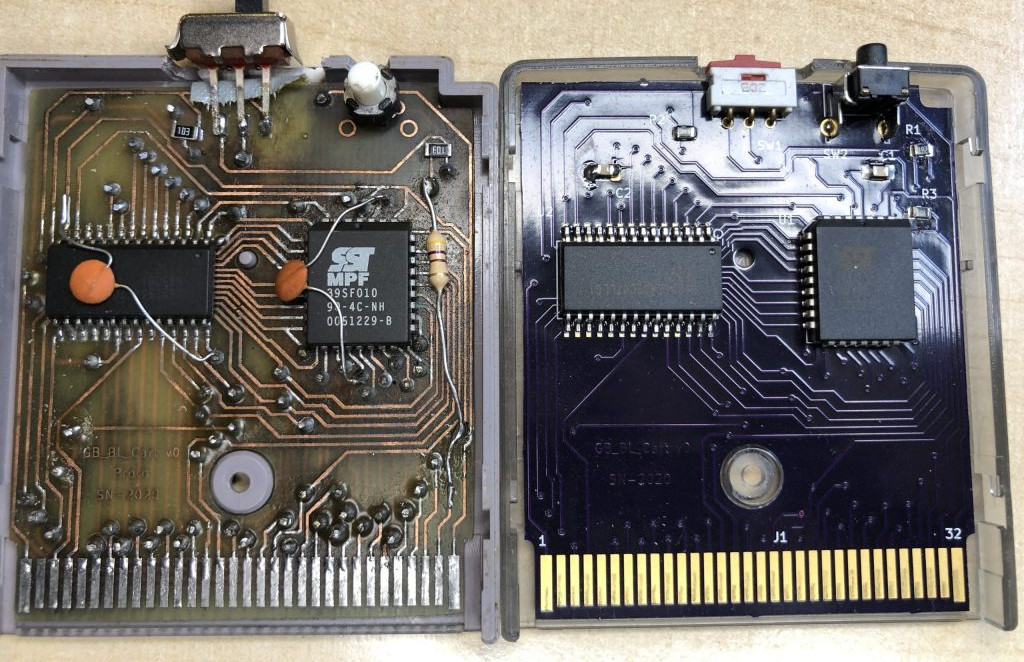
These days, it is easy enough to get a flash cart for your Game Boy that makes it easy to run code — yours or otherwise — on it, but they aren’t necessarily ideal for actual development. The process of shuttling new code over to the cart via an SD card isn’t bad if you’re doing it once, but it gets very annoying if you’re trying to make rapid incremental changes. Which is specifically what [MrFrenchLame] was looking to improve on with his development cart. Rather than using a SD card to move over ROMs, the cart features a small bootloader that establishes communication with the computer over the Game Boy’s link port. The new code goes right into the cart’s RAM, where it can be immediately executed without having to write it out to flash. When you want to load new code, just press a button on the cart, and the whole thing starts over fresh. The upload routine can even be worked into your IDE to streamline the process. This lack of permanence makes the cart a poor choice for actually playing games since everything goes poof when the power goes out. Plus, it only has 32K of RAM to work with, and can’t really do anything without being tethered to a computer. But it’s a fantastic solution if you’re looking to test things out quickly. That said, there is one pretty major problem with this project: it requires your development computer to have a physical parallel port, which is a tall order in 2026. [MrFrenchLame] mentions this could likely be addressed by pulling in knowledge from some of the modern DIY flash carts we’ve seen recently, but hasn’t had time to tackle it yet. Maybe you could lend a hand? My GB flash cart features an on-cart USB port that allows loading new roms: https://github.com/daid/SpiderCart (As well as pretty much any other feature you can think off) There are many was to skin a cat. Daid’s Spidercart above is an option. There’s a similar project, Crococart, that also has a RP Pico and could probably do a similar job over USB. If we’re keeping with the spirit of the original project: the first obvious upgrade is to replace the LPT port with your favorite brand of USB capable microcontroller board like Arduino or RP Pico. Then I would add reset sequencing and external chip select control. Might add a 74hcxxx OR chip for gating. Pin header up top for external control through the same microcontroller. Have series resistors connected to the switch so the switch can control the chip select independently which can also be overridden through the pin header. 100k pullups, 10k resistors for the switch and then low impedance for the external control. This way the microcontroller can reset, wait for the bootloader to pull data from the link port and then redet again if needed. Finally, I’d make sure that any games I prototyped using this cartridge had a serial interrupt and a small bootloader to allow a quick warm reboot, at least as long as the game didn’t crash.