Summary
Whenever I need driving directions or want to try a new restaurant, I always open Google Maps. That said, when I’m commuting, I want to know more details like when my bus is arriving and if there’s a quicker alternative when something goes wrong.
Citymapper fills this gap by putting public transport at the centre of the experience. It brings together buses, trains, the Underground, cycling, and walking routes. This app doesn’t try to map everything; it shows you the best way to get from here to there, right now.
I can compare different commuting options in one place
It shows me the route that actually works for me
Google Maps is super quick at suggesting routes, there’s no doubt about it. However, I don’t always want to take the fastest route if I have to change trains multiple times or take long walks. Citymapper allows me to compare these trade-offs in a much easier way.
When I enter a destination, I can see different ways to get there, combining public transport, walking, cycling, and other available options. Instead of choosing the first suggested route, I can quickly compare my journey times, walking distances, and the number of tube/bus changes involved.
I usually travel across London on weekends during rush hour. When I use Google Maps, it will show me driving, public transport, or walking directions to get there. On the flip side, when I enter my destination in Citymapper, it could suggest different options like taking the Underground for the entire journey, a mix of bus and train, or walking to a different station before boarding. I can compare these options before deciding which one makes the most sense.
If I’m running late, I can look for the quickest option. After spending an entire day in the City, I don’t fancy walking much, so I can choose a route that involves less walking. Citymapper also gives me options for minimizing changes and finding step-free routes.
So you see, rather than opening separate transport apps to compare services, I can see my options in one app and make a decision.
I can see exactly when my bus or train is arriving
No more waiting at the stops
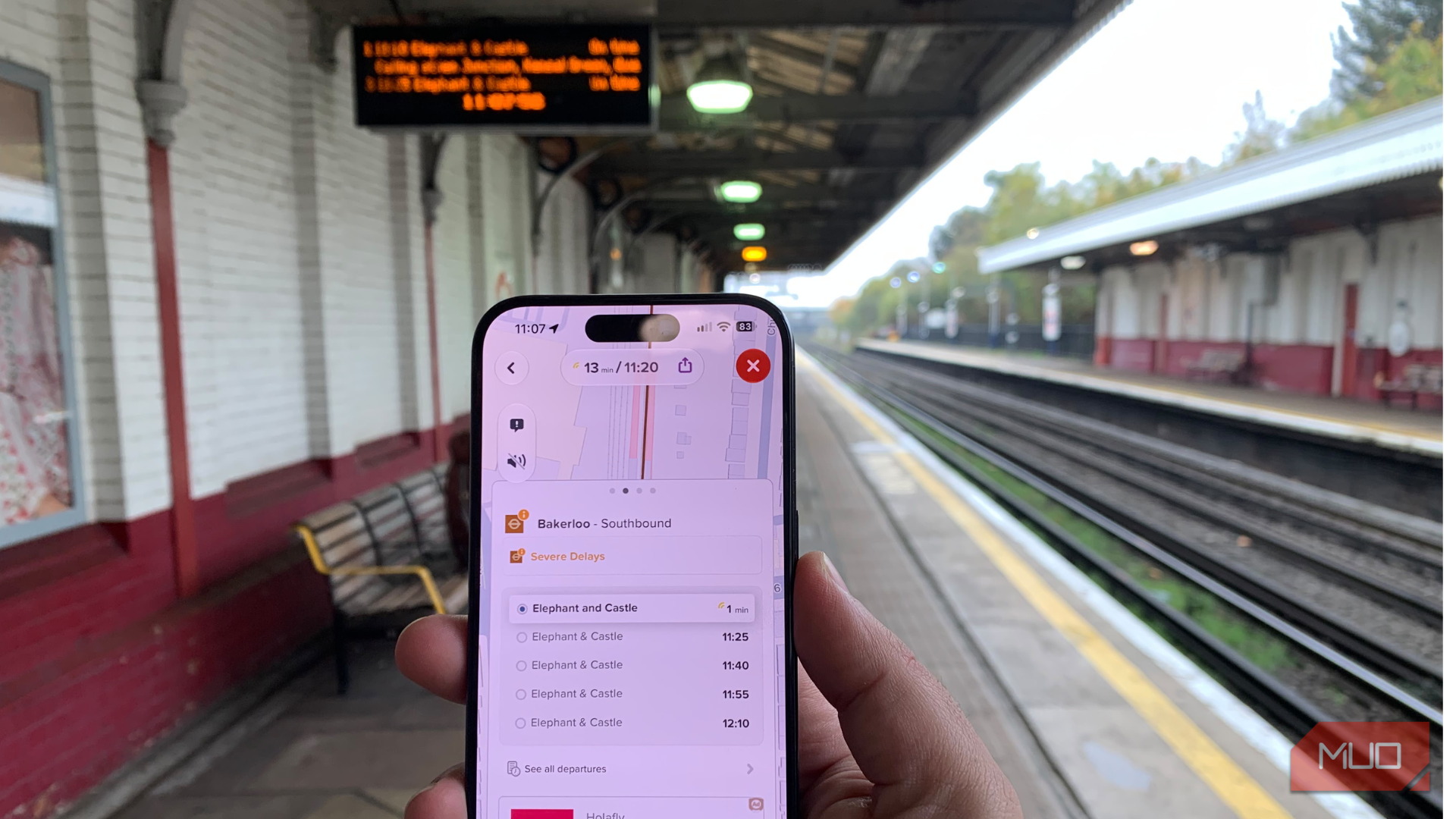
This is one of the main reasons why I love Citymapper so much. See, checking a bus timetable and knowing it will actually arrive are two different things. If you regularly commute by public transport, you already know how frustrating it is to reach a stop, only to know that the bus is running late.
Citymapper shows me live departure information and estimated arrival times, so I can see when the next bus/train and following vehicles are approaching on a real-time map.
For instance, if I’m getting ready to leave home for some work, I don’t need to head straight to the bus stop and wait, I can check if the next bus is arriving in six minutes, and if so, I know I should leave immediately. If it’s running late, I might have enough time to finish my coffee or take another route.
I would also like to mention a nifty feature that saves my time. Citymapper even tells me which train carriage to board. When I travel somewhere unfamiliar, I usually focus on getting onto the right train. I don’t always think about which carriage will leave me closest to the exit at my destination. With Citymapper, I always make to check and board the right carriage so I can save bit of unnecessary walking, particularly at large Underground and railway stations.
I get alerts before I miss my stop
This is made for me
I’m always checking my phone while travelling; maybe I’m replying to messages or listening to a podcast. The problem is that I might get distracted and miss a stop, especially when traveling on an unfamiliar route. Citymapper saves me with its GO feature.
When I tap GO, the app focuses on the next action I need to take, rather than showing up the entire route and leaving me to figure out where I am.
Citymapper guides me through everything: from walking to the station to waiting for the right departure. It also keeps track of my progress and sends an alert when my stop is approaching.
I also allow Live Activities on my iPhone, so I can see the journey information right on the Lock Screen.
I can save my regular routes and get disruption alerts
It also offers me information when I’m offline
At some point, we all have been in a situation where we get to know something is wrong after reaching a stop or station. I know how frustrating it feels. After all, a delayed train or an unexpected service disruption can change my journey. Instead of finding out at the platform, I would want to know about it before leaving home. Citymapper shows delays and disruptions right there, making it easier for me to figure out alternative routes before heading out.
I can also subscribe to my favorite transport lines to receive automatic notifications about delays, strikes, and service disruptions. For example, if you regularly use the same Underground line to get to the city; you can follow it in Citymapper. In case there’s a disruption, you can get an alert and check alternative routes before making any plans.
There’s an option to save frequently visited locations, including Home and Work, along with my favorite stops (mine is Piccadilly Circus because it takes me to the Lindt Flagship store). This makes planning my regular journeys quicker because I don’t have to enter the same destination every time.
Citymapper has some offline capabilities like I can plan a journey in advance and save it by starring the route. I can also access certain transport maps and scheduled Underground or metro departures. This gives me peace of mind that I can still check basic travel information when my connection drops.
Google Maps gives you a route; Citymapper gives you options
I haven’t replaced Google Maps, and there’s no need to even do that. It’s still an excellent navigation app for finding places, checking business information, and getting driving directions. That said, I prefer to use Citymapper when public transport is involved. It doesn’t just tell me how to reach a destination; it helps me manage the smaller details of getting there, too.
If you also commute regularly by bus, train, and Underground, Citymapper is the app you would want alongside Google Maps. It will make your everyday journeys easier to plan and give you more control when something doesn’t go according to schedule.
 Citymapper
 gives you real-time information and turn-by-turn directions for all your public transport, walking, cycling, and bike trips.