Summary
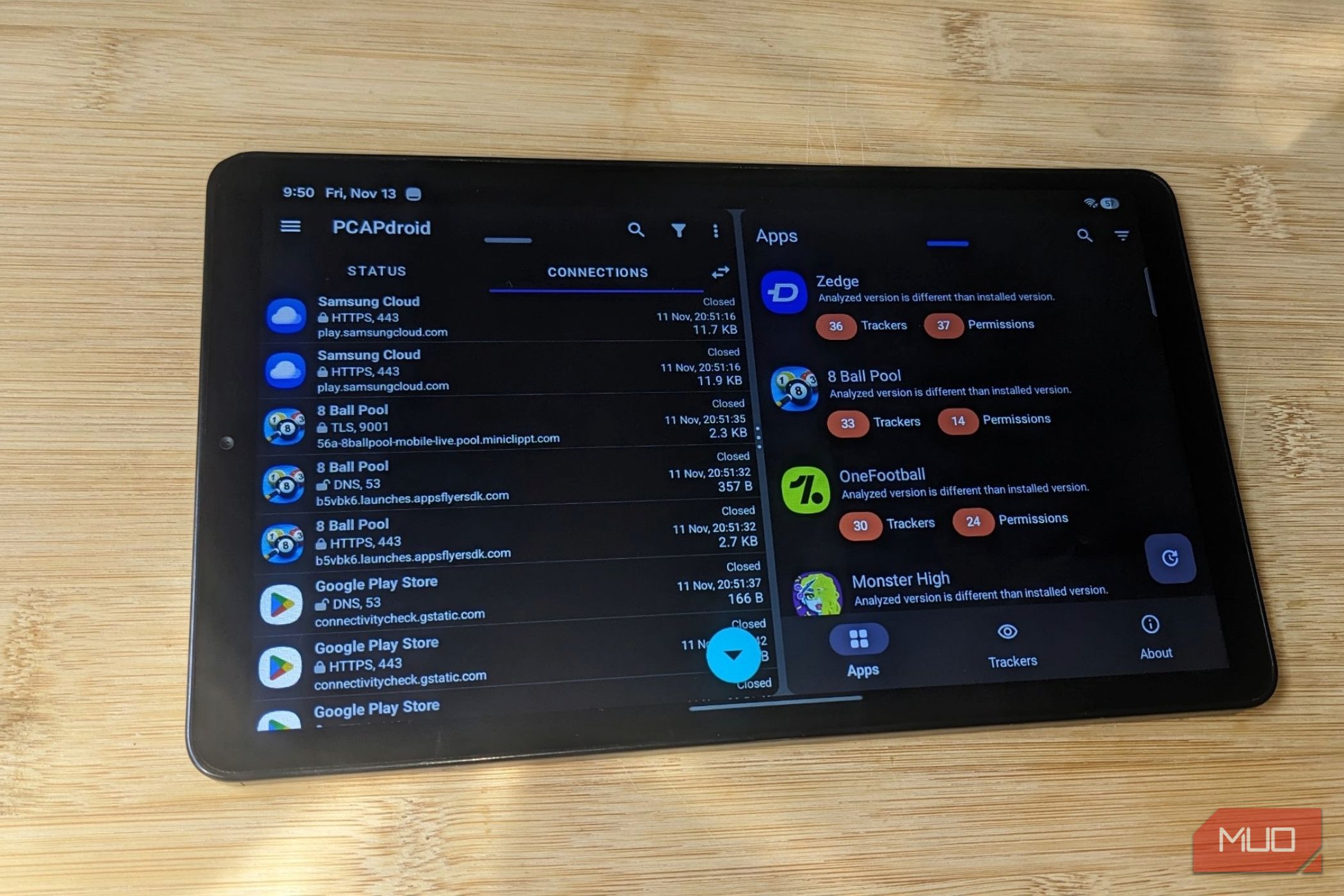
Since I wrote about PCAPdroid, I’ve added nearly 20 apps to my tablet. I can’t tell you what most of them do behind the scenes. PCAPdroid shows which servers an app contacts, but it can’t show what’s built into the app itself. That’s why I added Exodus Privacy to fill that gap. It’s a free app that lists the trackers hiding inside Android apps, along with the permissions each one declares. I used both tools together to decide which apps get to stay. 62 tracker types turned up on my tablet Firebase was the name I kept seeing Exodus found 62 different trackers across my apps. A tracker is a small piece of code apps include to collect information or share with other companies. Firebase Analytics appeared in 31 apps, Crashlytics in 17, and AdMob in 14. The first two help developers, while ad trackers like AdMob exist to earn money from your attention. Free apps often stack several ad companies, which helps explain Zedge’s 36, 8 Ball Pool’s 33, and Monster High’s 20. Exodus also lists declared permissions, which aren’t what I’ve granted. Xender declares 69, but I usually allow about five, mostly the microphone and media. Some permissions can hand a bad app your texts, location, and microphone. Reports can also cover older versions. Monster High was installed at 6.0.00, but Exodus analyzed 5.6.08, so I treated them as a rough guide. PCAPdroid showed me what those apps did while I used them A domain name only told me who was contacted A tracker list tells me what an app includes, but not what it connects to during everyday use. PCAPdroid fills that in by logging which app contacted which server during a capture, and how much data moved. It has limits. I can see which server an app contacted, not what was said, because the traffic is encrypted. It’s much like how your internet provider can still see many of the sites you visit. Some trackers may only trigger after a particular action, like watching an ad, so a capture can miss them. The domain names also need context. Temu logged 2,489 connections while I browsed my orders, but most of its traffic went to its own domains. OPay mixed its own servers with outside services, including AppsFlyer, Facebook, and Crashlytics. Seeing an app contact its own servers is different from seeing it contact third-party services, but neither tells me exactly what data was exchanged. Some apps made their tracker counts harder to ignore OneFootball, Zedge, and Monster High gave me plenty to look at Combining both tools became more useful. Monster High listed 20 trackers in Exodus, and its capture showed 83 domains in about a minute. Those included AppLovin, Pangle, Chartboost, Unity, and others. Ads are a common way free games make money, but seeing that many on a kid’s game made me question whether I wanted it on the tablet in the first place. OneFootball showed a similar pattern, reaching 57 domains in about 3 minutes, including Vungle, Moloco, and DoubleClick. Zedge reached 53 in less than a minute too. 8 Ball Pool disagreed with its report. Exodus listed 33 trackers, but PCAPdroid wouldn’t let me play online, so I played offline. It still reached about 12 domains in ten minutes, including Facebook, AppsFlyer, and Crashlytics. On my phone, the game shows an ad every two games, yet no ad networks appeared here. APKMirror Installer raised a different question. Exodus lists 3 trackers, yet its capture reached Vungle and Liftoff domains I couldn’t match to them. A domain isn’t proof of a tracker, so I’m not saying Exodus missed anything. Neither tool proves an app misused information. One shows what’s built in, the other what I saw in short sessions. That’s why I used both. When they agree, as with Monster High, that’s enough to make me question whether I need the app. I found fewer reasons to keep some apps than I expected Web versions and built-in features made several removals easier Privacy findings weren’t the only things I considered. I also asked what each app gives me, what it brings along, and whether something else already does the job. Some were easy to let go. I removed Monster High because of its trackers and Candy Crush due to its ads. I wasn’t comfortable with my kid’s game having that many ads and access. Zedge, OneFootball, APKMirror Installer, and 8 Ball Pool went too, because I can live without them and what I saw bothered me. Samsung Global Goals came with the tablet, so I could only disable it, even though it had a lot of trackers. And PCAPdroid confirmed how active they are. If ads are your main concern, Android has a hidden setting that blocks ads across apps without a VPN. Other apps were easier to replace. TradingView and Temu were heavy on ads for me, and both have web versions. There are built-in options for AccuWeather and AccuBattery. Xender is the only decision I made based on Exodus alone, with 5 trackers, 69 declared permissions, and no capture. OPay is the exception. Despite listing 8 trackers and 38 declared permissions, its capture included a lot of tracking and ad services. But it’s my bank, so it stays. The same findings that made other apps easier to remove weren’t enough to make me give this one up. I’ll be checking before I install the next app Moving forward, I’ll open Exodus’s website, which lets me check reports without installing anything. If a casual game or app comes with dozens of trackers, I’ll just skip it entirely or use the web version instead. And whatever I do install gets a quick PCAPdroid capture in the first few minutes. I need to be certain the app’s worth the baggage it comes with.