Summary
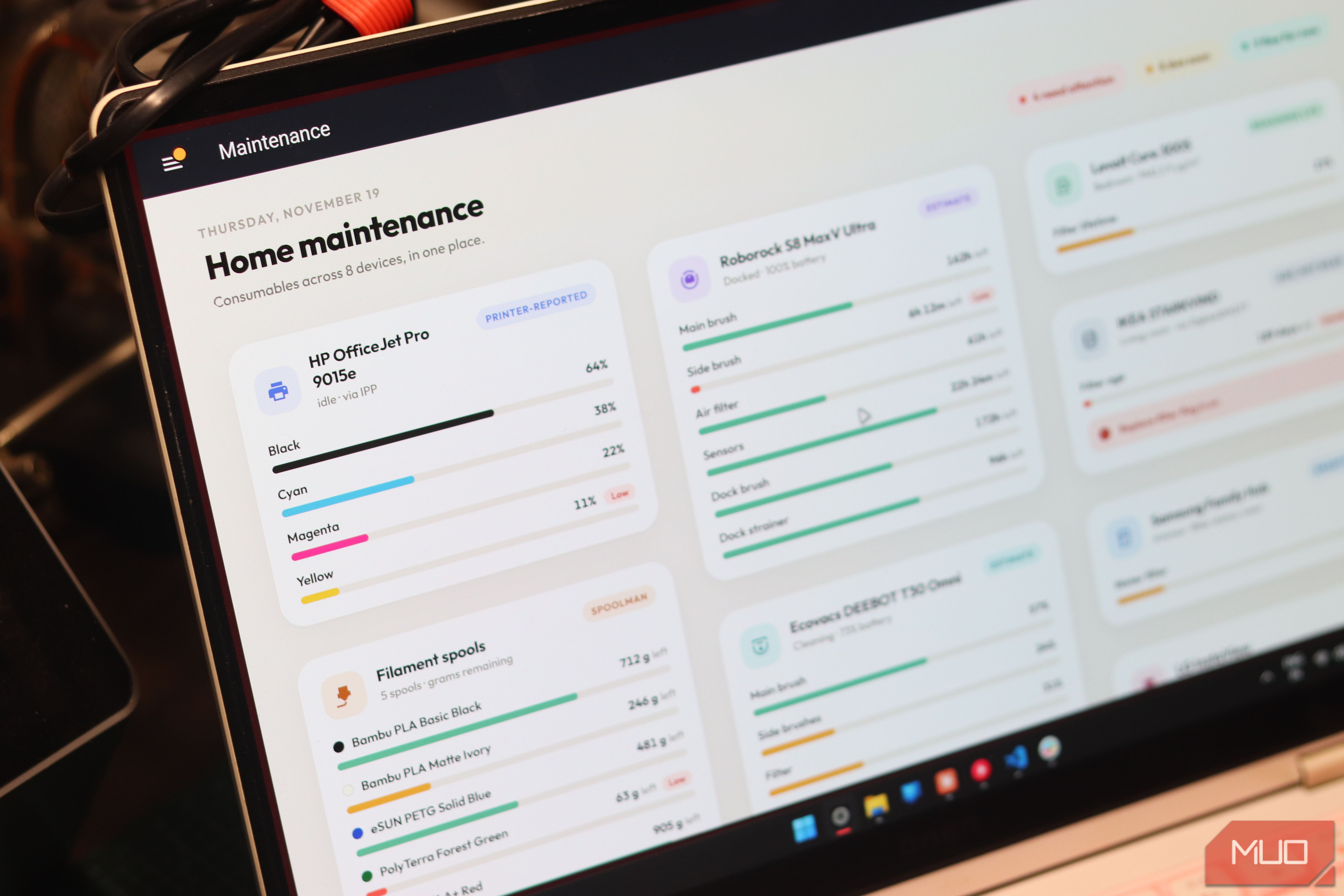
As you start adding more and more devices to your house, you’ll quickly realize that some of them require replacing parts or consumables from time to time. Your printer might run out of ink, the vacuum brushes wear out, air purifier filters slowly get clogged up, 3D printers need new filament, and so on. The problem is, almost all of these devices come with separate apps that can clog your notifications rather quickly. Thankfully, there are Home Assistant integrations that bring all this chaos to a simple dashboard. All you need is a handful of clicks, and all your maintenance notifications can live with the rest of your smart home chatter. IPP Because your printer will run dry at the worst possible moment Home Assistant’s Internet Printing Protocol integration handles networked printers that support IPP. It reads printer status, remaining ink or toner, and page counters. It checks for updates every 60 seconds, so there’s no need to open the manufacturer’s app just to check supplies. I’ve put the available cartridge sensors together on one dashboard card and use a low-level notification as a shopping reminder. I recommend using an ink threshold like 15 or 20 percent remaining to get new supplies, instead of relying on page counters. IPP reads what the printer reports, but it doesn’t independently measure the cartridge. Compatibility and the printer’s reporting capabilities determine just how useful this data can be to you. Spoolman Know how much filament is left before the print fails at 98% I use a custom 3D printer filament tracking app I made for myself, but if you need to find just how much filament you’ve got left, Spoolman is a great option. It keeps an inventory of your spools, but it runs as its own server, not inside Home Assistant. A community integration, added to HACS as a custom repository, then pulls the used and remaining weights or length in the Home Assistant dashboard of your choice. But just because you can see your inventory doesn’t mean it’s accurate. Something still has to report what each print used. On Klipper, Moonraker syncs usage with Spoolman natively, but if you’ve got a Bambu Lab printer, you can use SpoolmanSync with ha-bambulab. Set that up before you trust a low filament alert. Each threshold alert fires only once per spool until Home Assistant restarts, so don’t dismiss the first one you see. Roborock and Ecovacs Your robot vacuum won’t change its own brushes, no matter how smart Robot vacuums can automate cleaning the floor, but they can’t swap out their own consumables just yet. Roborock’s integration exposes remaining time for the main brush, side brush, and air filter on supported devices. Some models also report maintenance time for dock components, including a maintenance brush or strainer. These are manufacturer maintenance recommendations, though, not a direct measurement of actual physical wear. Ecovacs takes a similar approach with remaining lifespan sensors for supported components. Its documentation also describes percentage-based lifespan attributes on the vacuum entity, which can be extracted into a template sensor if needed. So an Ecovacs filter and a Roborock brush aren’t using identical units or thresholds. Mop information also needs attention. A mop-attached sensor, mop-washing control, or drying countdown isn’t a mop-pad replacement counter. Reset a counter only after you’ve actually done the maintenance. Both integrations ship with their reset buttons disabled, so you’ll need to enable them first. Roborock’s can’t be undone, and it has no reset buttons for the dock’s maintenance brush or strainer, even though it tracks both. Levoit and IKEA Filter age is not filter wear, but it beats guessing For supported Levoit purifiers, the VeSync integration exposes remaining filter lifetime. Devices must first be registered in the VeSync app, and Home Assistant polls the VeSync cloud every 60 seconds. Remaining filter life is available on the Core 200S, 300S, 400S, and 600S, the EverestAir, and the LV-PUR131S. The Vital purifiers work with the integration, but the documentation is inconsistent about whether they report filter life. Ikea’s Starkvind takes a different route. Through Zigbee2MQTT, both the standalone purifier (E2007) and table version (E2006) expose filter age in minutes and a replacement indicator. Zigbee2MQTT describes that indicator as signalling a filter older than six months. Its Home Assistant integration uses MQTT discovery to bring devices into the system. That said, both approaches aren’t exactly telling just how much your filter has actually been used, just how old it is. SmartThings and LG ThinQ Your fridge only tells you what it chooses to expose A refrigerator’s water filter can join the same maintenance dashboard as the rest of your devices, but there’s no universal fridge-filter integration. Home Assistant’s SmartThings integration supports water-filter usage, filter-status capabilities, and a water-filter reset button when the connected device provides them. LG ThinQ’s refrigerators include a water filter usage property and notifications for water-filter replacement, depending on the appliance’s capabilities. Check the entities each fridge creates before designing automations around a percentage or replacement alert. Receiving a reminder isn’t the same as a numerical usage value, and neither should be assumed from the brand name alone. Home Assistant reminds you; you still do the chores A dashboard can nag, but it can’t change your filter Getting all these devices into Home Assistant isn’t about collecting another screen full of percentages. It’s about having all the information in one place so you just need to check one dashboard to decide what needs ordering and what will last for now. Keep the dashboard simple, label estimates clearly, and make reminders specific enough to act on. A brush countdown should lead to an inspection, not an automatic purchase, and you should end replacements by resetting the appropriate counters. Home Assistant can’t carry out your maintenance for you, but it can make remembering these small jobs infinitely easier.