Summary
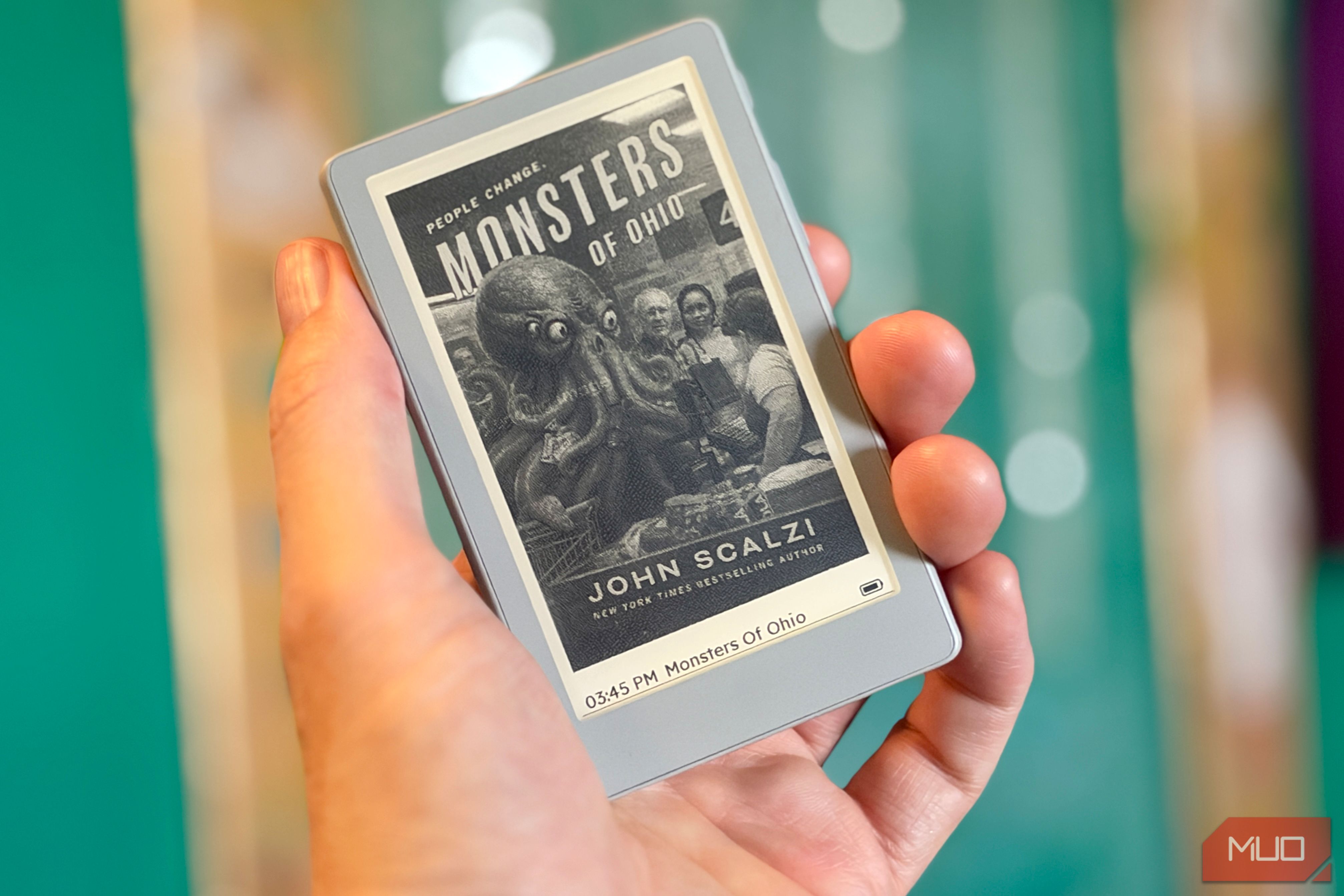
I just finished Monsters of Ohio, the latest novel by John Scalzi. It’s amazing, fast-paced, and funny as heck, and I read the whole thing on a tiny e-ink reader. The Xteink X4 Pro handled the novel easily and, thanks to its magnetic back and mini size, was always with me, in my pocket or my EDC bag. It charges quickly on the optional charging base, and I’m loving this little thing. I think you will, too.
At 149.99 price](https://www.techrepublic.com/article/news-amazon-echo-kindle-fire-tv-price-increases/) and adds the front light and touchscreen the original X4 lacked. I tested it on Xteink’s stock software, which is where most buyers will start.
About this review: Onyx provided MUO with the Xteink X4 Pro for review. The company had no input in this article. All views are my own.

 Xteink X4 Pro
- Brand
- Xteink
- Screen
- 4.3-inch e-ink touchscreen
- Resolution
- 800 x 480, 219 PPI
- Weight
- 72g The Xteink X4 Pro is a pocket-sized e-ink eReader built for reading on the go. Its 4.3-inch, 219 PPI display adds an adjustable front light with warm and cool tones, so you can read in the dark, and it pairs a touchscreen with physical page-turn buttons. At 72 grams and under 6mm thick, it slips into a pocket or bag, and a magnetic back attaches to MagSafe and Qi2 phones. It reads DRM-free EPUB and TXT books natively, with MOBI and PDF converted through the Xteink app, and includes a 16GB microSD card expandable to 256GB. Books transfer over Wi-Fi with the app’s Cloud Sync. Charging is through pogo pins, using an included magnetic USB-C adapter or an optional charging stand.
- Tiny enough to slip into any pocket or bag
- Charges from 20% to full in about 30 minutes
- Stock firmware handles full-length novels without a hitch
- No built-in bookstore, so every book is a manual DRM-free sideload
- Magnets aren?t strong enough to keep it attached to a phone
- Companion app is cluttered with features you?ll never use Xteink X4 Pro pricing and availability You can grab the Xteink X4 Pro from Amazon or Xteink’s official website in a bundle that includes a free magnetic case, protective case, and a couple of screen protectors for $99, as long as you want the Space Black color. Specifications
- Brand
- Xteink
- Screen
- 4.3-inch e-ink touchscreen
- Resolution
- 800 x 480, 219 PPI
- Storage
- 16GB microSD (included), expandable to 256GB
- Connectivity
- 2.4GHz Wi-Fi
- Front Light
- Yes, adjustable brightness and color temperature
- OS
- Xteink stock firmware (XT Licorice)
- Battery
- 1,100mAh
- Buttons
- Physical page-turn buttons plus touchscreen
- Weight
- 72g
- Dimensions
- 111 x 69 x 5.95mm
- Format Support
- EPUB, TXT (MOBI and PDF via app conversion)
- Document Formats
- EPUB, TXT, MOBI, PDF
- Image Formats
- JPG, PNG, BMP
- Screen Size
- 4.3 inches
- Ports
- Pogo pin (magnetic USB-C adapter), microSD slot
- Connections
- Bluetooth The Xteink X4 Pro design is small enough to go everywhere A tiny box, a tiny reader, and weak magnets The box came in the mail at about the size of a thick CD. It’s all cardboard, very eco-friendly, with a QR code to help you download the app to your phone. There’s a spot in there for the little proprietary pin charger, but no USB-C cable; you’ll have to provide your own. The company sent me a gray unit, and tossed in one of the optional charging stands, which has a place for the little charging adapter to go in it. The box also included some adhesive magnetic stickers to fit on a non-MagSafe phone, too. The magnets themselves on the unit will let it stick to any MagSafe phone, but they’re not super strong. I ended up having the eReader come off my phone in my pocket, so I stopped trying to keep them attached. Plus, my iPhone Duo’s passport-style design meant that the Xteink X4 Pro stuck out from the bottom by a couple of inches. Not a deal-breaker, for sure, but a slab phone will be better suited to this form factor. I just keep it in my pocket or EDC bag, so it’s always with me. Charging happens via pogo pins on the tiny magnetic adapter, which can easily fall off or not connect completely. It’s also small enough that I can easily see losing it; a replacement is only $6, so not the end of the world. I’d have preferred a USB-C charging port, but this works fine. I charged this thing twice during my time with it; once when I got it, then again when it got down to 20% after a long day of reading on it. It charged up to full in about half an hour. It’s tiny; Boox’s new Picco is smaller, but this is the smallest eReader I’ve ever used. That size makes sure it’s always with me; I keep it near my keys and wallet so I grab it to go out the front door. Xteink doesn’t give an official battery life figure for the 1,100mAh battery, but in my time with the device, it only needed a charge after heavy reading with the light enabled. Even still, a half-hour top-up made it a non-issue. The Xteink X4 Pro display finally works in the dark 219 PPI and a warm front light The 219 PPI text display is less sharp than on, say, a Kindle or Kobo, which use 300 PPI displays, but it’s just fine at this screen size. I was able to read easily in bright and indirect light, even without the screen light this new model provides. That front light adjusts brightness and color temperature, even though it doesn’t have an auto-brightness or scheduling feature. It’s easy to turn on and off, though, with just a swipe from the top, which also exposes the light/dark mode display along with Wi-Fi and Bluetooth toggles. Like all e-ink displays, this one flashes a refresh every once in a while, which might be a bit more noticeable on this tiny screen. Still, it’s not a problem and never interfered with my reading. The touch input is new to this X4 Pro, too. I tend to like buttons on my eReaders, anyway, so I don’t rely on touch, but it was nice to have in certain hand positions. The left button turns the page backward, while the right button and side of the screen advance the page. The buttons work every time, while the touch can be less than responsive at times, requiring a second tap. Getting books onto the Xteink X4 Pro takes some work My ebooks.com-to-Xteink routine Kindle, Kobo, and Nook owners have it so easy. Just pop into the store on the device, the web, or phone app, purchase the books you want, and they’re sent right to the device. Same with library books via Libby; getting these on traditional eReaders is super convenient and easy. Not so with a device like the Xteink X4 Pro; you’ll have to source your own DRM-free books and then send them to your device via Wi-Fi. It’s not super hard, but it does add a layer of friction between you and your reading material. There are basically four ways to get your ebook onto your Xteink reader: add the books to the microSD card, and pop it back into the reader, use the Xteink phone app (this is what I did), use Calibre to wirelessly transfer books from your computer to your eReader (for those of you with extensive Calibre libraries), or grab your books from an OPDS book server catalog (this is more complex, but feels more like having a built-in book store). I bought Monsters of Ohio from ebooks.com, having filtered the list of books in the sci-fi genre to “DRM-free,” then saved the download to Drive. I then used the Xteink app to import the Drive file, and synced it via Cloud Sync in the app. It was fast; the whole novel appeared in seconds. The Xteink X4 Pro software is the weak spot The firmware is fine; the app features feel superfluous I’m not one to overly customize my screens and such, but the Xteink app has a bunch of ways to add cover images to your X4 Pro. I didn’t find it super intuitive to use, though, so after figuring out how to set the “off” state to the cover of whatever I was currently reading, I gave up on it. The companion app is cluttered, to say the least. Alongside feeds, weather, and a reading schedule, it pushes extras like a lyric poster, a work badge, receipts, and book cover makers. None of it helps you read. I’ve considered flashing to the open-source CrossPoint firmware once it’s released for the X4 Pro, as it adds better book formatting, more fonts and layout options, a dictionary, and a night mode. There is a spot to download public domain work in English, so it’s not a total loss. Should you buy the Xteink X4 Pro? You should buy the Xteink X4 Pro if:
- You want a dedicated e-ink reader small enough to carry everywhere, in a pocket or an EDC bag.
- You already buy DRM-free ebooks, or don’t mind moving books onto it yourself.
- You want a cheap second reader for on the go, alongside a bigger one at home. You should NOT buy the Xteink X4 Pro if:
- You want a built-in Kindle or Kobo store, or library loans.
- You’re hoping it’ll stay stuck to the back of your phone; the magnets aren’t strong enough.
You want one eReader for everything; a larger model like the
PocketBook Era Litewould be a better home reader.
Xteink X4 Pro
- Brand
- Xteink
- Screen
- 4.3-inch e-ink touchscreen
- Resolution
- 800 x 480, 219 PPI
- Weight
- 72g