Summary
Portable computers have come a long way, making otherwise low-power devices surprisingly more capable than they’d appear to be at first glance. Naturally, this applies to handheld gaming PCs as well, which, with the right setup and tools, can be a viable desktop replacement.
To test out the same, I replaced my main desktop with my Lenovo Legion Go, and the results were seriously impressive, save for one aspect — gaming. Even then, the outcome might surprise you.
 Until Linux gets serious about multiplayer gaming, my Steam Deck will collect dust while I play on my Windows gaming handhelds instead.
Replacing my entire desktop with a Legion Go
Downsizing and keeping a certain degree of performance expectations
My current desktop is an AM4-based build with a Ryzen 5600G (yes, I am bottlenecked), 32GB of RAM, and an RX 9070 (non-XT) as the GPU. It’s certainly not the most powerful system out there, but it manages to outclass the puny Ryzen Z1 Extreme powering the Legion Go by a considerable margin, especially in games.
That being said, this PC takes up a lot of space, heats up the room, and isn’t portable at all — all three things the Legion Go has the upper hand in. This particular Legion Go uses the AMD Ryzen Z1 Extreme CPU with 16GB of onboard RAM, a far cry from the main PC’s specs.
Taking all of that into consideration, my expectations were very, very low. Still, I needed the device to output to a single 1080p monitor and handle day-to-day tasks such as word processing, multiple browser tabs, and some Electron apps in the background (Slack and Discord, specifically).
While this isn’t too “extreme”, it is in no way lightweight either, and I came in fully prepared to watch the Legion Go stumble and fall flat on its face. Imagine my surprise when it managed to take over most tasks like a champ, defying and even surpassing my expectations.
You’ll need a USB-C hub at the very least
Other accessories also help
You really can’t use the Legion Go as-is, and you’ll want to connect some peripherals (beyond a monitor) to make it into a full-fledged desktop replacement. Which is why I opted to grab a very basic USB-C docking station for the purpose.
This particular no-name dock has HDMI out, Ethernet support, and a bunch of other USB ports, including one for power pass-through (which is pretty much necessary since you’d want to charge the device while using it!).
If your monitor has a built-in docking station (not all of them do), it’s as simple as connecting a single USB-C cable from the handheld for both data and charging, with your accessories connected to the monitor instead for a cleaner look.
Speaking of accessories, all I really needed was a keyboard and mouse, along with wired internet. Of course, there’s nothing stopping you from adding in devices of your own, some of which may be a bit exotic…
The USB-C dock and relevant accessories help transform the Legion Go into a desktop PC, and were essential to my setup. Alternatively, you could abandon the mouse and use the right controller as a vertical mouse.
The Legion Go also has
charge through either port. This comes in handy a lot more than you’d think, and having more ports is always appreciated.General performance
And also some light gaming
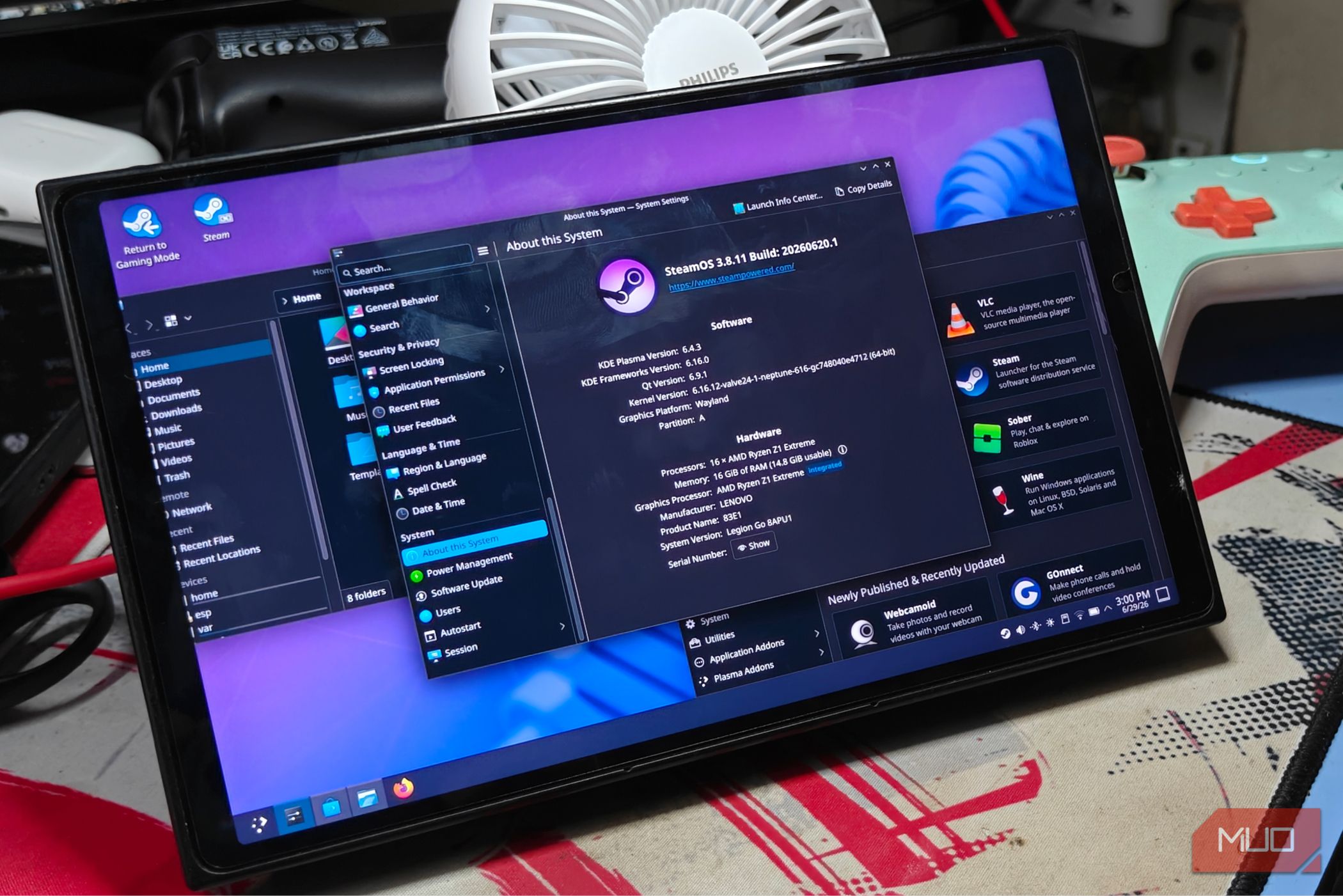
Once the console was ready, I simply plugged it in and booted into SteamOS, which I had replaced the Windows 11 install with. Performance should be largely the same across both operating systems, though I am a bit biased toward Linux because it is more lightweight and bloat-free.
Switching to desktop mode brings up the familiar KDE Plasma interface, which should feel familiar to Windows 11 users. Going back to performance, I’m happy to report that I’ve had barely any issues running it as my main desktop.
From opening files to browsing the web, everything just worked, and often impressively so. Telling the difference from my regular PC was quite difficult, and I’d dare say that handhelds make for perfect, portable desktop replacements in their current state.
Still, it is far from perfect. Push the machine a bit too hard, and the cracks start to appear. Gaming is arguably where it suffers the most.
The integrated graphics of the Z1 Extreme shine at sub-1080p resolutions, and multiple monitors were a no-go. Even then, games have become much more demanding in recent years, and the Z1E barely manages to keep up in some cases.
If you’re looking for something that can seriously game, this might not be it. Almost all PC gaming handhelds are decent enough for a portable form factor and smaller screens, where you can scale back the resolution for more FPS.
Still, the Z1E is still mighty impressive for what it can do, and I was able to play a few older games without much hassle. The latest and greatest, perhaps not — but you could always hook up an external GPU to its USB 4 ports instead for a bit more juice.
A capable, ultraportable PC that still manages to impress
It’s honestly amazing how portable and powerful computers have become in the past decade alone. Handheld gaming PCs, for example. These used to be very niche, underpowered devices that used some rather awful processors and barely managed to keep up and run a very limited number of games.
Compare that to modern-day handhelds, and the difference is night and day. Present-day handhelds are several degrees more powerful, and I’m looking forward to the next batch of devices.
Until Linux gets serious about multiplayer gaming, my Steam Deck will collect dust while I play on my Windows gaming handhelds instead.
Replacing my entire desktop with a Legion Go
Downsizing and keeping a certain degree of performance expectations
My current desktop is an AM4-based build with a Ryzen 5600G (yes, I am bottlenecked), 32GB of RAM, and an RX 9070 (non-XT) as the GPU. It’s certainly not the most powerful system out there, but it manages to outclass the puny Ryzen Z1 Extreme powering the Legion Go by a considerable margin, especially in games.
That being said, this PC takes up a lot of space, heats up the room, and isn’t portable at all — all three things the Legion Go has the upper hand in. This particular Legion Go uses the AMD Ryzen Z1 Extreme CPU with 16GB of onboard RAM, a far cry from the main PC’s specs.
Taking all of that into consideration, my expectations were very, very low. Still, I needed the device to output to a single 1080p monitor and handle day-to-day tasks such as word processing, multiple browser tabs, and some Electron apps in the background (Slack and Discord, specifically).
While this isn’t too “extreme”, it is in no way lightweight either, and I came in fully prepared to watch the Legion Go stumble and fall flat on its face. Imagine my surprise when it managed to take over most tasks like a champ, defying and even surpassing my expectations.
You’ll need a USB-C hub at the very least
Other accessories also help
You really can’t use the Legion Go as-is, and you’ll want to connect some peripherals (beyond a monitor) to make it into a full-fledged desktop replacement. Which is why I opted to grab a very basic USB-C docking station for the purpose.
This particular no-name dock has HDMI out, Ethernet support, and a bunch of other USB ports, including one for power pass-through (which is pretty much necessary since you’d want to charge the device while using it!).
If your monitor has a built-in docking station (not all of them do), it’s as simple as connecting a single USB-C cable from the handheld for both data and charging, with your accessories connected to the monitor instead for a cleaner look.
Speaking of accessories, all I really needed was a keyboard and mouse, along with wired internet. Of course, there’s nothing stopping you from adding in devices of your own, some of which may be a bit exotic…
The USB-C dock and relevant accessories help transform the Legion Go into a desktop PC, and were essential to my setup. Alternatively, you could abandon the mouse and use the right controller as a vertical mouse.
The Legion Go also has
charge through either port. This comes in handy a lot more than you’d think, and having more ports is always appreciated.General performance
And also some light gaming
Once the console was ready, I simply plugged it in and booted into SteamOS, which I had replaced the Windows 11 install with. Performance should be largely the same across both operating systems, though I am a bit biased toward Linux because it is more lightweight and bloat-free.
Switching to desktop mode brings up the familiar KDE Plasma interface, which should feel familiar to Windows 11 users. Going back to performance, I’m happy to report that I’ve had barely any issues running it as my main desktop.
From opening files to browsing the web, everything just worked, and often impressively so. Telling the difference from my regular PC was quite difficult, and I’d dare say that handhelds make for perfect, portable desktop replacements in their current state.
Still, it is far from perfect. Push the machine a bit too hard, and the cracks start to appear. Gaming is arguably where it suffers the most.
The integrated graphics of the Z1 Extreme shine at sub-1080p resolutions, and multiple monitors were a no-go. Even then, games have become much more demanding in recent years, and the Z1E barely manages to keep up in some cases.
If you’re looking for something that can seriously game, this might not be it. Almost all PC gaming handhelds are decent enough for a portable form factor and smaller screens, where you can scale back the resolution for more FPS.
Still, the Z1E is still mighty impressive for what it can do, and I was able to play a few older games without much hassle. The latest and greatest, perhaps not — but you could always hook up an external GPU to its USB 4 ports instead for a bit more juice.
A capable, ultraportable PC that still manages to impress
It’s honestly amazing how portable and powerful computers have become in the past decade alone. Handheld gaming PCs, for example. These used to be very niche, underpowered devices that used some rather awful processors and barely managed to keep up and run a very limited number of games.
Compare that to modern-day handhelds, and the difference is night and day. Present-day handhelds are several degrees more powerful, and I’m looking forward to the next batch of devices.
 Lenovo Legion Go
- Brand
- Lenovo
- Weight
- 1.88lbs
- Chipset
- AMD Ryzen Z1 Extreme
- RAM
- 16GB LPDDR5X The Lenovo Legion Go is a portable gaming PC that checks off some of the important boxes but fails to deliver a performance that stacks up to the demands of modern-day titles. If your goal is cloud gaming or casual indie enjoyment, the Legion Go is a solution, but not the best handheld possible.
- Storage
- Up to 1TB
- Display
- 144Hz 8.8-inch QHD+