Summary
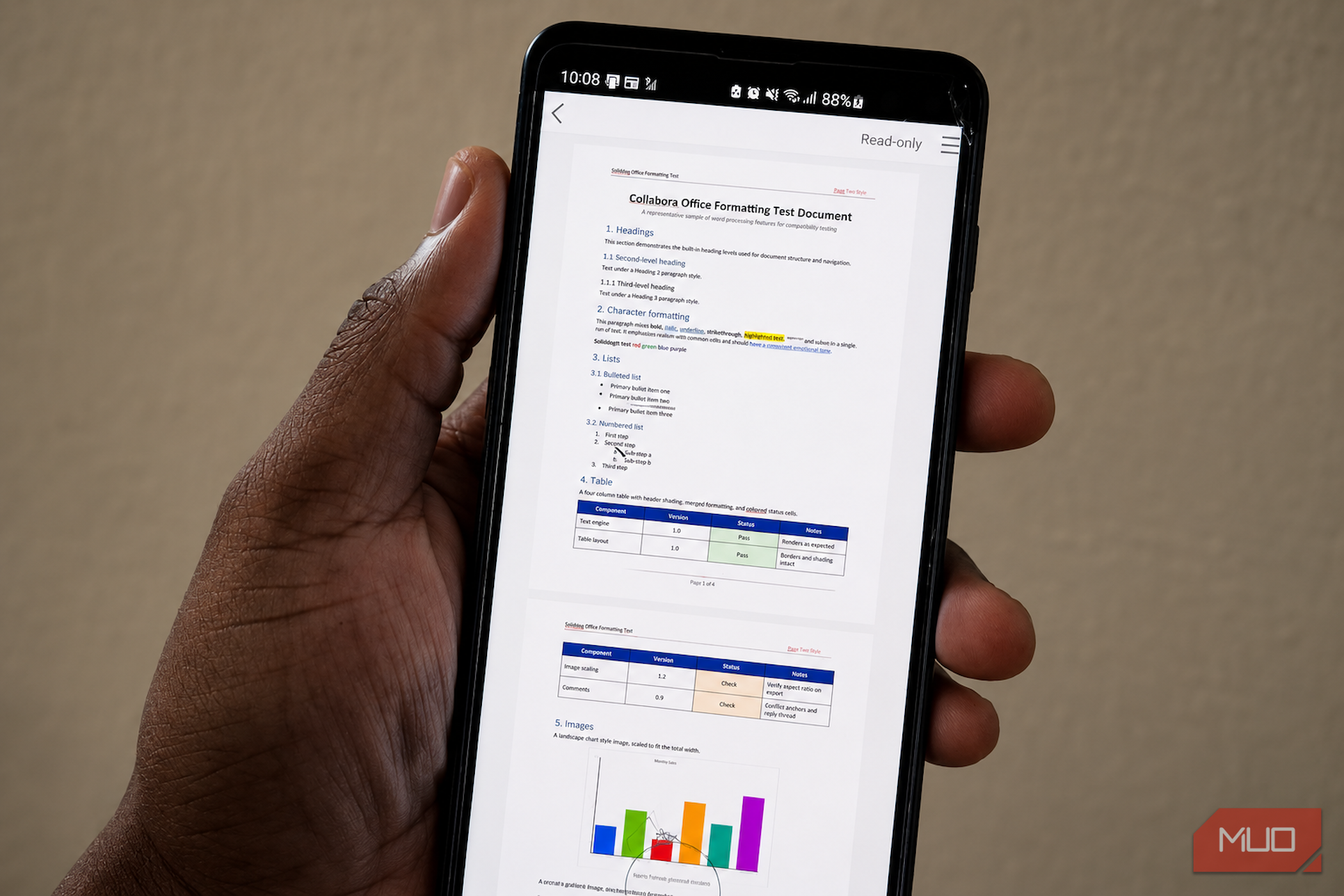
I had assumed that serious Office editing on Android meant installing Microsoft’s apps, signing in to an account, and eventually encountering a feature tied to Microsoft 365. Collabora Office makes a better offer. It opens Word documents, Excel workbooks, and PowerPoint presentations locally, then provides enough tools to make substantial changes without first moving the file to someone else’s cloud. I tested it on my Samsung Galaxy S10+ using three conventional Office files, and for the editing I actually do on Android, the result made Microsoft 365 feel optional. Collabora Office lets me edit before asking me to join anything I opened a document, not a relationship Collabora Office is an open-source mobile suite built around the same document engine used by LibreOffice, the free office suite that runs across platforms. It combines document, spreadsheet, and presentation editing inside one app, with an interface adapted for phones and tablets. Collabora says its Android work has been under development since 2012, so this is not a hurried mobile offshoot. The mobile app is available through Collabora’s website, Google Play, the Apple App Store, and Collabora’s F-Droid repository. I installed it, opened a local file, and reached the document without creating an account or encountering a subscription screen. Google Play currently states that the app neither collects data nor shares it with third parties, although that privacy declaration is provided by the developer. Once a file is on the phone, Collabora can edit it offline and does not require uploading just to change a paragraph or formula. That’s increasingly unusual when Microsoft keeps directing Windows and Office users toward cloud storage rather than local files. Files stored in OneDrive, Google Drive, or another provider still follow that service’s rules, while sharing sends the file through whichever app I select. Local-first does not make an insecure phone secure, but it lets me keep a document local. Files initially open in a viewing state, with an alarming “Read-only” label at the top. Tapping the pencil reveals the editing interface. In my testing, documents handed over via Android’s file manager occasionally required me to create an editable copy, whereas opening the same files in Collabora avoided that friction. It feels needlessly fussy, but it is not the same as the app refusing to edit local files. The file viewer disguise falls apart quickly There is a desktop suite hiding behind that tiny pencil Feature lists are easy to assemble. I care far more about what happens when a mobile office app opens a document created on a desktop, revised several times, and already carrying enough formatting to expose weak compatibility. To test that, I cooked up a four-page DOCX on my desktop with headings, colored text, highlighting, nested lists, tables, headers, footers, page numbers, comments, tracked changes, and two images with different proportions. Collabora opened it on my Galaxy S10+ without disturbing the layout. Table shading, list hierarchy, image scaling, and comments all survived, and I could edit text, resize images, change table cells, and navigate between pages without watching the document fall apart. The bottom toolbar covered everyday formatting, while the pencil menu opened Character and Paragraph panels for styles, spacing, indents, alignment, and highlighting. Page setup, headers and footers, comments, and tracked-change controls were tucked elsewhere in the interface. A few labels, including WordCountDialog and AcceptAllTrackedChanges, looked as though the developers had skipped the final polish, though the underlying tools were present and functional. Calc exposed the clearest divide between what the app could do and how comfortable it was to do it. My XLSX workbook contained four sheets, formulas, frozen headers, filters, currency and date formatting, conditional formatting, merged cells, and two charts. Collabora rendered the dashboard, charts, data bars, colored cells, and worksheet tabs correctly. Editing a value or formula through the input bar was straightforward, and switching between sheets was manageable. It was still a spreadsheet on a 6.4-inch phone. Narrow cells required careful taps; selection handles sometimes obscured the value I was inspecting, and the keyboard occupied nearly half the workspace. The 40-row workbook remained usable, but a much larger sheet would leave even less room to navigate and edit comfortably. Impress was pleasantly capable. My PPTX preserved its text, images, shapes, slide layouts, speaker notes, and embedded video poster frame. I could resize objects, change layouts, enter master view, duplicate slides, and launch a full-screen presentation. The deck looked coherent in slideshow mode, although animations, uncommon fonts, and embedded media are still details I would verify on the machine that will present them. After saving the three files, I reopened them on my desktop to check whether Collabora had damaged anything during the round trip. My text edits, comments, tracked changes, images, formulas, conditional formatting, charts, object positions, and slide layouts were all still intact, and the spreadsheet recalculated as expected. The only visible wobble was a nested list whose indentation had shifted slightly, causing one line to wrap earlier than it had in the original document. It took seconds to correct, but it was a useful reminder that preserving the content is not always the same as reproducing every formatting decision perfectly. That final check mattered more than how accurate the documents looked while they were still open on the phone. Across all three files, Collabora was strongest when I arrived with a document and needed to correct, review, or finish it. Creating a long report or deck from scratch on a phone would feel like doing upholstery through a letterbox, but that is an ergonomic limitation rather than a lack of tools. Microsoft still owns the smoother ecosystem The price of polish is apparently an account Microsoft’s Office Android apps are not entirely locked behind a subscription. Core editing is free on devices with screens up to 10.1 inches, while a qualifying Microsoft 365 plan unlocks features including tracked-change review, page-orientation controls, adding and modifying chart elements, SmartArt tools in Excel and PowerPoint, Presenter View, and support for certain rights-managed files. Microsoft also provides tighter OneDrive integration, version history, Microsoft account integration, and real-time cloud-based collaboration. That broader ecosystem is where Microsoft still holds the advantage. Its Android apps feel more polished, and I would trust them first for documents that rely on advanced Office-specific features. Collabora handled my conventional test files well, but I would still check the saved result in Microsoft Office before relying on macros, SmartArt, unusual fonts, complex charts, elaborate animations, embedded media, or rights-managed documents. Collabora is enough more often than I expected Most of my Android office work is considerably more modest. I correct text, review comments, update a budget, tweak a formula, repair a slide, and send the file on its way. Collabora handled that workload within a single free app without requiring an account or pushing me toward a cloud service. Microsoft 365 remains the stronger ecosystem, but Collabora Office showed me how rarely I need that entire ecosystem for the work I actually do on Android.