Summary
I’m a big fan of Spotify’s AI DJ, but it comes with one limitation: I can only play Spotify’s catalog. This isn’t such an issue, given Spotify’s massive library; however, over the decades I have built up a significant collection of original music and rarities, much of it digitized from vinyl, and I wanted something that could intelligently mix my own library at home.
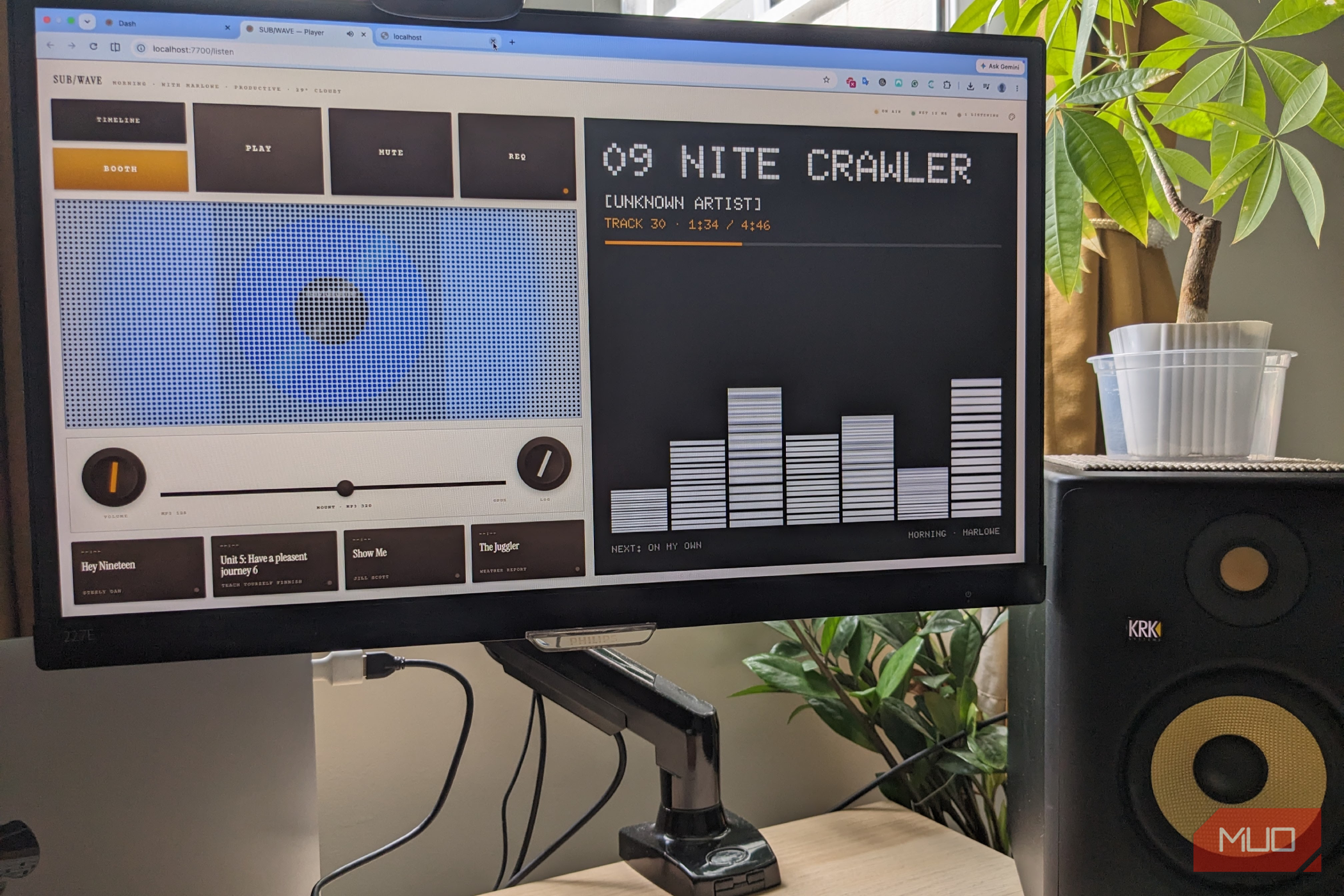
This is how I came across SUB/WAVE. This self-hosted solution turned my music collection into a DJ-style radio station, and although it wasn’t exactly plain sailing from the outset, it’s so worth the time investment.
How SUB/WAVE solves the problem
Create a self-hosted AI radio station that runs on your own hardware
I was looking for something different from mainstream streaming platforms, and I found it. Rather than connect you to a commercial streaming catalog, SUB/WAVE connects to your own music server and plays your music radio-station style, with crossfades and even optional live DJs. While it’s not exactly straightforward, a novice like me could set it up in around an hour, including a few stumbles along the way.
The setup is surprisingly modular. Unlike Spotify, SUB/WAVE isn’t a single application, but a collection of services that work hand-in-hand. At the heart of the setup is Navidrome, an API that indexes my local music collection. SUB/WAVE uses Navidrome to browse the library, queue tracks, and build a continuous radio station based on AI analysis.
This AI analysis is powered by Ollama, which runs its own LLM locally on my computer. SUB/WAVE queries this local model to generate playlists, create smooth transitions, and make programming decisions. Each of the three components runs inside Docker, within their own containers; this keeps everything in a single environment that’s much easier to manage. These require you to enter various commands into Terminal during setup to make each component communicate.
Copy down all URLs and credentials when creating accounts, as the SUB/WAVE install wizard will ask for them later on.
The finished experience was highly convincing
It genuinely feels like listening to a live radio station
Still with me? As exhausting as that all sounds, once you begin building, the process starts making more sense, and there’s a very satisfying feeling when you first hear your own tunes coming through an AI DJ that you created. Everything runs locally, so you’re no longer reliant on streaming services, and the setup also broadcasts a proper internet radio stream, meaning you can listen through a browser or any compatible audio player around the house.
I love having a bespoke radio station that only plays the tracks that I want to hear. I leave it on for hours at a time, and the smooth song transitions make it even easier on the ear. Rather than queueing up favorite tracks, I found myself listening to songs that I’d forgotten, and a few that I didn’t know existed, so it feels like I am getting to know my music collection all over again.
The AI works convincingly in the background, maintaining steady momentum as different genres blend seamlessly, always feeling appropriately placed rather than jarring. The queue is constantly generated, meaning I don’t have to stop and think about what’s next up, so I found myself listening more closely. The whole experience reminds me of the FM radio of yesteryear, rather than today’s streaming on demand.
I won’t pretend the installation was effortless
It’s not a beginner-friendly project, but the end result is worth it
I approached this project as a complete newcomer, and it showed. Getting multiple Docker containers talking to one another required patience, and troubleshooting involved inspecting logs, testing API endpoints, verifying network connections, and eventually discovering that my external hard drive had become unmounted.
At that point I was ready to hurl my laptop off a tall bridge. However, I persisted, and once everything clicked into place, the system proved remarkably stable. The controller built playlists automatically, the broadcaster streamed continuously, and the AI-generated radio station kept playing, uninterrupted.
I learned firsthand how, without experience using Docker, Linux commands, or self-hosted applications, this kind of debugging can quickly become frustrating. Yet after the initial configuration, the day-to-day experience is refreshingly hands-off, and well worth the effort.
Is SUB/WAVE better than Spotify’s AI DJ?
I have to concede, for most people, Spotify’s AI DJ will be the easiest and most convenient choice. It works instantly, requires no technical knowledge, and introduces listeners to new music with minimal effort. SUB/WAVE, on the other hand, asks a lot of its users. Far from being an out-of-the-box solution, you’ll need your own music library, a server, Docker, and enough patience to troubleshoot the occasional configuration problem. It’s a project aimed squarely at enthusiasts rather than casual listeners.
That said, as someone who has spent years curating a music collection, the payoff is well worth it. To have an AI-powered radio station that’s built entirely around my favorite tunes is an achievement that, once set up, will run on its own steam without any input or effort.