Summary
Samsung phones come loaded with audio controls and customization. There is an equalizer in the sound menu, Dolby Atmos toggles, and Adapt Sound profiles that tune output to your hearing. But that is the version of Galaxy audio Samsung expects you to use.
Go one layer deeper, and there’s an entire app full of tools most users will never find. Once you try it, you will wonder why Samsung didn’t build it directly into the phone.
Meet Sound Assistant, Samsung’s hidden audio powerhouse
The app Samsung never told you about
Sound Assistant is a free Good Lock download from the Galaxy Store. It doesn’t come preinstalled on your Galaxy phone, and unless you’ve looked for it, you have probably never seen it. The most useful feature it adds is per-app volume control. By default, Samsung devices use one master media slider for everything. Turn up the volume for a quiet podcast, and the next video on your social feed blasts at full volume. Sound Assistant lets you assign each app its own volume level, so you no longer reach for the volume key every time you switch apps.
Beyond individual app controls, it completely reworks the phone’s volume panel. Samsung’s default interface is rigid, offering a single fixed layout with no options to change its appearance or screen position. Sound Assistant puts all of that in your hands. You can move the volume bar to either side of the display, swap its visual theme, adjust its expanded layout, and customize exactly which audio controls appear when you press a hardware button.
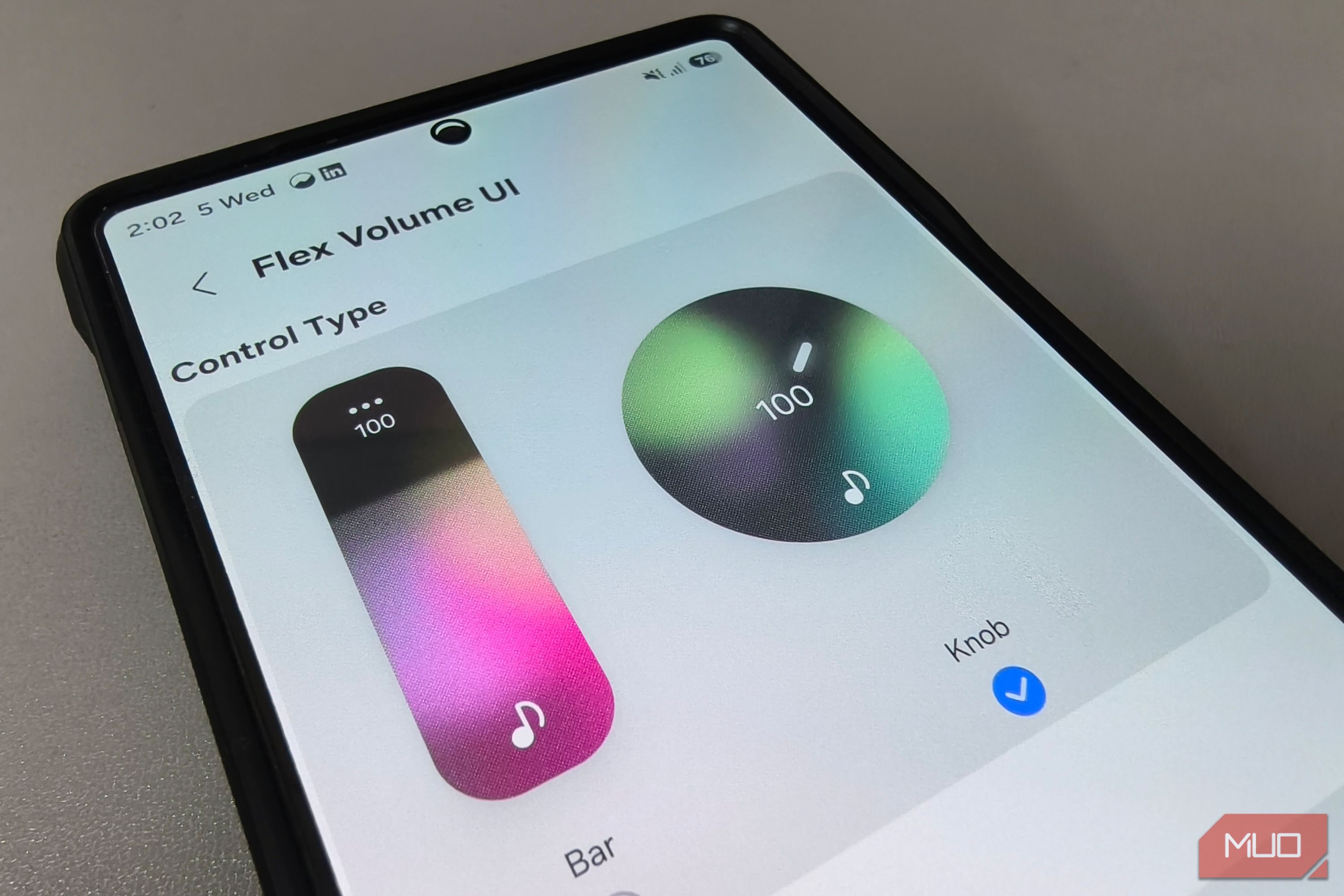
The standout visual upgrade is Flex Volume UI, which replaces the standard volume bar entirely. You can swap the stock slider for a vertical sound bar or a rotating knob, complete with lighting effects that glow as you adjust. Turning the knob triggers a haptic pulse under your thumb, mimicking the subtle resistance of a physical audio dial. That tactile feedback makes a basic software slider feel like something worth installing the app for.
The features get stranger and better from here
Far more than a volume tool
Once you move past the volume controls, the strangest discovery inside Sound Assistant is a full voice changer. It works with Samsung Voice Recorder, screen recordings, and compatible game chat, letting you switch between presets such as Sci-fi horror, Lo-fi landline, and Robot. You can even build your own with custom pitch and tone controls. That is the sort of feature you expect from a dedicated gaming utility or specialized software, not an app built around volume controls.
As you dig deeper, the app keeps handing you tools that feel like they belong in separate software. Concert Hall adds reverb to simulate a larger listening space through headphones. Below that, a Bluetooth metronome lets you manually adjust audio timing to fix wireless sound delay when watching videos. You also get granular control over headphone alerts, with separate toggles for ringtones, alarms, and notifications, so you’re not forced to hear every notification or silence them all while wearing headphones.
Then there is the navigation toggle, which prevents GPS directions from automatically lowering your music volume every time a turn is announced. Rather than forcing your playlist to quiet down, it keeps your media volume steady while directions play alongside it.
Why Samsung buries its best tools
Clean menus, but at what cost?
Samsung’s current approach favors a cleaner default experience. One UI keeps everyday controls approachable, while many advanced options live separately inside Good Lock, a suite of tools available through the Galaxy Store. Camera controls, custom gestures, display tweaks, and audio utilities all sit there, away from the everyday interface.
Someone who just wants to adjust their brightness or change a ringtone shouldn’t have to scroll past a Bluetooth metronome or a voice changer to get there. Samsung builds the surface for the majority while letting curious users go find the rest on their own.
However, this setup comes with a major downside. Most folks only look for options inside their phone’s main settings menu, not in a separate app. Because Samsung hides these tools behind an extra download, many people will never even know what their phone is capable of doing.
Compatibility and availability
Sound Assistant works on all Galaxy phones running full One UI, including the S and Z lines and many A- and M-series devices. Some budget models use a lighter version of Samsung’s software that doesn’t support Good Lock. If it is available for your phone, enable the floating volume button in the app settings, which places a subtle, movable icon on your screen so your custom audio controls are always a single tap away.
 Good Lock
- OS
- Android
- Developer
- Good Lock Labs
- Price model
- Free Good Lock is a powerful customization suite for Samsung Galaxy devices, offering a collection of modules and plugins that let you personalize almost every aspect of your phone. With Good Lock, you can tweak the lock screen, home screen, navigation bar, keyboard, notifications, and more to match your style and workflow.