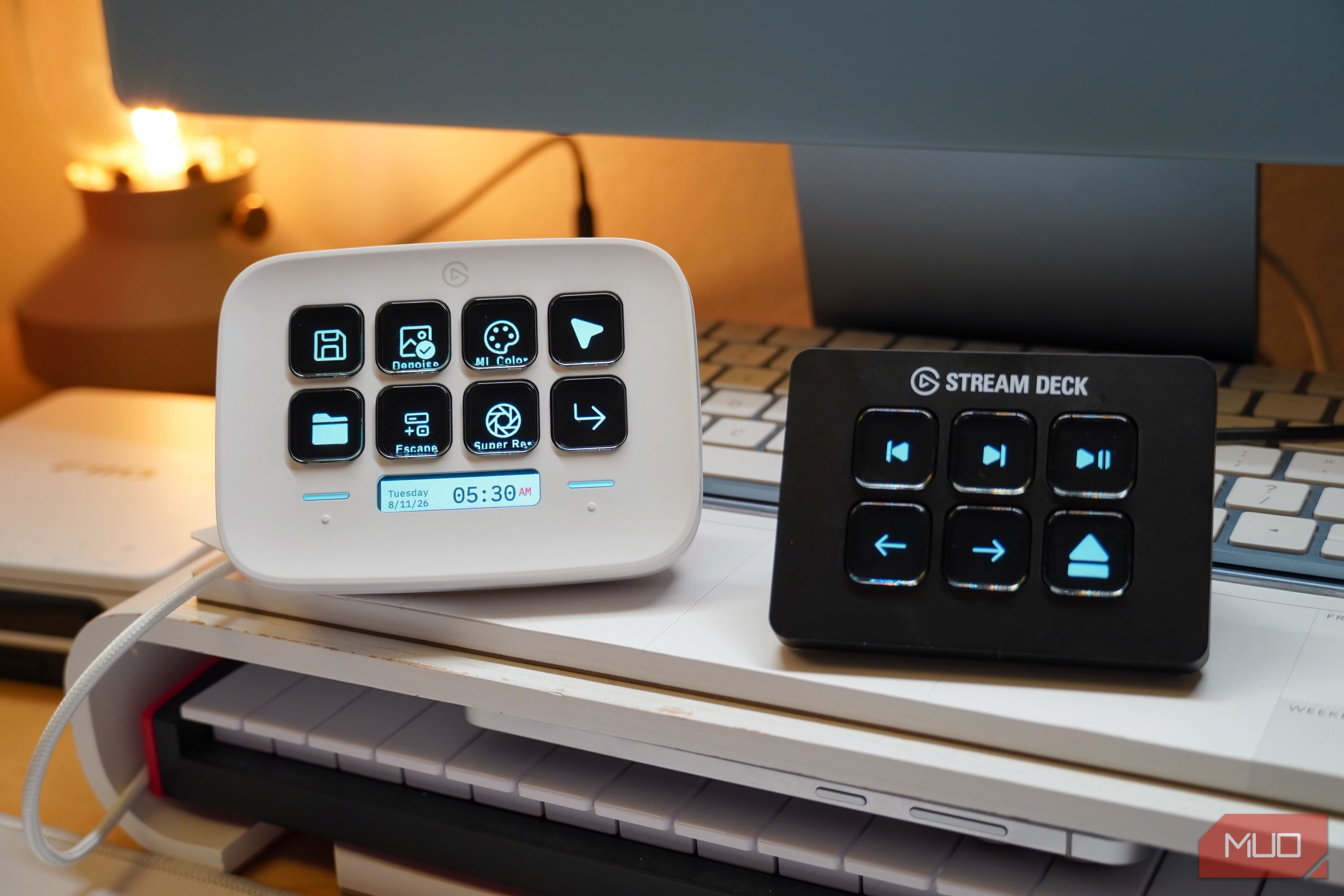
I don’t game or stream at my desk, but I love the Stream Deck so much I bought two
7 min read
Summary
Keyboard shortcuts are an easy way to speed up creative and productivity workflows. You probably know the keyboard commands for copy, cut, and paste — and power users might have many more saved to memory. However, you can make keyboard shortcuts and workflow processes even faster by using macros. These are saved sequences of actions, like a keystroke or a pointer click, that can be kicked off by a single shortcut. Instead of contorting my fingers to press a four-key shortcut every time I want to run it, I can configure a macro to complete the keystrokes with only one button press.
A macro pad is a set of physical buttons mapped to the customized macros you’ve created to hasten your PC commands. Technically, you can turn any keyboard into a macro pad with the right software. It’s not necessary to buy premium macro pads, like the Stream Deck. It’s positioned toward gamers and streamers, but the Stream Deck has become an invaluable part of my desk setup. I exclusively use it for photo editing, productivity, and media control, and it’s served me so well that I bought a second one.
I use a Stream Deck Neo to speed up creative workflows
I don’t have to remember every keyboard shortcut thanks to the Stream Deck
Elgato sells a variety of Stream Deck models, starting with the original 15-key macro pad. There are smaller and larger units available to fit your specific needs, including models with extra buttons or knobs. I opted for the Stream Deck Neo, an eight-key macro pad that’s relatively affordable at 100.ThisversionoftheStreamDeckdoesn′tscream"gamer,"especiallyinthetastefulwhitecolorway.WhiletheStreamDeckNeoislightonphysicalkeys,ithastwotouchpointsthatcanbeusedtoswitchbetweenpages.Plus,there′saseparateLCD"infobar"thatIusetoglanceatthedateandtime.EachkeyhasatinyLCDpanelunderneathit,whichcanbecustomizedtoshowicons,variablestatusinformation,orevenanimatedGIFs.Forexample,yourkeyboardmighthaveamutebutton,buttheStreamDeck′smutebuttoncanusetheLCDtodisplaythereal−timestatusofthemicrophone.Thiskindofcustomizable,glanceablecontrolisattractive—regardlessofwhetheryou′reagamerorsimplylookingtoimproveyourcreativeworkflows.IfoundmyselftrippingoverkeyboardshortcutsandmenusinPixelmatorPro,myphotoeditingsoftwareofchoice,untilIboughttheStreamDeckNeoandputittowork.IusetheMLColor,Denoise,andSuperResolutionfeaturesinPixelmatorProquiteoften.Theycaneachbetriggeredwithakeyboardcommandorwithamenubarbutton.However,it′salottokeeptrackof,andtherearemorePixelmatorProcommandsIneedtouselessfrequently.Insteadofwastingtimepressingkeys,IconfiguredmyStreamDeckNeotoautomateeveryphoto−editingtoolIneed.TherearebuttonsforMLColor,Denoise,andSuperResolution,butalsomacrosfortheselectiontool,theescapebutton,andthereturnkey.Whenit′stimetosave,NewFolderandExportmacroshandlethefinishingtouches.It′struethatIcouldusekeyboardcommandsfortheseedits,andaddingEscapeandReturnkeysmightsoundredundant.It′sallaboutoptimizationandefficiency,though.EverykeyIneedisonaStreamDeckNeothatlivesrightabovemyMagicTrackpad.So,Icaneditlargebatchesofphotoswithoutevertouchingmykeyboardormouse.Eightmacrosandatrackpadtakecareofeverypartoftheprocess,andIbreezethroughphotoeditingnow.IkeepmyStreamDeckrelativelybasic,usingthecustomizableHotkeysystemshortcuttoautomateanykeystrokeIneed.YoucanmakeyourStreamDeckasbasicorascomplexasitneedstobetostreamlineyourworkflows.Therearethird−partypluginsandiconpacksthatseriouslyimprovetheexperience,liketheAppleMusicpluginthatcontrolsmusicstreamingonmyworkstation.Betteryet,youcanfillupto10pagesofmacrosonasingleStreamDeckprofilethatcanbequicklycycledwiththeNeo′stouchpoints.Thistinydeskaccessoryquietlyhides80macrosinside,andit′sadream.IuseaStreamDeckMinitocontrolmymediaPCIcannavigatemylibrary,controlplayback,andejectdiscswithmacrosI′vehadtheStreamDeckNeoformonths,andit′sbecomeaproductivitylifesaverforcreativework.Thatsaid,themacropadwassoneatthatIboughtanotherStreamDeck—thistimethe"Mini"version—formymediaserver.ThisisthemachinethathandlesCDripping,localmusicstorageandplayback,andcloudmusicstreaming.Italsoresidesonthesamedeskasmymainworkstation.RatherthanusetwokeyboardsonmydeskorkeepmovingawirelesskeyboardbetweenPCs,IdecidedtosetupaStreamDeckMiniasmymediaserver′scontroller.WithonlysixLCDkeysandnotouchpointsavailable,theStreamDeckMiniismorelimitedthantheNeo.Ifyouwanttousemultiplemacropages,Iwouldn′trecommendit.YouneedtouseoneortwoofthekeystochangepagesontheStreamDeckMini,sothesixmacrosquicklybecomefouronthemiddlepages.Luckily,sixkeyswereallIneededtocontrolmymediaserver.Iconfiguredforwardandbackkeystoaidwithalbumandsongselection,nextandprevioustrackkeys,andaplay/pausebuttonforplaybackcontrol.SinceI′musingadesktopamplifierforvolumecontrol,Ididn′tneeddedicatedvolumekeys.Ratherthanuseaspecificplugin,Isetupbasichotkeysthatworkacrossdifferentapps.TheplaybackcontrolshortcutsworkregardlessofwhetherI′musingmylegacyiTunesmedialibraryortheAppleMusicstreamingservice.IalsoaddedanejectkeyformyopticaldrivetotheStreamDeckMini,sincemymodernwirelesskeyboarddoesn′tevenhaveoneofthose.Alltold,Ilovethetactileexperienceofcontrollingmymusicserverwithasimplesetofphysicalbuttons.WhyyouprobablyonlyneedoneStreamDeckIneedoneforeachPC,butasingleDeckcanhold10pagesofmacrosIfyou′reintriguedbytheStreamDeck,there′sgoodnews:youprobablyonlyneedone.IownaStreamDeckNeoandaStreamDeckMinibecauseIusetwoPCsonthesamedesk,andeachneedstheirownmacropads.However,ifyou′reonlyusingonedesktopcomputer,[asingleStreamDeckisfine](https://www.makeuseof.com/stream−deck−productivity−boost/).Withsupportforupto10macropadpagesperprofile,there′splentyofroomforcustomshortcuts.Ifyoubegintorunoutofspace,usingfoldersandseparateprofilesareeasywaystogetmoremacrosonasingleStreamDeck.Thepossibilitiesarealmostendless,andIknowmyStreamDeckscouldbedoingmoreonmydesk.Anaffordablewaytogetstartedisby[choosingtheStreamDeckMini](https://www.makeuseof.com/elgato−stream−deck−for−productivity/),whichusuallycostsbetween50 and 60.Ifyouhavemoretospend,Ican′trecommendthe100 Stream Deck Neo enough — the LCD info bar and the navigation touch points really refine the experience.
Elgato Stream Deck Mini
Brand
Elgato
Color
Black
Weight
6.2 Ounces
Dimensions
2.4 x 2.3 x 3.3 inches
Integrations
Windows 10, macOS 10.15
The Elgato Stream Deck Mini is a small macro pad with six customizable buttons. You can use Stream Deck software to use the accessory to open apps, trigger shortcuts, or activate commands.
 Elgato Stream Deck Mini