Summary
HTTPS arrived and drastically altered the internet. Our data was more private than ever, and all it took was the major browsers forcing compliance, and Google Under the hood, Encrypted Client Hello is actually closing a gap present throughout the entire HTTPS era: even on a fully encrypted connection, your internet provider could always see which website you were visiting, just not what you did there. Better still, ECH is doing this without you needing a VPN or other security toggles, all built right into your browser. It’s all to do with how your device and the server communicate Your data slips through the little gaps HTTPS gets sold as the thing that made browsing private. It didn’t. Well, at least, not entirely. Every time you connect to a website, app, or online service, and everything clicks into place nicely, a whole lot of standards and protocols have been communicating behind the scenes. One of the first steps is the TLS handshake, which establishes an encrypted connection between your device and the server. The first message in that handshake, known as the ClientHello message, includes the site’s hostname in a part of the process called the Server Name Indication (SNI) field. This happens because the server needs it to know which certificate to hand back before anything gets encrypted. Once the handshake’s done, the page content, cookies, and passwords get locked down. But that field has always traveled as plaintext, meaning that even in the era of HTTPS, it’s data that your ISP can see. Now, it’s useful data for the website server, as it’s how it identifies the certificate to return to your device before encryption starts. That’s exactly what Encrypted Client Hello is designed to protect, with the finalizing and publishing of RFC 9849 in March 2026. But even though the standard was only finalized this year, major browsers like Chrome and Firefox have supported ECH since 2023, while Android added ECH support in August 2026. See the issue? It’s the bit between the request landing and the encryption beginning. While that doesn’t sound like a huge issue, there is evidence that it’s been previously exploited in the wild to collect data. A prime example is the FTC’s 2021 report that revealed US ISPs were monitoring unencrypted domain-level browsing data and using it to build advertising profiles around location, demographics, and even political leanings. How Encrypted Client Hello works One protective handshake at a time Encrypted Client Hello is technically interesting because it doesn’t encrypt the TLS handshake used in nearly every connection. Instead, ECH builds a second version of the handshake message, and almost uses it like a decoy. One encrypted message holds the real information, such as the hostname, while the other is sent into the open with a generic placeholder name instead. The server unlocks the real version once it arrives and carries on as normal, but your ISP only ever sees the decoy. I’ve written an outline of how the process works, cutting down on the technical jargon:
- Get the server’s public key: Before connecting, the client looks up an ECH configuration in DNS.
- Build two ClientHellos: The real one (ClientHelloInner) carries your actual destination. A decoy (ClientHelloOuter) carries a generic placeholder name instead, usually the hosting provider’s own domain rather than the site you’re visiting.
- Encrypt the real one, hide it inside the fake one.: The client encrypts ClientHelloInner with that public key and packs the ciphertext into an extension on ClientHelloOuter. Only the outer hello is ever exposed, so anyone watching sees a normal handshake addressed to the wrong name.
The server tries to unlock it: It checks the extension against its known keys. Decryption works, and it recovers your real ClientHelloInner and hands it to the right backend — ECH accepted.
- If the decryption fails or the server doesn’t support ECH, the decoy ClientHello is processed as a normal connection instead. The client typically receives an updated configuration to retry the process with.
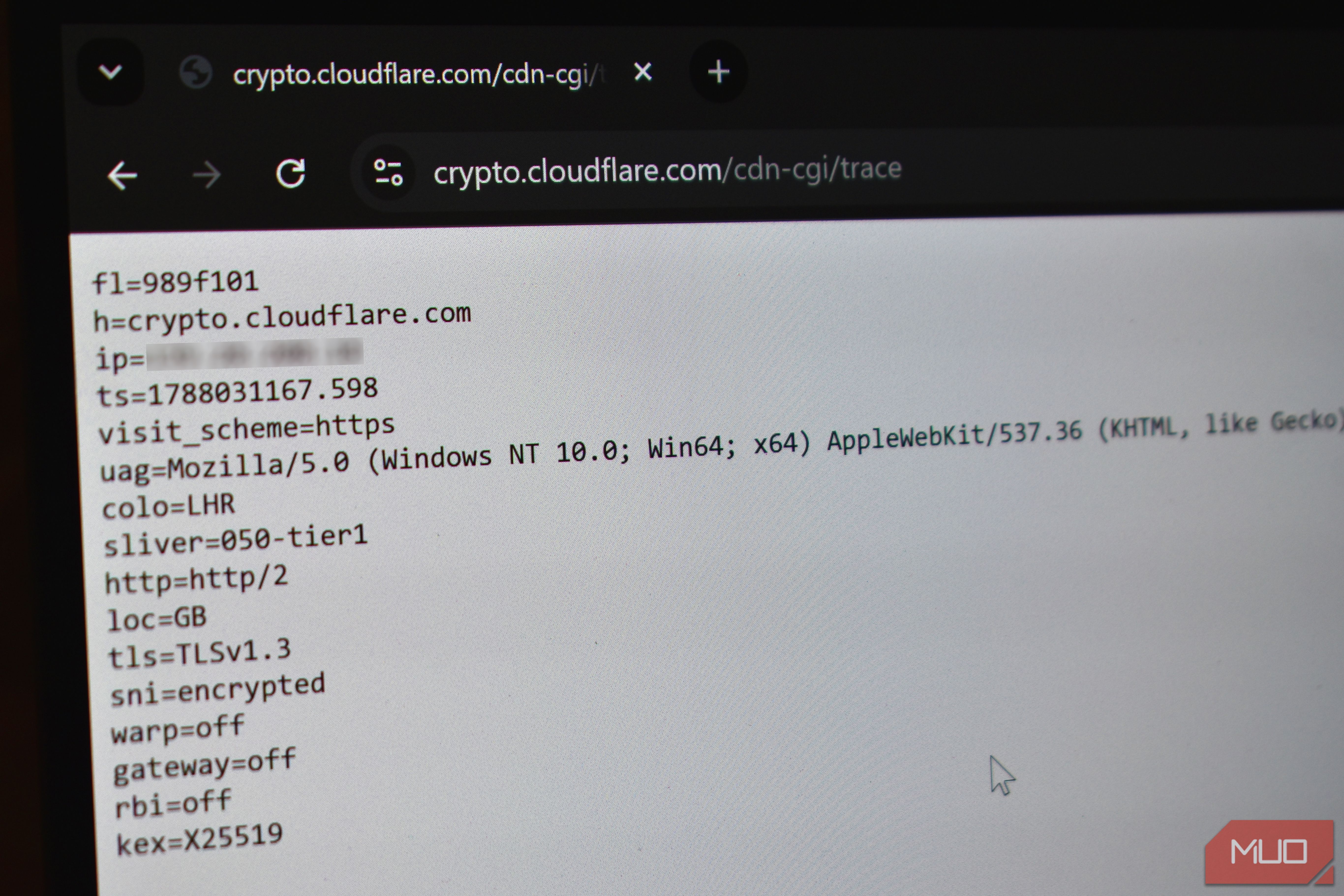
- The client checks which one was used: A small confirmation signal buried in the server’s response tells the client whether its real request went through or it just talked to a placeholder. ECH protects the SNI, and your privacy is boosted. ECH either works or it doesn’t There is no magic toggle to switch it on — but you can check it The thing with ECH is that it works in the background, silently protecting your privacy. In that, there is no specific toggle you can go hunting for to flip and turn ECH on. That’s also in part because, as said, most major browsers and operating systems now support some form of ECH. For example, Chrome implemented ECH in version 117 (September 2023), while Firefox added ECH in version 118 (September 2023). So, if you’re running any version of those browsers past late-2023, you’re already protected. Similarly, with Android now rolling out ECH support for Android 17, once your device updates to the latest version, you’ll also receive this additional privacy boost, keeping your data a little bit more obscured from your ISP. Confirming it’s actually doing something is more useful than confirming it’s switched on, and it takes one caveat: test against a site that supports ECH, or you’ll get a false negative that has nothing to do with your setup. crypto.cloudflare.com/cdn-cgi/trace is the simplest check — visit it, and look for the sni= line in the plain-text response. It’ll read encrypted if ECH succeeded on that connection, without any installation or otherwise. The final point to note is that ECH only hides the hostname. Your DNS lookup is still in plaintext unless you encrypt it, and your browser can still be fingerprinted unless you take steps to avoid it. As with all things privacy, it’s a big old cake with many layers that need to work together to keep you safe.