Summary
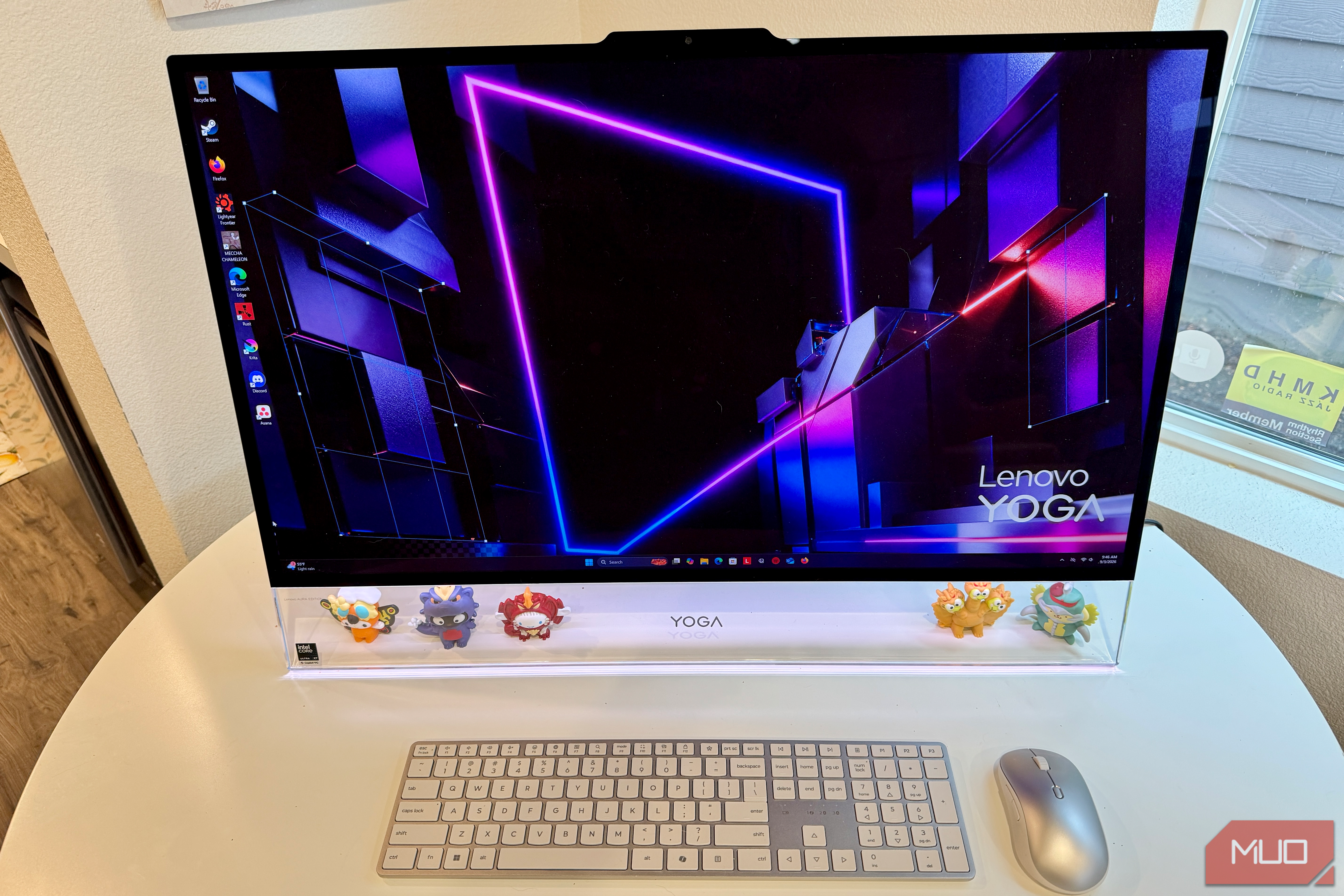
I didn’t expect a Windows PC to make me miss the flat, colorful iMac Apple redesigned a few years back, but here we are: the Lenovo 31.5” Yoga AIO i Aura Edition All-in-One has been sitting on my desk for weeks now, and I keep reaching for it over my MacBook Air M5 without even thinking about it. That’s not something I say lightly. I’ve been an Apple person for a long time, and “I’d rather use the Windows machine” isn’t a sentiment I expected to have in 2026. But between the thin profile, the glowing chin, and the sheer presence of this thing on my desk, propped up on a stand that looks more like it belongs under a Studio Display than a PC tower, it’s the first computer in years that’s made me want to just sit down and use it, the same pull that redesigned iMac had the first time I saw one in person.
Lenovo may or may not be chasing that all-in-one magic Apple leans on with its flat-panel iMac. Still, the design and feel of this PC, down to the keyboard and mouse included in the box, is definitely Apple-esque.
It’s also not the first Lenovo machine to win me over this year: I’ve spent time with the Yoga 7a 2-in-1, the budget-friendly IdeaPad Slim 3i, and, closer kin to this AIO, the Yoga 7 Slim Ultra, which actually shares this unit’s Aura Edition branding and the same Smart Modes and Smart Share software. This all-in-one asks the question: can a desktop actually replace the emotional pull of an iMac? After a couple of weeks of daily use, I definitely have an opinion.
 Lenovo Yoga AIO 32IPH11
- Brand
- Lenovo
- CPU
- Intel Core Ultra X7 358H (16 cores: 4P+8E+4LP, 16 threads)
- Graphics
- Intel Arc B390 (integrated)
- Memory
- 32GB LPDDR5X-9600 (soldered, dual-channel) The Lenovo Yoga AIO 32IPH11 is a striking 31.5-inch all-in-one desktop featuring a stunning 3840x2160 4K OLED display with a fast 165Hz refresh rate and 99% DCI-P3 color coverage. Powered by an Intel Core Ultra X7 358H processor paired with 32GB of LPDDR5X-9600 RAM and integrated Intel Arc B390 graphics, it includes a well-rounded port selection: one Thunderbolt 4 port, two additional USB-C 10Gbps ports, two USB-A 10Gbps ports, and one USB-A 2.0 port, plus HDMI 2.1. The Seashell chassis floats on an easel-like stand with a transparent, customizable Adaptive Lighting Bar, backed by a 16MP IR camera for Windows Hello, Harman/Kardon speakers with Dolby Atmos, and dual 1TB NVMe SSDs for 2TB of combined storage. It’s a genuinely eye-catching desktop centerpiece that trades portability for presence, and delivers on both fronts without feeling like a compromise.
- Bright, big, thin screen that begs to be used
- Lighting bar at the bottom is an eye-catcher
- Two 1TB NVMe drives will keep you happy for storage
- Includes Thunderbolt and more USB ports than most
- Benchmarks are strong for a machine at this level
- Integrated Arc B390 graphics only
- Non-touch display
- Design demands more footprint than many all-in-ones
- Only runs Windows/Linux, no macOS
Lenovo loaned us the Yoga AIO 32IPH11 for this review, but the company had no input in this article and did not see it before publishing.
Lenovo Yoga AIO i Aura Edition pricing and availability
Desktop presence with a real-world price
Lenovo lists the Yoga AIO 32IPH11 (Aura Edition) at $2,869.99 for the configuration reviewed here, and it’s available directly through retailers like B&H Photo. I didn’t see a way to purchase on Lenovo.com itself, though.
hat price gets you the full build tested for this review: Intel Core Ultra X7 358H, 32GB of LPDDR5X-9600 RAM, 2TB of combined NVMe storage across two drives, and the 31.5-inch 4K OLED panel at 165Hz.
Specifications
- Brand
- Lenovo
- CPU
- Intel Core Ultra X7 358H (16 cores: 4P+8E+4LP, 16 threads)
- Graphics
- Intel Arc B390 (integrated)
- Memory
- 32GB LPDDR5X-9600 (soldered, dual-channel)
- Storage
- 2x 1TB M.2 2280 PCIe 4.0x4 NVMe SSD (2TB combined)
- Ports
- 3x USB-C (1x Thunderbolt 4, 2x USB 10Gbps), 3x USB-A (2x 10Gbps, 1x USB 2.0), 1x HDMI 2.1 TMDS, 1x 3.5mm audio combo jack, 1x power connector
- Display
- 31.5” UHD (3840x2160) OLED, non-touch, 165Hz, 1000 nits peak, 99% DCI-P3
- Operating System
- Windows 11 Home
- Case
- Seashell colorway, V-shaped easel-style stand with transparent Adaptive Lighting Bar
- Dimension
- 720.68 x 64.1 x 509.13mm (28.37 x 2.41 x 20.04”)
- Weight
- 8.5 kg (18.74 lbs)
- USB Ports
- 3x USB-C (1x Thunderbolt 4, 2x USB 10Gbps/USB 3.2 Gen 2), 3x USB-A (2x USB 10Gbps, 1x USB 2.0/Hi-Speed)
- Networking
- Wi-Fi 7 (802.11be, 2x2) + Bluetooth 5.4
- Price
- $2,869.99
- PSU
- 330W external power supply, 90% efficiency
- Cables
- USB-C cable and Thunderbolt cable included for One Cable Link; standard power cable Design and build quality The lightbar glows even as it floats The Lenovo Yoga AIO i made an immediate impression on me with its easel-like, upside-down V-shape stand that feels like a suspension of the massive display, making the screen look like it floats. Tucked seamlessly into the bottom chin is a transparent lighting bar. Much like the modern iMac, this PC becomes a conversation piece on your desk. While Apple’s take on the desktop centerpiece relies on a ultra-thin, colorful aluminum slab paired with a minimal L-shaped foot, Lenovo leans into a warmer, more architectural aesthetic here. It’s gorgeous and people want to know what it is when they see it. Rather than using a physical toggle, the lighting bar is fully configurable in software via Lenovo AI Turbo Engine > Lighting Setting. It features six distinct operational modes:
- Default: Displays a customizable fixed static color to match your workspace.
- Sound: Pulses and reacts dynamically to the rhythm of playing audio.
- Video: Syncs and shifts color temperatures in real time to match on-screen content.
- Greeting: Triggers a welcome ambient glow when presence detection senses you sitting down.
- Notification: Flashes distinct visual alerts for incoming emails or connected hardware events.
- Boot Up: Displays an ambient light sequence prior to OS loading. The chassis is wrapped in a clean Seashell color that works with any decor you might put it in. Despite its rather large footprint, the AIO manages to maintain a surprisingly restrained profile on a desk, weighing in at around 18.l74 pounds, not super heavy, but designed to feel solidly there wherever you put it. Display and audio 31.5 inches my MacBook can’t touch on its own The crown jewel of this Lenovo Yoga AIO i is its massive, 31.5-inch UHD OLED panel. It boasts a silky-smooth 165Hz refresh rate, 99% DCI-P3 color coverage, and hits a dazzling 1,000 nits peak brightness for HDR content, all while holding TÜV Low Blue Light, Eyesafe, and Flicker-free certifications. It’s simply huge, gorgeous, and lovely to use. Obviously, you can’t compare a laptop like the MacBook Air to this machine, but I did anyway. The sheer joy of using the Lenovo’s screen just kept me coming back for more, while my MacBook stayed in its bag. Lenovo’s 32-inch 4K OLED completely engulfs your field of view with pitch-black contrast ratios, ultra-fast refresh speeds, and vibrant color saturation that a standard laptop panel simply cannot match. The media experience is equally expansive thanks to an integrated AV setup tucked right into the chassis:
- Audio Setup: Powered by Harman/Kardon-branded speakers with Dolby Atmos support, which produces decent sound via two 5W woofers and two 3W tweeters, paired with a quad-microphone 3D array.
- Camera System: Houses a high-resolution 16MP IR camera supporting Windows Hello face unlock, accompanied by a physical electronic camera switch located on the side port cluster for instant privacy control. I took a few video calls on the Yoga, and it picked up a bit of echo from the surrounding room, while the image quality was solid and high quality. It’s also nice to have a little switch on the right to turn the camera off, just for a basic piece of mind. The audio is great for watching TV or movies, and even music, though audiophiles will still want bigger speakers for full bass and treble support. These are fine and would work real well in a spot with limited space, like a dorm room or small apartment. Ports and connectivity Thunderbolt 4 is the one that matters Since this is a desktop machine, Lenovo provides a bunch of modern ports and I/O. On the back panel, housed in the kickstand itself, and on the left side of the screen itself, you’ll find three USB-C ports (one Thunderbolt 4 and two USB 10Gbps / USB 3.2 Gen 2), three USB-A ports (two USB 10Gbps and one USB 2.0 / Hi-Speed), an HDMI 2.1 TMDS port, and a dedicated power connector. Thunderbolt delivers up to 40Gbps bandwidth, 100W power delivery, and a great way to connect a secondary high-resolution monitor. Would it be great to have more than one of them? Sure, but adding the other USB-C and USB-A ports is super helpful, especially if you’re using the older spec still. Having the ability to connect my USB-A thumbdrives was a massive help, keeping me from having to rely on something like a dock. Lenovo’s One Cable Link capability lets you use the entire AIO to double as a dock and monitor setup. You can connect a laptop (PC-only) via a single USB-C or Thunderbolt cable and turn the Yoga’s 31.5-inch 4K OLED display into your main workspace monitor while passing through reverse laptop charging, built-in Harman/Kardon speaker audio, and full access to the 16MP webcam. It’s all through Thunderbolt Share, which also lets you use the laptop as a second screen. While the idea is neat — I like the idea of connecting a gaming laptop to the larger screen, mouse, and keyboard — in practice it’s a little underwhelming. Even after I turned off the sleep function when closing my laptop’s lid, the screen didn’t stay up on the Yoga AIO, which meant leaving the laptop open in mirroring mode, which is, well, annoying. ` Lenovo Yoga AIO i performance and benchmarks Solid numbers across the board .bench-table th { background-color: e0e0e0; text-align: left; padding: 12px 16px; font-weight: bold; } .bench-table td { padding: 12px 16px; vertical-align: top; } .bench-table tr:nth-child(even) td { background-color: f2f2f2; } .bench-table td.suite { font-weight: bold; vertical-align: middle; } | Benchmark suite | Test profile / metric | Result | |---|---|---| | Geekbench 7.0.0 | CPU single-core | 2,387 | | CPU multi-core | 16,827 | | | OpenCL GPU | 55,981 | | | Cinebench 2026.1.3 | Single-thread | 334 pts | | Multi-core | 4,126 pts | | | MP ratio | 12.37x | | | CrystalDiskMark | SEQ1M Q8T1 Read | 6,875.11 MB/s | | SEQ1M Q8T1 Write | 5,868.12 MB/s | | | SEQ1M Q1T1 Read | 3,340.24 MB/s | | | SEQ1M Q1T1 Write | 4,968.95 MB/s | | | RND4K Q32T1 Read | 709.01 MB/s | | | RND4K Q32T1 Write | 543.03 MB/s | | | RND4K Q1T1 Read | 60.40 MB/s | | | RND4K Q1T1 Write | 193.03 MB/s | The numbers here show a workstation that can easily handle most local productivity needs, without pretending to be a dedicated gaming or high-end rendering device. The multi-core CPU performance (16,827 in Geekbench 7 and 4,126 in Cinebench) is the standout, as it gives you enough headroom to export multi-track 4K video, compile code, and run dozens of browser tabs and background utilities simultaneously without issue. Everyday app launches and single-threaded tasks will remain completely fluid, backed by sequential drive speeds hovering around 6.8 GB/s read and 5.8 GB/s write that keep file transfers and project asset loads fairly instant. Meanwhile, the GPU’s OpenCL score of 55,981 points to a capable media engine meant for hardware-accelerated timeline scrubbing, photo filter processing, and casual 1080p gaming. I was able to play Lightyear Frontier at high settings and Rust at Medium to Low without a problem, but higher end games like Baldur’s Gate 3 were a little stuttery even at low resolution. Otherwise, everything on this machine felt snappy and responsive, making it a joy to use for daily computing tasks. You should buy the Lenovo Yoga AIO i Aura Edition if:
- You want a Windows desktop that doubles as a design centerpiece.
- You want a snappy, responsive computer that everyone will want to look at.
- You don’t already have a big monitor. You should NOT buy the Lenovo Yoga AIO i Aura Edition if:
- You need a dedicated GPU for serious gaming or rendering.
- Desk space is tight.
- You already have a gorgeous, big monitor to plug your laptop into. So how did a 31-inch all-in-one PC make me want to use it so much? This amazing, gorgeous PC offers presence —that magnetic pull of a dedicated, always-on desktop centerpiece that is missing from my MacBook Air + ultrawide monitor setup. Living with the Yoga AIO i changed my daily routine in a way I didn’t quite expect. Instead of opening my MacBook Air on the couch or moving it around the kitchen island, I found myself sitting down at the AIO to start the workday. Spread across a sprawling 31.5-inch 4K OLED canvas, not to mention that cool lit-up bottom chin, the sheer focus and immersion of a dedicated desktop setup simply made writing and daily work feel joyful again. It’s not a machine for the person who needs to work out of coffee shops or convention centers, but someone who wants a striking, singular centerpiece for the home office. The giant glowing desk object that is the Lenovo Yoga AIO i Aura Edition may make you excited to get to work again. I know it did for me.