Summary
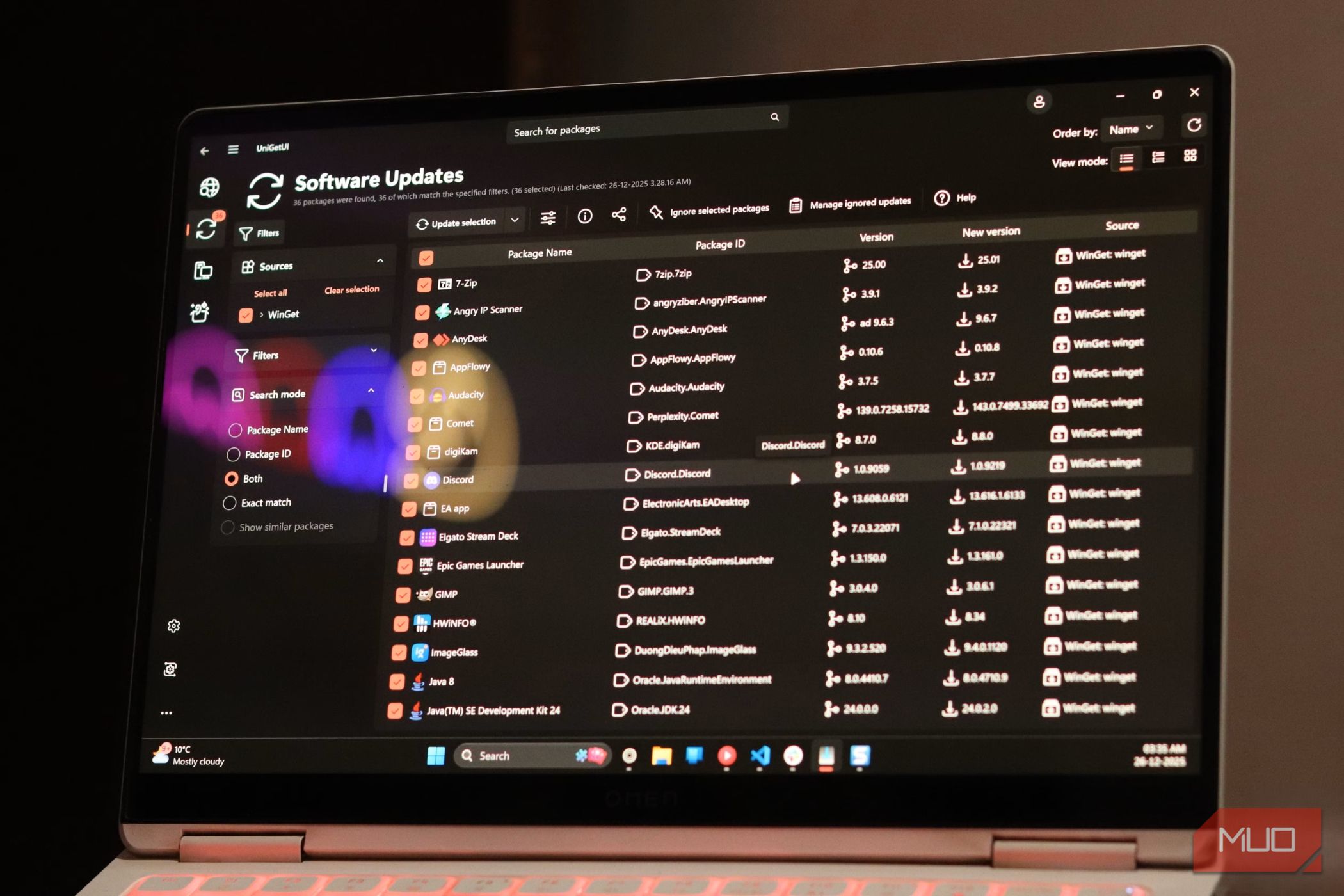
Setting up a fresh Windows PC these days is still old-school for an operating system that runs so much of the corporate world. One app comes from the Microsoft Store, another requires an installer from some random developer’s site, and a third is easiest to install from Terminal. Then, once everything is installed, many of those apps bring along their own background updater and start pestering you separately. Microsoft has had much of the underlying plumbing needed to make this cleaner for years. What it has never really done is wrap that infrastructure in a simple interface most people would actually want to use. That is where UniGetUI comes in. It pulls those scattered package sources into one place and gives you a single interface for installing, updating, and managing apps. UniGetUI makes the scattered way Windows handles software much harder to justify. Windows has an app distribution problem Microsoft built a package manager but left most people out of it The Microsoft Store is far better than the mess it was in the Windows 8 days, but it still does not cover every program you might use. Plenty of developers distribute software from their own websites, while others publish packages through repositories that Windows users can reach with package managers. Microsoft already solved a big part of that problem with WinGet. Windows Package Manager can search for software, install it, update existing programs, and remove them, and Microsoft now ships it through App Installer on current versions of Windows. The limitation is how you usually interact with it. WinGet is primarily a command-line tool. I do not mind typing winget upgrade —all , but I would rather have a proper interface where I can browse installed apps, see which ones need updates, and manage them without remembering package IDs or specific commands. That was the original idea behind UniGetUI. It started life as WingetUI, but creator Martí Climent renamed it in 2024 after the project grew beyond WinGet and the old name no longer fit. UniGetUI now sits atop several package managers rather than locking you into one. On Windows, it can bring together WinGet, Scoop, and Chocolatey, along with developer-focused ecosystems such as npm, pip, Cargo, and .NET Tool. You get one place to manage software that would otherwise be spread across several different tools and repositories. UniGetUI makes package management feel like an app store Everything important is finally visible Calling UniGetUI an app store needs one technical caveat. It does not host all of this software itself. UniGetUI is a graphical front end for the package managers and repositories doing the actual work underneath. From the user’s side, though, the app-store comparison is pretty fair. The Discover Packages page gives Windows package management the browsing layer WinGet’s command line has always lacked. You can search for an app and see its package name, ID, version, and source instead of tracking down an installer in your browser. If the same app is available through more than one package manager, you can see which source each listing comes from instead of having that distinction hidden from you. Before installing anything, it can also surface details such as the publisher, download URL, version, architecture, and source, depending on what the package manager provides. If you want more control, you can change things like installation scope and parameters without opening Terminal. The Installed Packages view is one of UniGetUI’s most useful features. Software that would normally be managed with separate tools can appear in one place. You can check for updates, select several packages at once for bulk operations, and uninstall apps from the same interface. It also gives you more control than blindly firing off an update-all command. WinGet has its own package-pinning and update-control tricks, but UniGetUI puts similar controls behind switches and menus. You can exclude individual packages from updates, skip specific versions, get notified when updates are available, or let UniGetUI handle selected updates automatically. That comes in handy when there are a few apps you’d rather leave alone until you know what changed. Then there are Package Bundles. Windows already has ways to batch-install multiple software packages, but UniGetUI turns that into something you can easily save and reuse. It can export a collection of packages and import it on another machine, including saved installation parameters. After reinstalling Windows or setting up a new PC, you do not have to remember every app you normally use and go hunting through their websites again. UniGetUI can’t fix everything underneath it The package managers still show through Some rough edges are unavoidable because UniGetUI inherits the quirks of the underlying systems. Package metadata varies between sources, different managers support different options, and the same app may appear through several channels. If a WinGet package is broken upstream, adding a friendly button in front of it won’t magically fix it. It is also worth paying attention to where a package comes from. Not everything UniGetUI surfaces undergoes Microsoft’s WinGet validation process. WinGet’s community repository performs its own manifest and security checks, while the other package managers UniGetUI supports have their own repositories and policies. UniGetUI itself is available from the Microsoft Store, which its maintainers recommend for Windows installs. You should pay attention to that because the project has also warned that the unigetui.com and old wingetui.com domains are unofficial. Microsoft already had most of the ingredients Someone else built the front door The interesting part is that UniGetUI’s biggest strength depends heavily on infrastructure Microsoft helped build. WinGet already provides Windows with a capable package management system and a large community repository, while UniGetUI wraps all that machinery in an interface that regular Windows users are far more likely to use. UniGetUI is not a small one-person side project anymore, either. Devolutions acquired it in March 2026 after the project had grown to more than 300,000 monthly active users and become too large for Climent to maintain in his spare time. Devolutions now maintains the project, while UniGetUI remains free, open-source, and MIT-licensed. Microsoft does not need to copy UniGetUI feature-for-feature. But Windows users should not have to choose between a limited storefront, downloading installers one by one, and learning command-line package management just to keep their software organized. Windows should have had this years ago UniGetUI won’t replace every installer or make the Microsoft Store irrelevant. There are still good reasons to get some Windows apps through the Microsoft Store. What UniGetUI proves is that Windows already had most of the machinery needed to make software management far less scattered. Microsoft built much of the plumbing; UniGetUI turned it into something ordinary people can actually use.