Summary
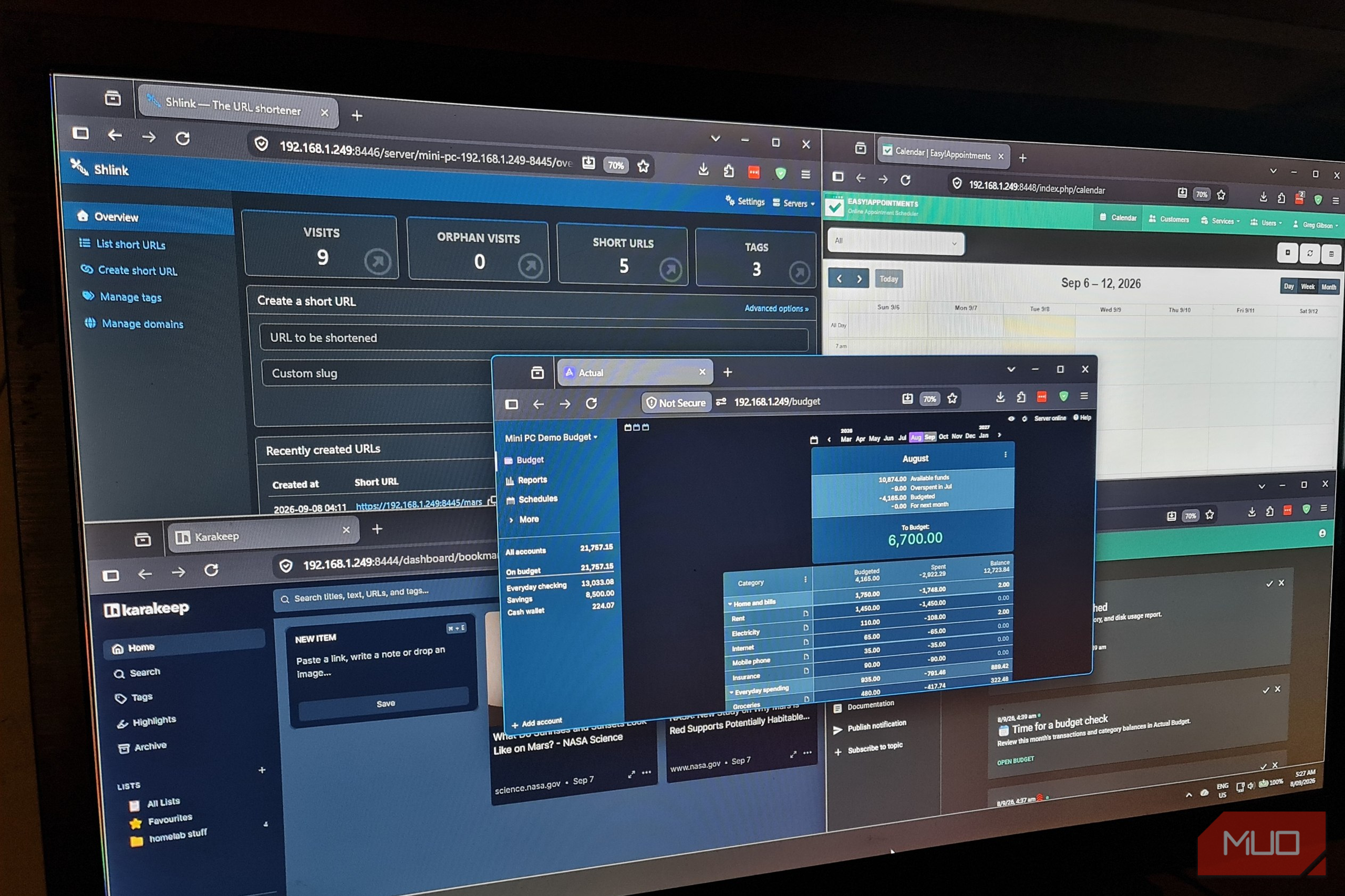
I don’t really need every single feature in paid budgeting apps or a PDF editor. I only need to organize my spending, combine documents for invoicing, and just get on with my workday. Paying increasingly expensive subscriptions for entire suites of software that are more suited to a small-to-medium business just feels excessive, especially with a more-than-capable mini PC. My mini PC that’s been gathering dust since I got a Google TV Stick costs barely anything to run, has an efficient Celeron J3455, 4 GB of RAM, and a 120 GB SSD. It’s certainly no powerhouse, but enough to make me curious enough to see if it can handle these everyday tasks. I installed Ubuntu Server and six free applications, put them on my network, and accessed them through my browser. They covered budgeting, PDFs, bookmarking, short links, notifications, and appointments. Each app did the job perfectly, with very few compromises. 6 Actual Budget Put my spending plan on my own server Actual Budget was my open-source alternative to my $15/month YNAB subscription for tracking spending and where my money disappeared to. I wanted to see whether hosting it myself would mean giving up features that made the budgeting app useful. I imported a few months’ worth of transactions across checking, savings, and cash accounts. From there, I allocated money to categories, checked transactions, and moved money from a few categories to another to reflect my real-life spending. Adjustments happened immediately, which is exactly what my old paid software used to handle. The spending report showed me exactly where the money was going, while the net worth chart gave me a broad view of my accounts. I could move between individual purchases and see the bigger picture without needing to export anything to Excel. There was only one annoying part of Actual Budget, but fixing it actually set up the infrastructure for the remaining applications. Since it’s a browser-based app, and I can’t stand self-signed certificates, I installed Caddy on the Mini PC to handle HTTPS certificates. I’m now using Actual as a standalone budgeting app, just as I did with YNAB. So, banking syncing wasn’t something I actually missed. If needed, Actual does support connecting to banks through SimpleFIN, though that does add a subscription cost through SimpleFIN itself. Actual Budget is 100% free, but that convenience costs extra. Actual Budget is an open-source, local-first personal finance tool with synchronization to show changes between devices.
- Developer(s)
- Actual Budget open-source community.
- Price model
- Free, open-source software.
5 Stirling PDF
Merging, compression, OCR, and redaction without opening Acrobat
As an alternative to the expensive Adobe Acrobat subscription, I installed Stirling PDF alongside Actual Budget. I used Acrobat on a near-daily basis to combine files, compress PDFs, or convert image-based PDFs to text-readable PDFs. Creating elaborate documents isn’t really my thing.
I started with a project brief and an invoice, combining them into a single three-page document. Both were easy to inspect and export in the browser. I also ran an image-only copy of the brief through compression and OCR with excellent results. I could search for phrases within a PDF that previously had zero searchable text.
For redaction, I removed an email address and client reference from a test invoice, which worked flawlessly even from a newly-created image-to-text PDF.
After using Stirling for my current invoicing workflow, I can say that while it doesn’t replace every Adobe Acrobat feature, it does do all of what I needed from a PDF tool. Those same chores that kept me paying for Acrobat now live in my browser on my own server.
 StirlingPDF
 - OS
- Web
- Price model
- Free, Premium
Stirling PDF is a self hosted, open source PDF toolkit that lets you merge, split, compress, convert, redact, and secure documents locally through a clean web interface with privacy control.
4 Karakeep
A searchable reading collection with lists and highlights
If I’m honest, saving links has never been difficult, but remembering what is in each article definitely is. With Pocket now shut down, I was tempted to pick up that functionality using the paid platform Readwise paired with Obsidian. Instead, I tried Karakeep as a self-hosted option.
I tested it out by adding a few technical reference pages and some NASA articles, and the preview cards made the collection easy to browse. My homelab references list kept practical guides together, which the reading view let me open articles and highlight any passages worth retaining.
Full-text search is what really made me love this tool. I searched for a random word I saw in one of the NASA articles, “ferrihydrite.” Despite not appearing in the title, Karakeep found the exact article containing the word and highlighted it. Using Karakeep means I could remember small details and still find the source.
I can’t claim that Karakeep is a like-for-like replacement for paid platforms like Readwise’s Reader feature. But for saving and organizing references, and retrieving exact articles based on half-remembered text, Karakeep gave me a searchable collection without yet another subscription.
 Karakeep
 - OS
- Docker, iOS, Android
- Individual pricing
- Free, open source Karakeep is a self-hosted app that stores images, links, and PDFs for later access.
- Developer(s)
- Localhost Labs Ltd
3 Shlink
Custom short URLs and visit information on my own infrastructure
Shlink covered the link management jobs I’d otherwise be using a URL shortener subscription like Bitly for. With Shlink installed on the Mini-PC, I could create memorable paths, organize them with tags, and check visits straight from the dashboard.
However, my initial links only worked inside my own network. That severely limited their usefulness as they couldn’t be shared with anyone outside of my LAN. To make the shortened URLs public, I connected Shlink to one of my Cloudflare domains and created a Cloudflared tunnel. The connector runs on the Mini-PC and makes an outbound connection, allowing public access to the links, but not the dashboard itself.
I changed Shlink’s configuration to use the public hostname:
DEFAULT_DOMAIN: “go.ggcontentlabs.com”
IS_HTTPS_ENABLED: “true”
Then applied it with:
sudo docker compose up -d shlink
Caddy forwards the public redirect requests while blocking Shlink’s management API on that route, so I can still manage links through the private dashboard.
I then created a new link to an Actual Budget help page, and gave it the URL slug /budget-guide. I used my mobile internet connection to verify the link worked and it was now shareable.
The compromise, of course, is that the Mini-PC needs to run 24/7. But for a free shortening service that meets my needs and gives me control over the domain and destinations, it’s one I’ll happily take.
 Shlink is a free, open-source URL shortener you host yourself. It supports custom domains, editable link destinations, and visit tracking, with a web dashboard for managing links.
 - Platform(s)
- Self-hosted via Docker or a compatible PHP server
- Price model
- Free. Hosting and domain costs may apply
2 ntfy
Small notifications with priorities, action buttons, and attachments
I tried out ntfy as a self-hosted alternative to Pushover. I started with a notification that displayed the Mini-PC’s live memory and disk metrics, intending to use it locally to provide useful information about the Mini-PC rather than yet another dashboard.
Sending an alert took a short command from the Mini-PC’s Ubuntu terminal:
curl -u greg
-H “Title: Hello from the mini PC”
-d “This alert came from my Ubuntu NUC.”
http://127.0.0.1:8090/mini-pc-alerts Messages went to mini-pc-alerts, which is a topic that acts like a named notification channel. I also sent an urgent test message, added a button that could open applications running on the Mini-PC, and even attached a downloadable server report. Every single alert could double as both a notification and a way to take action. Pushover’s personal license is just a one-time purchase fee of $5, so self-hosting ntfy is more a personal choice than saving money. What appealed to me most about ntfy was having a notification service on the server already hosting apps I’ve used as alternatives to paid subscriptions. ntfy is an open-source, HTTP-based pub-sub notification service. It lets you send push notifications to phones or desktops via simple PUT/POST requests.
 - Platform(s)
- Self-hosting available via Linux or Docker
- Developer
- Philipp C. Heckel and the ntfy open-source contributors
1 Easy!Appointments
A public booking page with the scheduling software running at home
Easy!Appointments became my Calendly alternative after I was going to originally use Cal.diy (Cal.com’s community edition), but its Docker image returned “not found.” So I decided to give Easy!Appointments a try, as it has remarkably similar functionality to Calendly.
I created three test services lasting 13, 30, and 60 minutes, assigned them to my provider account, and configured weekday availability with weekends off and lunch breaks. That gave any visitors only specific appointments to choose from, within hours I had pre-defined.
To make the booking page accessible outside my network, I added book.ggcontentlabs.com to the same Cloudflare tunnel I used for Shlink. I also updated the application’s address:
BASE_URL: “https://book.ggcontentlabs.com”
I then completed a booking using mobile internet. Choosing a service and time led the “customer” through details and then a confirmation. Once confirmed, the appointment appeared in my administration calendar.
I now have a public scheduling page backed by my own hardware, with complete control over the services, availability, and appointment records.
 Easy!Appointments is a free, open-source scheduling application you host on your own server. Customers can book available appointments online, while you manage services, staff schedules, and bookings through a browser.
 - Platform(s)
- Self-hosted via Docker or a PHP/MySQL web server
- Price model
- Free for personal and commercial use My little Celeron still had room to spare With all six applications running across 11 containers, the Mini-PC used about 2.4 GB of RAM, with 1.0 GB available, and 241 MB of Linux SWAP in use. With every single app running at once, switching between them still felt responsive with no noticeable lag. This was with light use of all six, though. I wasn’t hammering every service trying to make the Mini-PC fail. The bigger commitment with this setup is that now updates, backups, and access are all my responsibility. This is the DIY tax that must be paid when seeking viable alternatives to paid subscriptions. Still, I came away impressed by how much this tiny PC could handle. For several everyday jobs, the hardware I already owned was enough to give me a credible alternative, cancel five subscriptions, and replace a paid app.