Summary
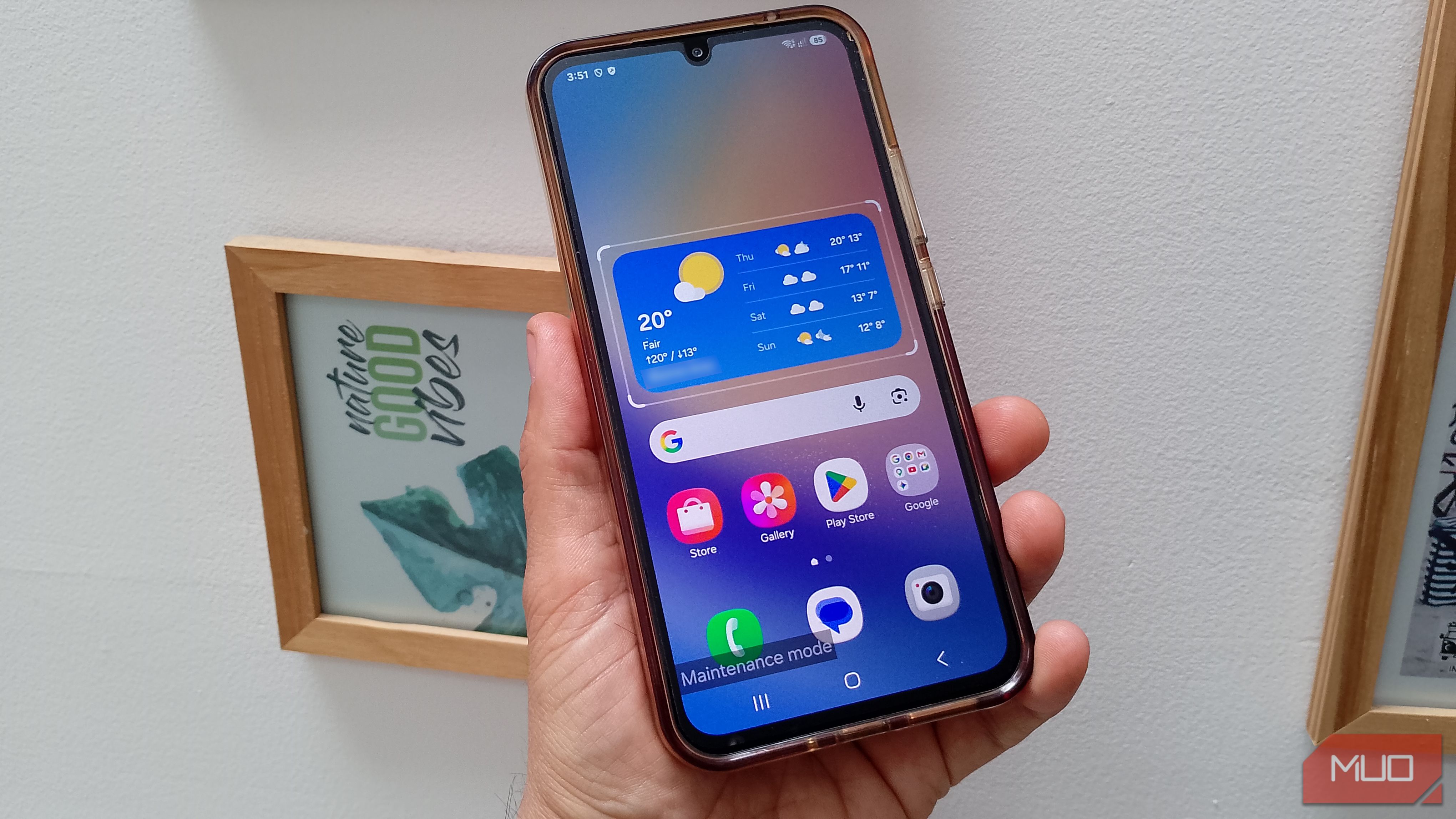
I have to admit I’m not too happy about handing over my phone for repair, with all the pictures and files on it. Sure, I could wipe it clean, but that sounds like too much, and something I wouldn’t do anyway. I’d heard about Samsung’s Maintenance Mode, but assumed it was a basic feature, even though I never really checked it out. So I’m testing it now, before I actually need to send my phone in for repair. I mostly wanted to see if it really keeps my personal stuff out of view without making the phone useless for whoever has to repair it. I knew that was the idea, but I didn’t expect my phone to look quite this different once I turned it on. Maintenance Mode “removed” but didn’t erase my files Gallery didn’t have a single picture or video I opened Gallery to see if my pictures and videos were really gone, and they were. If someone was being nosy with my phone, I’m sure that’s the first place they’d look. I would. The Gallery app had no albums, pictures, or videos. I also checked Google Play and only came across a sign-in page. When I opened Messages, it was like a flashback to when I first started using it. The empty Contacts made me low-key panic since it gave me that “they’re all gone” feeling. My Yorkie wallpaper was also gone and replaced with a default one. The whole phone looked more like a fresh Galaxy than one somebody had been using every day. A Maintenance mode label sat in the bottom-left corner, and it actually overlapped some buttons a little. I hesitated before tapping behind it, but the buttons actually worked. I have to admit, I really like this feature because I’ve always been uncomfortable with the idea of handing over my phone for repair. I have years of:
- Pictures
- Messages
- Accounts
- Personal stuff So, handing over my phone isn’t something easy for me. I actually saw what Samsung means when it says Maintenance Mode puts the phone into a separate account where the personal data can’t be seen. Nothing has been erased, but from that side of the phone, there really wasn’t much to see. Maintenance Mode still left enough of the phone open to work with I could still move around and use the basics The phone wasn’t locked down nearly as much as I expected. My Galaxy was still pretty usable in Maintenance Mode. I could see that a technician could check Settings, Device Care, the Camera, and other preinstalled apps without accessing the Google account already on the phone. Samsung says downloaded apps are hidden in Maintenance Mode, while preinstalled apps stay available, which is exactly what I saw. Before I put the phone into Maintenance Mode, Samsung also offered to create a system log. The screen explained that it could include things like recent errors, app activity, and storage information to help support staff figure out what’s wrong. I skipped it because I was only testing it to see what a technician would actually have access to. If I were actually sending it in for repair, though, I’d probably create the log. It could give the technician useful information about why I’d be sending my phone in for repair in the first place. So the phone wasn’t just sitting there locked down with nothing useful left to check. A technician could still look at quite a bit without accessing my personal files. Maintenance Mode left nothing behind on my phone The fake MUO contact was gone after the restart Before I turned it off, I made a fake contact called MUO Writer with a made-up phone number and email. I wanted to leave something behind on purpose so I could see whether it would still be there once I went back to my regular profile. When I tapped Exit Maintenance Mode, Samsung reminded me that anything created or changed while I was in there wouldn’t be saved. I restarted my phone, and once I entered my PIN, my original setup was there. I opened Contacts to see if the fake one I made was still there, and it wasn’t. That was what I wanted to see. Samsung says that if someone makes any changes while in this mode, they disappear when you exit. That includes any installed apps or added contacts. Samsung also required my PIN before I could return to my normal profile. So whoever has the phone during a repair can’t just exit Maintenance Mode and start looking around my normal side of the phone. Maintenance Mode can’t protect my data from the repair itself A factory reset can still wipe the phone Maintenance Mode can protect my privacy, but it can’t protect the data itself if the repair requires wiping the phone. Samsung made that pretty clear before I even turned the feature on. On the Maintenance Mode screen, it recommended backing up first and gave me two options: Temporary Cloud Backup or an external storage backup. I skipped both because I was only testing the feature, not handing the phone over for an actual repair. Samsung says some repairs may require a factory reset or even replacement of the phone’s storage. If that happens, Maintenance Mode can’t stop my files from disappearing. So I wouldn’t treat this as a replacement for a backup. It solves a different problem. I’d still use Maintenance Mode, just with a backup first A backup covers a reset, while Maintenance Mode keeps my stuff private Knowing that a repair could still wipe the phone or replace its storage wouldn’t make me skip Maintenance Mode. I’d just make sure I had a backup first. Samsung already pushed me in that direction during testing. The backup options were right there on the Maintenance Mode screen, so the reason is pretty obvious now. If my phone needs a reset, the backup is what saves my data. Maintenance Mode can’t do that for me. I’d rather figure this out before I actually need it I’m still not going to love handing someone my phone for repair, but Maintenance Mode takes away the part that bothers me most. My pics, messages, accounts, and other personal stuff stay out of view, and I don’t have to wipe the whole phone just to get that privacy. If your Galaxy supports it, I’d try Maintenance Mode once while nothing is wrong with your phone. That’s a much better time to figure it out than when you’re already at a repair counter.