I added Android Auto to my old car for $20 without replacing the stereo
5 min read
Summary
Whenever I drive a hire car, one of my favorite bits of the process is having Android Auto. My regular car is old and doesn’t support Android Auto, which is a pain — and something I’d really love; my next car will definitely have it!
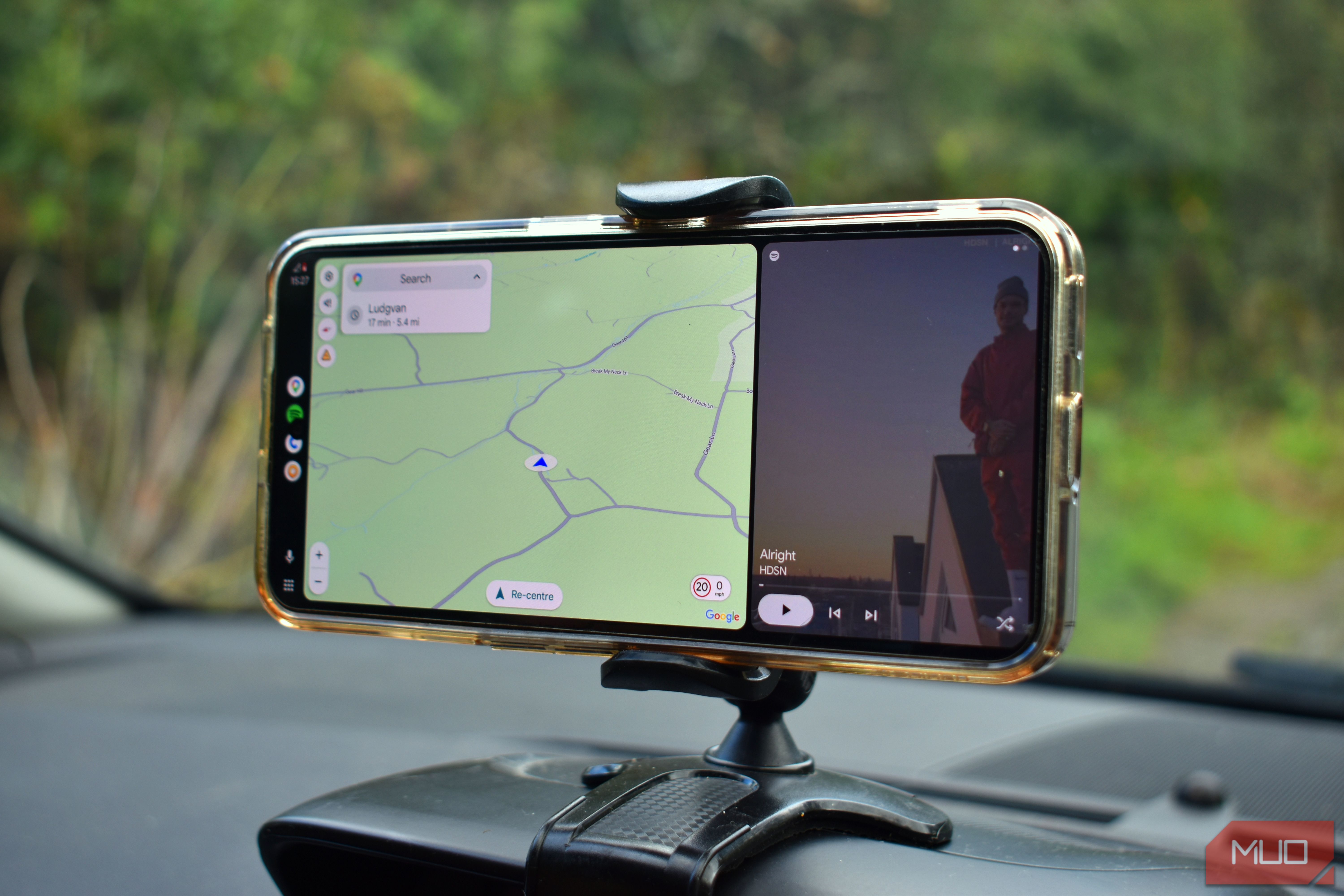
Turns out, I don’t actually need to spend tens of thousands on a new car. I paired the open-source project, Open Headunit, with an old Android smartphone and a 20Bluetooth−to−3.5mmaudiodongle,andsolvedmyAndroidAutoproblemsforgood.OpenHeadunitbringsAndroidAutotoalmostanyAndroiddevicePutthatoldphonetogooduse[OpenHeadunit](https://github.com/andreknieriem/open−headunit)istheperfectwaytobringlifebacktoanoldAndroiddevice,aswellasmakenavigationinyourcarabiteasier.Onceinstalled,OpenHeadunitletsyourunAndroidAutowithoutneedingtoplugintoavehicle,meaningyoucanrunitanywhereyoulike.Somefolkshaveeventakento[runningAndroidAutoathome](https://www.makeuseof.com/use−old−phone−as−android−auto−for−desk/)tocutdownonsmartphonedistractions.SettingupOpenHeadunitdoesn′ttakelongFollowthetutorialandusetheconnectionwizardOnceinstalled,fireuptheOpenHeadunitappandworkthroughthesettingstutorial.Thereisanoptiontosettheappupwithoutthetutorial,butIfoundituseful,especiallyasitwasn′timmediatelyclearwhatsettingsIneededforconnectivity.That′sinpartbecauseofhowtheappandyourdeviceaccessAndroidAuto.Basically,allAndroiddevicesmanufacturedsincearound2018supportAndroidAuto,butswitchinghowyouconnecttoandaccessitmeansdifferentthingsondifferentdevices.ThetutorialcanhelpyouAuto−Optimizeyourdevice,cuttingdownonsetuptimeandotherheadaches.Thefirstbigdecisionishowyou′llkeepthedeviceconnected.AndroidAutoneedsastableinternetconnection,achievedthroughUSBoranadapter,Wi−Fi,orSelf−Mode,fordeviceswithanactiveinternetconnection(i.e.,stillusingacellularconnection).I′musingmymainphoneasahotspotforthesecondary,soIchoseWi−Fi.Nextup,chooseyourdevicesize,theAndroidAutoscalesize(canbechangedlater),appearance,audio,andwhichdeviceOpenHeadunitshoulduseforGPSnavigation(eitherthedeviceortheconnecteddevice).Youcanalsoaddauniquenametoyourdeviceatthispointifyouwant,butit′snotrequiredtocompletethesetup,andlikeeveryotheroption,itcanalsobechangedlater.It′sworthplayingaroundwiththeAndroidAutoscaletoseewhatfitsbestforyoursmartphoneandvehicle.Asanexample,IsetminetousetheAutomaticdevicepixeldensityof480DPI,butthatlookedabsolutelyawful.Readablefornavigation,butwithoutbeingabletoseeanyothernavigationdetails.SettingtheDPItoaround220onmydevicegavemethevisualstyleIwantedwithoutmakingitdifficulttotapanybuttons.Fromhere,yourdeviceshouldchangetothefamiliarAndroidAutoconnectionpage,whereyoucanchoosetheAndroidAutologotobootthenavigationapp.UsetheWirelessHelperifyourconnectionisn′tworkingproperlyOlderversionsofOpenHeadunit(whenitwasknownasHeadunitRevived)hadaseparatewirelessconnectionhelperapptotriggerAndroidAutowirelessconnectionsonyourdevice.However,thenewerversionfeaturedhereintegratesaWirelessHelpermode,whichhelpstotriggerthewirelessconnectioninthebackground.Ifyou′restrugglingtoconnectwirelessly,Isuggesttogglingthissetting,restartingtheapp,andtryingagain.Iconnectedthesecondaryphonetomycarwitha20 Bluetooth dongle
Man, my car is real old
As mentioned, my car is old enough that it doesn’t have Wi-Fi, Bluetooth audio, or anything else. Instead, I bought a $20 UGREEN Bluetooth 6.0 to 3.5mm dongle so that I could connect my smartphone to the car, as my old USB-C to 3.5mm adapter cable stopped working.
The same applies to my secondary phone, too. In fact, the UGREEN dongle supports two incoming Bluetooth connections, which in this case would have been really handy. However, as Android Auto also integrates Spotify, it’s easier for me to run it all through one smartphone.
With Open Headunit running, Android Auto open and configured, and Spotify doing its thing, the dongle was the last step in turning my old smartphone into a proper Android Auto unit. Oh, and an in-car mount. You’ll want one of those, too; otherwise, you’ll have to keep glancing down at your smartphone or position it so it doesn’t fall out of place.
Open Headunit isn’t perfect, but it’s fantastic for any old car
I appreciate that I’m lucky enough to have an old Android device hanging around that I can turn into an Android Auto substitute. Other folks may not have that option. But if you do, it’s well worth doing.
Open Headunit won’t solve all of your navigation issues, and in truth, you may simply find it easier to stick Google Maps on your current device with a playlist in the background. It’s worked for years, so why change that?
Still, if you have an old device lying around and 15 minutes spare, you should absolutely try Open Headunit, ready for your next trip.