Summary
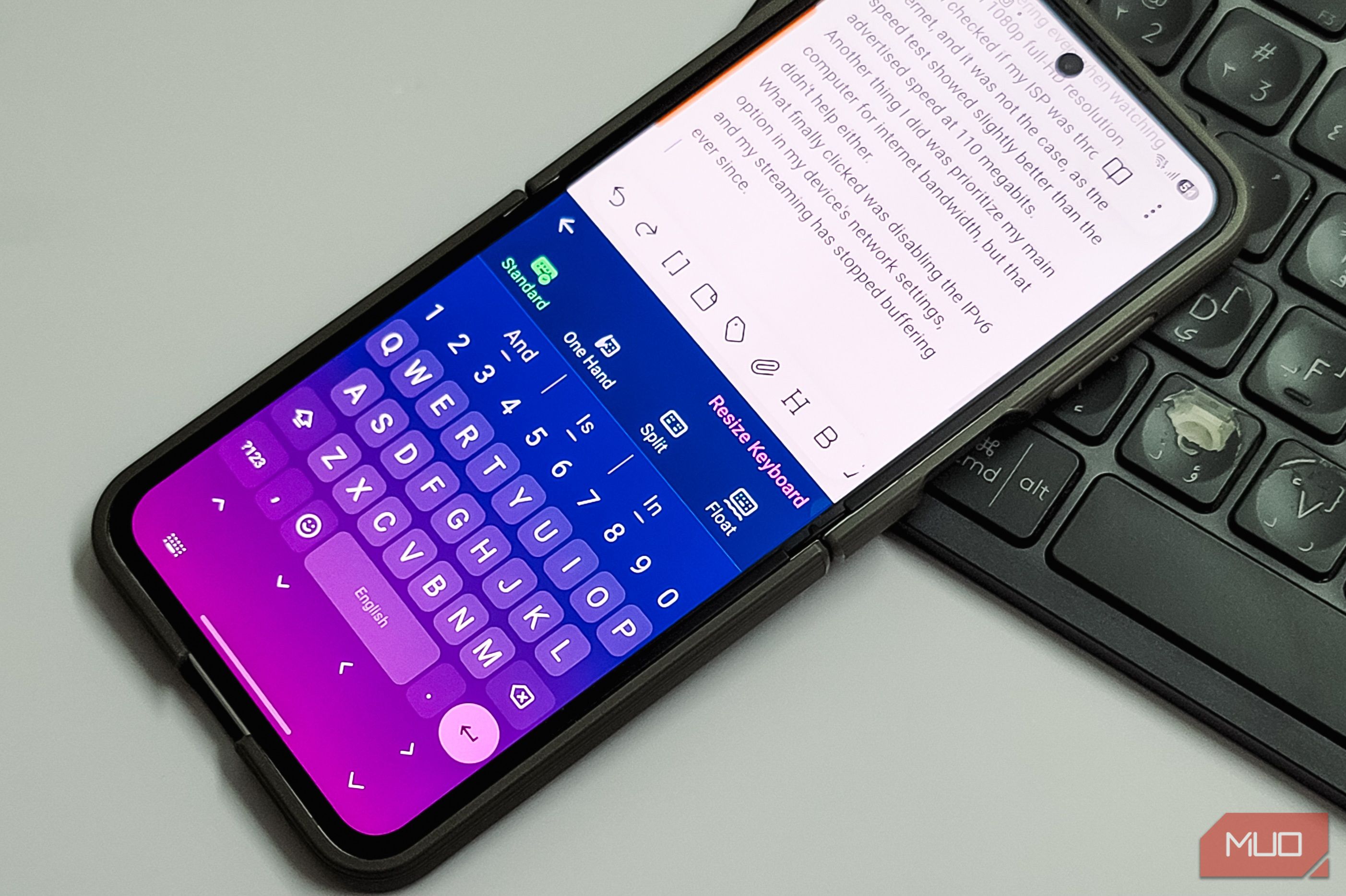
Google’s Gboard is an easy recommendation to anyone who wants a good Android keyboard with excellent voice typing support. However, if you are privacy-conscious, you might not like the fact that Gboard needs internet access for voice typing and shares some of your data for training purposes. While there are plenty of open-source keyboards that respect your privacy, FUTO Keyboard is the only one I’ve tried that offers a fully offline voice typing experience that doesn’t make you manually correct and retype your sentences. I replaced Gboard with FUTO for a month, and I think it’s the best offline keyboard for anyone who wants privacy without giving up the features that make a keyboard usable. FUTO doesn’t feel like a compromise A privacy keyboard that can keep up with the big names Often, when trying privacy-focused keyboards, they feel like a compromise. They don’t have the development resources behind them; they also don’t have as much data to improve their predictions, and they lack internet connectivity by design. FUTO has felt different from these alternatives from day one, and after almost a year, it doesn’t feel like a compromise switching from Gboard. For instance, a recent update added swipe to type, and it works quite well. It may not be as smooth as SwiftKey or Gboard, but it’s close. I wrote this entire section using FUTO’s swipe typing, and it got fewer than 10 words wrong. The keyboard layout is similar to what SwiftKey offers, with a dedicated number row at the top, which is a handy feature to have on any keyboard. The Actions toolbar at the top shows Undo and Redo buttons and gives you access to a text editor layout, clipboard manager, themes, and the ability to resize the keyboard. You can customize what appears in the action toolbar from the Settings. You can press and hold the spacebar to move the cursor, and doing the same with the delete button lets you select and delete text. The dedicated navigation row at the bottom is another handy feature if you frequently navigate between lines. The autocorrect works perfectly fine with an English keyboard, and FUTO lets you control how aggressively it corrects your mistakes. You can also turn personalized suggestions on or off and block words you never want to see again. It even has a personal dictionary for words you use regularly. FUTO also supports multilingual typing, so instead of switching between keyboard layouts, you can enable multiple languages and have FUTO predict and autocorrect words from all of them at the same time. Offline voice typing is solid A Whisper-based engine that runs entirely on your phone Many third-party and open-source keyboards tend to fall short when it comes to voice typing. Open-source keyboards often skip Google’s voice recognition because that would defeat the privacy purpose, and their own voice engines aren’t mature enough to be reliable. FUTO has done an excellent job here by keeping the voice engine completely offline while still making it practical and reliable. It’s not technically open-source, but source-available under the FUTO Source First License, which also means anyone can inspect the code. FUTO uses a local version of OpenAI’s Whisper model to convert your voice to text. The model downloads when you first set up voice input. Once it’s on your phone, voice typing works without any internet connection at all. Punctuation, grammar, and general transcription quality are all impressive for something that works without the internet. I’ve used it to dictate quick messages and longer notes, and it handled both well. What’s nice is that FUTO offers multiple model sizes. The default model prioritizes speed over accuracy, but you can download a larger model that prioritizes accuracy. In my testing on a relatively modern phone, I didn’t notice much difference in speed between the fastest and slowest models, so I’d recommend going with the larger one for better results. The one quirk I’ve noticed is that FUTO’s voice input doesn’t always pick up on product names. For example, it tends to write “Whisper” related terms incorrectly. But for everyday dictation in English, it’s on par with what Gboard offers, and it does it all without sending a single word to a server. It takes a few seconds longer than Gboard or SwiftKey, but that’s the ultimate cost one has to pay for a fully offline model. There’s plenty to customize Make it look and feel exactly how you want Despite being big on privacy, FUTU has some bling to it. You can pick from built-in color presets or create a custom theme using your own photos as the keyboard background. If you prefer a cleaner look, you can toggle key borders on or off for a more minimalist appearance. You can even change the font and font size on the keys for better readability. What’s more, you can adjust the keyboard height to free up screen space or make the keys bigger for easier tapping. There’s a one-handed mode that shrinks and shifts the keyboard to one side for easier typing on larger phones, and a split layout for tablets that separates the keys into two clusters for thumb typing. The haptic and sound feedback are customizable as well, so you can set the vibration intensity and key click sounds to whatever feels right. You can also adjust how long you need to hold a key before secondary symbols appear, which is one of those small touches that makes a noticeable difference when you type fast. FUTO is not Gboard, and that’s okay FUTO isn’t trying to be Gboard, and there are things it can’t do. You can’t search for GIFs without leaving the keyboard, which is something Gboard handles well with its built-in search. There’s no handwriting input, so if you rely on Gboard’s handwriting recognition with a stylus, FUTO won’t work for that use case. It also lacks a built-in translation feature, which Gboard offers through Google Translate integration. But if you want a keyboard that keeps everything on your device, FUTO is hard to beat. The keyboard itself works almost as well as Gboard, and in some areas like customization and navigation keys, it does more. The offline voice typing is the real standout, offering accuracy that rivals cloud-based options while making sure your voice data never leaves your phone. If your priority is privacy without a painful trade-off in usability, FUTO is a solid alternative without many compromises.