Summary
My life changed when I switched to a mechanical keyboard. I’ve been using Logitech’s MX Mechanical keyboard all year, and the satisfying action of each key has made typing everything more pleasing and fast.
But there are many levels of mechanical keyboards. When Lenovo sent me their 170 for my Logitech), I was curious about what a higher-end mechanical keyboard could offer. And I was amazed.
This is the Lenovo Yoga Creative Keyboard AngryMiao Edition
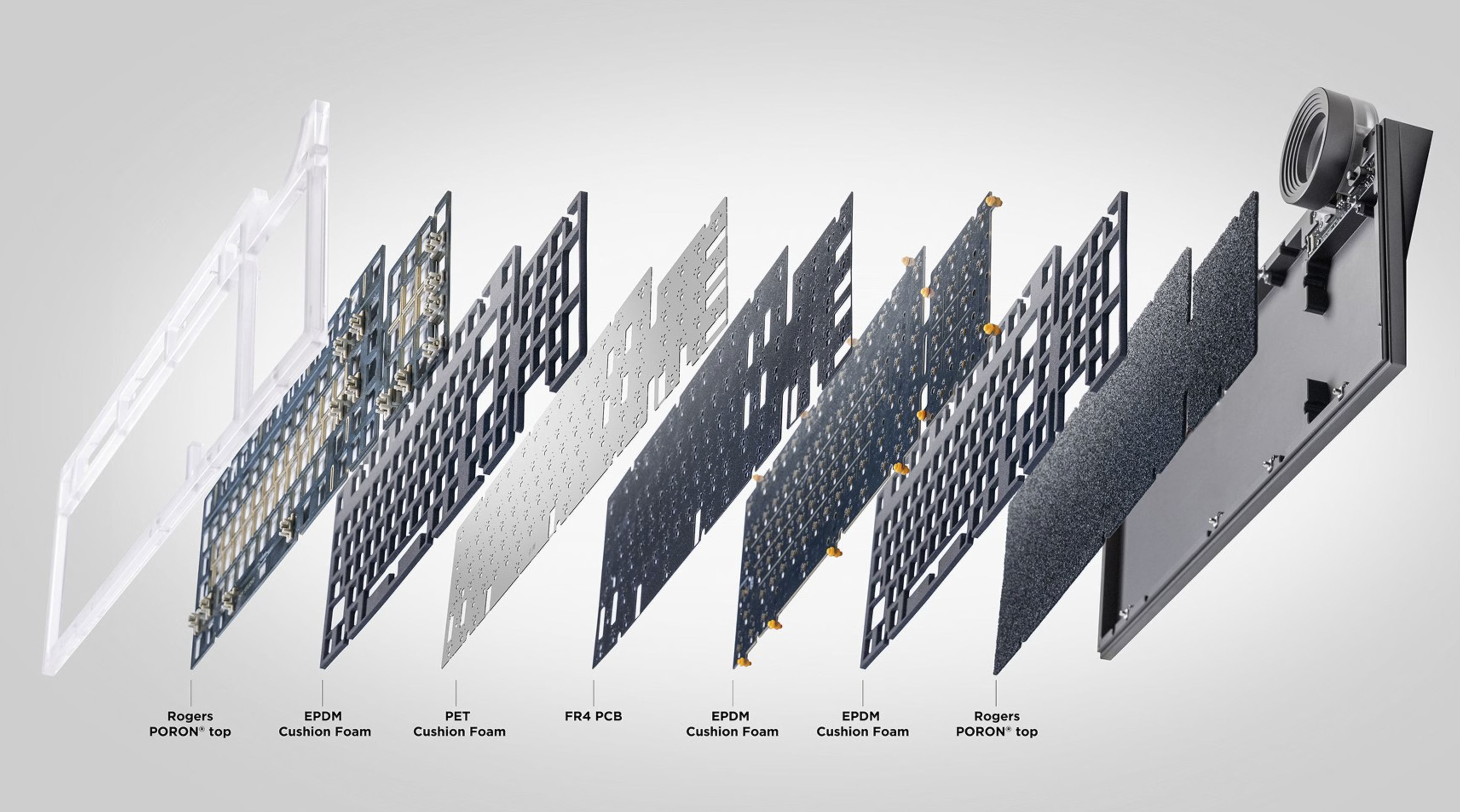
It’s an 8-layer premium mechanical keyboard
The Lenovo Yoga Creative Keyboard is a tank. It’s 5.73 lbs (2.6kg), which is more than double the weight of some laptops. So it’s not a portable keyboard.
But it’s built with a CNC-machined solid aluminum base combined with a frosted acrylic top plate. This gives the keyboard a substantial, high-quality feel that makes it feel (and look) like a high-end keyboard.
What is AngryMiao? It is a boutique hardware design studio known for making cyberpunk-inspired high-end desktop accessories and is well known in China. And you can see that cyberpunk inspiration in the design of this keyboard, where Lenovo and AngryMiao collaborated.
The keyboard itself has an eight layer dampening structure which makes the keyboard feel like a cloud when you type on it lightly (with almost no sound). But if you type faster and with more pressure, the sound comes alive. But as we’ll discuss below, the switches used in the keyboard are designed to be quiet and solid, not clicky like most other mechanical keyboards.
The Lenovo Yoga Creative Keyboard is made for Windows, but I tested it on my Mac, and it works fine (the Windows key doubles as a Command key).
It has a silent switch structure with pink switches
The Lenovo Yoga Creative Keyboard uses a custom Bsun Light Sakura silent linear switch, designed to be precise and stable, but very quiet. Compared to the brown switches of my Logitech MX Mechanical keyboard, which are much louder, the switches of the Lenovo keyboard are nearly silent, but with very high stability and precision of each key.
It’s the most satisfying typing experience I’ve ever had, and it’s genuinely hard to explain. The eight layers of dampening make each keystroke effortless, with none of the hollow rattle you get on cheaper boards. This is the Rolls-Royce of keyboards.
The keyboard offers hot-swappable keyboard switch sockets, letting you customize the typing experience on a key-by-key basis if you choose to do so with switches of different colors.
This is the Rolls-Royce of keyboards.
It’s built for creators
With a customizable mechanical dial
The reason Lenovo calls this a “Creator Keyboard” is because of this big, illuminated dial (that I wish was in a better location where it was more natural to use) in the upper-right corner of the keyboard.
This dial has an accompanying hardware three-way switch that lets you toggle between three modes. The first mode is volume control mode. The second mode is for left/right navigation, and is useful when positioning your text cursor or scrubbing video timelines if you’re editing video. The third mode is page up/down mode, which lets you vertically scroll, ideal for navigating large websites or documents.
The dial itself is also mechanical, and has a “notchy” feel when you turn it, making it very precise when you need it to be.
It also looks premium
But it’s lacking key features
The keyboard is wired, which is not ideal if you’re going for a minimal desk setup, but comes with a high-quality braided USB-C cable. In addition, the keyboard can act as a hub. It has two dedicated USB-C expansion ports on the rear of the keyboard, offering USB 3.2 Gen 1 (5Gbps) speeds.
It’s certainly a nice looking keyboard, perhaps not minimal, but it looks substantial relative to a normal keyboard you’d find at Best Buy, with its array of RGB features and the translucent acrylic panel that seems to highlight the colors.
Speaking of RGB (which some think is overly flashy), each key on the keyboard has RGB lighting which can be customized with the function keys or with the Lenovo software. By default, the keyboard offers a soft rainbow glow that changes every couple of seconds to give the keyboard a pleasing, colorful vibe, and this is called “Dynamic Spectrum.” Then, the dial, which also has an RGB array, turns red with a corresponding animation pattern when it’s activated.
The keyboard has no expandable feet but has a built-in slope of about 8 degrees (flatter is better anyway for wrist comfort and ergonomics), which is a good amount to give you some lift without straining your wrists.
As mentioned, the keyboard isn’t cheap at $299.99. That’s almost double the price of my Logitech MX Mechanical keyboard, which I think sounds better than the Lenovo, but doesn’t feel as rock solid and premium.
The Lenovo Yoga Creative Keyboard is a dream to type on
But you might have better options
When shopping for a mechanical keyboard, you have a ton of options, most of which are a fraction of the price of the Lenovo keyboard. But if you have the money and want the typing experience only a 5+ lb metal and acrylic keyboard can offer that has eight layers of dampening, along with a handy mechanical dial, the Lenovo Yoga Creative Keyboard AngryMiao Edition is in a league of its own.
 Lenovo Yoga Creative Keyboard AngryMiao Edition
The Yoga Creative Keyboard is an eight layer premium mechanical keyboard with custom Bsun Light Sakura silent linear switches. It offers a dedicated mechanical scroll dial that can be customized to scrub video timelines or control system volume.
Lenovo Yoga Creative Keyboard AngryMiao Edition
The Yoga Creative Keyboard is an eight layer premium mechanical keyboard with custom Bsun Light Sakura silent linear switches. It offers a dedicated mechanical scroll dial that can be customized to scrub video timelines or control system volume.
- Incredible typing feel
- Integrated dial is useful and precise
- Very solid and heavy
- Expensive
- Very quiet for a mechanical keyboard
- Ring dial is in awkward place
- Not wireless