Summary
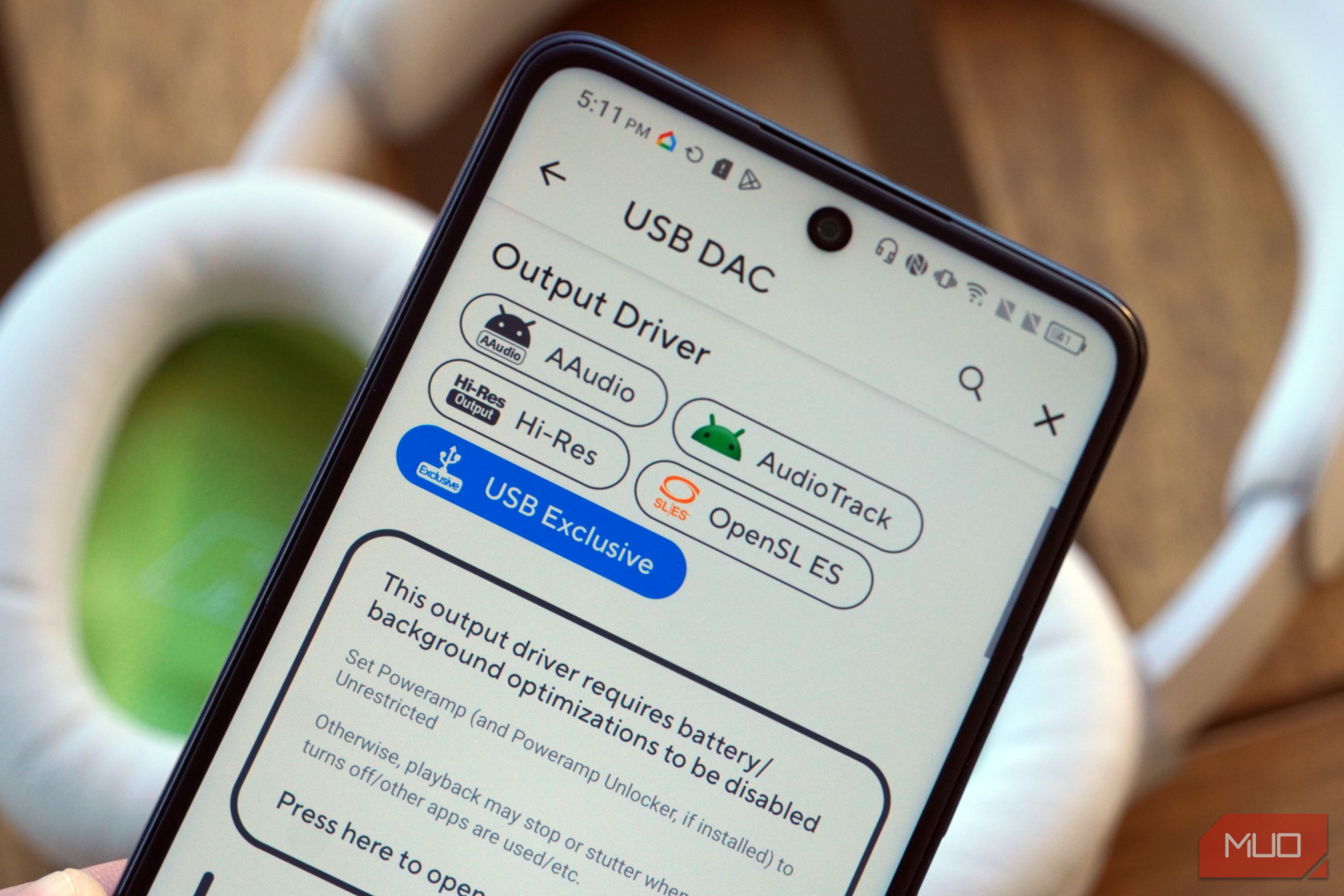
I’ve written about how using your phone’s USB-C port for audio is better than using a 3.5mm headphone jack, even if your phone actually has one. The reason comes down to an important Android quirk — all system audio goes through the AudioFlinger system audio server for resampling. Even if you’re playing high-quality audio files, these will be downsampled to 48kHz by the system audio server before the sound ever reaches your ears. This is a problem for audiophiles, and not because your ears can hear the difference between 48kHz, 96kHz, or 192kHz files. It’s because any unnecessary conversions or resampling in the delivery process can alter the sound quality. Android only added bit-perfect audio playback with Android 14, and to this day, just a handful of apps support it. Even seasoned Android power users and audio fanatics might not be familiar with the process. Here’s how I use bit-perfect audio with USB-C earbuds, headphones, and DACs on my Android phone, and how you can too. USB-C headphones plug straight into your phone With the right app, they can use Android’s USB exclusive mode There are clear advantages to using a USB-C digital-to-analog converter (DAC) with your Android phone. However, the feedback I hear from fans of the 3.5mm jack is clear: they don’t want to have to use a dongle between their favorite headphones and their smartphone. It makes sense. The convenience of plugging a pair of headphones or earbuds directly into your phone’s 3.5mm jack is unmatched. With the right gear, the USB-C port can offer the same convenience. While many in-ear and studio monitors still depend on the 3.5mm headphone jack, USB-C earbuds and headphones are a growing category. As you can see in the photo below, my TCL 60 XE NXTPAPER phone has both a USB-C port and a headphone jack. Still, I opt to use USB audio instead of the 3.5mm jack, and I don’t need a dongle or DAC to do it. Instead, I use USB-C earbuds or headphones, such as the Sony IER-EX15C earbuds or the Bose QuietComfort 2 headphones. Simply connecting a pair of USB-C earbuds or headphones to your phone isn’t enough to take advantage of Android’s USB exclusive mode. You need an app that supports the MIXER_BEHAVIOR_BIT_PERFECT flag, such as USB Audio Player Pro, HiBy Music Player, or Roon Arc. My music player of choice is Poweramp, and luckily, it’s adding bit-perfect audio support in version 1026. I tested the Poweramp beta with USB exclusive mode support, and it offers bit-perfect audio playback for free on Android. Open the Poweramp app (version 1026 or newer), and start playing a track. Tap the hamburger menu, and you’ll see two key audio options: Bit Perfect and USB DAC. Select Bit Perfect and choose one of four modes:
- Follow Track: This mode aligns the playback sample rate to match the audio file you’re currently playing. This is ideal for libraries encoded in different formats, sample rates, and bit depths.
- Perfect Bit Perfect: This mode is completely bit-perfect. It disables all processing, including digital-signal processing, gain adjustments, and crossfade, sending the audio data directly to your USB earbuds, headphones, or DAC.
- 64-bit Pipeline: This mode extends the internal format to Float64. It allows for bit-lossless processing and better digital-signal processing.
- DSD Remastering: This mode converts audio to DSD64-1024. It can be combined with Perfect Bit Perfect mode.
To get bit-perfect audio playback on my Android phone with Poweramp, I connected my USB-C headphones, enabled USB Exclusive mode in the USB DAC menu, and flipped on Perfect Bit Perfect mode in the Bit Perfect menu. You’ll see the change take effect in these menus and on Poweramp’s playback screen.
After changing these settings, I successfully avoided the AudioFlinger system audio server. The audio data runs straight from Poweramp to my USB-C earbuds and headphones. As a reminder, there’s absolutely no way to avoid the system audio server and the mandatory resampling that comes along with it when using a built-in headphone jack.
Why you might need a USB-C DAC
Your headphones’ DAC might not be able to process hi-res files
Keen-eyed audio experts may have noticed that the USB-C earbuds and headphones in some of the photos above weren’t operating in bit-perfect mode. This is because your USB-C earbuds and headphones have limits as to the quality of audio files they support. In my case, the Sony earbuds I tested max out at 16-bit, 48kHz. The Bose headphones, meanwhile, top out at 24-bit, 48kHz. Songs at that quality or lower played in bit-perfect mode just fine, whereas higher-resolution files required resampling.
The solution here is to use a USB-C DAC if you have files encoded at a higher quality than your USB-C earbuds or headphones natively support. If you have a pair of 3.5mm headphones or earbuds, you’re going to need a dongle anyway, and you might as well use a DAC like the Fiio KA11. While I find 16-bit, 44.1kHz quality is perfect for my ears, I loaded up 32-bit, 192kHz files to see how my Android phone and Poweramp handled them.
In USB exclusive mode with the Fiio KA11 connected, everything I threw at my Android phone running Poweramp played back in bit-perfect quality. Whether I was playing a 256kbps AAC track or a 32-bit, 192kHz FLAC track, my phone sent the audio data directly to the USB-C DAC, bypassing the system audio server. For the first time, those higher-resolution tracks actually made it to my headphones without being ruined by the AudioFlinger mixer.
USB audio beats Bluetooth and the 3.5mm jack
It’s the proper solution for audiophiles using an Android phone
It’s a fact that when playing hi-res audio files, USB audio outperforms both Bluetooth and the 3.5mm headphone jack. But there’s a lot of confusion surrounding USB-C audio on Android and how it works. In reality, it’s as simple as this: everything runs through the AudioFlinger system audio server by default, whether you’re using USB-C, Bluetooth, or a 3.5mm connection for playback. USB audio is unique because it’s the only delivery method that can bypass it for bit-perfect reproduction.
Using USB-C audio on your Android phone is absolutely worth it, but you need the right gear. A third-party app with a USB exclusive mode is a must. You might also need a USB-C DAC if your files are high-resolution, and if your earbuds or headphones don’t support their sample rate and bit depth. Once you have those two things, you’ll get quality that beats using a built-in headphone jack. It’s why I use USB-C audio even on phones with a 3.5mm output.
 Fiio KA11 USB-C DAC
 - Type
- 32-bit/384KHz
- DAC
- THD+N: <0.0006% SNR: 125dB Noise: <1.7uV
- Amplifier
- 245 Milliwatts
- Connectivity
- USB-C The Fiio KA11 is a USB-C dongle digital-to-analog converter (DAC) that brings up to 32-bit, 384kHz sound to any Type-C device, including phones, tablets, and PCs.