Summary
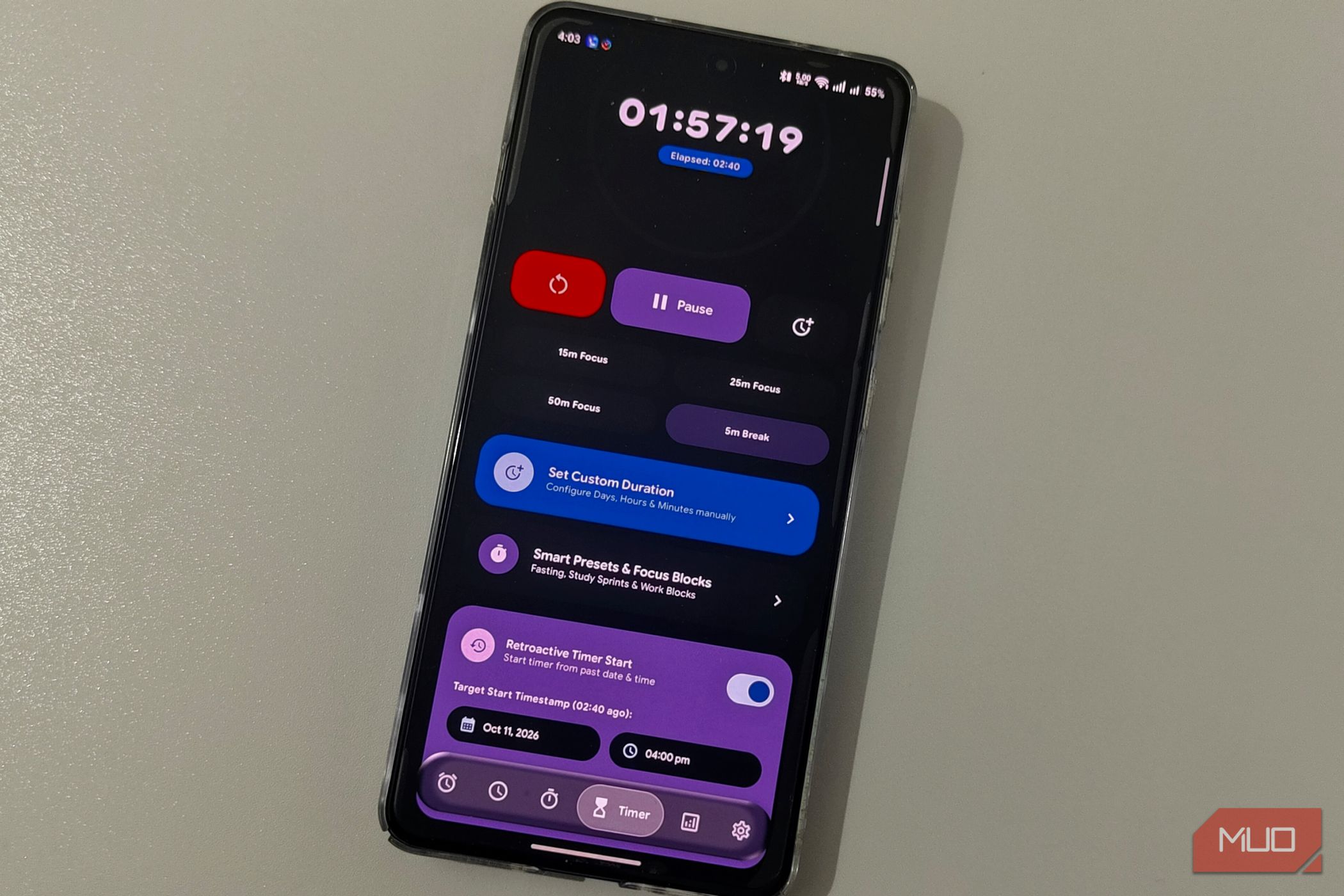
There are apps we take for granted on our Android smartphones because they work, and clock apps fit that description. For most people, Clock is an app they open to start timers or set an alarm. It turns out, a single clock app can do so much more without troubling you with ads or pop-ups. I’ve been testing this free clock app, Pixel Clock, for the past week, and it’s helped me uninstall 3 different apps for good. A timer that starts after you forget to start it Doc Brown, but for your oven The moment you open Pixel Clock, you can see a familiar clock interface. Thanks to its modern, Pixel-inspired UI, it feels nice to scroll through world clock entries and add a few options. But the clock is only the tip of the iceberg. For starters, you can swipe right to reach Pixel Timer, which offers unique features. Think of all the times you were supposed to start a timer but remembered only a few minutes (or an hour) later. Maybe for baking, maybe for starting a study session. Pixel Timer has a feature called Retroactive Timer Start that lets you start a timer from a past date and time. You enter those details, select the duration, and Pixel Timer gets to work. I recently had to time a 15-minute quiz and forgot to start the timer at the right time, so I used this retroactive timer feature without doing calculations. The app also shows a rich live notification interface that offers quick controls over the timer. Its built-in Picture-in-Picture mode lets you keep track of timers and stopwatches, too. The focus app I deleted first Goodbye, little tomato After testing Pixel Clock for a while, I realized I don’t really need those dedicated apps to get the job done. In the Timers section of Pixel Clock, you can set up Smart Presets and Focus Blocks. The app already has a few options, such as a 2-hour Study Sprint, an 8-hour work shift, and 16:8 standard intermittent fasting. You can set up a custom duration for these timers, too. The clock app also has an entire section for analytics and tracking. This page, called Stats, becomes a central space where you can get a gist of what you’ve been doing. It’ll keep track of all the focus timers you’ve run, along with a general history of timers. I’ve been using this feature as a habit tracker for things I do like reading. As long as I’m honest about what I track, I get accurate statistics of what I’ve done in a day, week, or month. As someone who has found most habit trackers and focus timers overkill, Pixel Clock has been a breath of fresh air because it’s just simple. I also let it wake me up for a week Math problems before coffee, a bold choice My smart alarm app was the next thing that Pixel Clock helped me replace! I’ve tried a number of apps to set up a more difficult-to-miss alarm, so I don’t sleep through it. When I found a smart alarm function with some math problems on Pixel Clock, the deep sleeper in me was happy. While it’s not as fancy as other smart alarms out there, Pixel Clock gets the job done. You can set up an alarm the usual way or use one of the quick options for power naps. The intuitive interface still feels great, though. The wake-up mission has four options: None, Easy, Medium, and Hard. Depending on the choice, you’ll have to solve some math problems of addition, subtraction, and multiplication to dismiss the alarm. The clock app offers the standard customization options for repeat and alarm tone, as you’d imagine. It also does a great job of showing live notifications, which are great while running multiple timers/alarms. Minor improvements also make Pixel Clock a better app for Android users. The stopwatch automatically ranks your laps, and you can switch between the normal and Pure OLED Black Mode, enable the Liquid Glass Navigation Bar, and even back up and restore data using JSON. Where Pixel Clock still falls short Despite how innovative and useful Pixel Clock has been, it does sometimes feel like a few-week-old app, which it is. I remember coming across some bugs while trying to set up multiple timers, and it could offer additional customization options for those focus timers. The comparison here is with the clock apps that come with Android smartphones by default, and by that yardstick, it’s easy to recommend this free clock app over existing options!