Summary
Google’s Pixel phones have accumulated plenty of software perks over the years, but Now Playing has always been one of the easiest to covet. If you leave a Pixel within earshot of a song, it can identify the track automatically, then slip the title onto the lock screen without making you open an app, ask Google, or scramble for Shazam before the chorus ends. Ambient Music Mod brings much of that same experience to other Android phones, including Samsung Galaxy devices. I installed it on my Galaxy S24 Ultra, and getting everything running required a bit of enthusiast-grade Android plumbing. Once the setup was out of the way, however, the result came remarkably close to the Pixel feature I had been missing. Getting Pixel software onto a Galaxy takes some plumbing The setup makes you earn the payoff Ambient Music Mod takes a little more work than installing a normal APK and tapping through a permission screen. Because it ports Google’s Now Playing components to phones that were never meant to run them, Android needs a bit of coaxing before everything falls into place. On newer versions of Android, that job starts with Shizuku. It gives compatible apps access to ADB-level privileges without forcing you to root the phone. Ambient Music Mod supports Android 9 and newer, with Shizuku handling Android 12 and up while older devices can use the root-based Sui method. On my Galaxy, I installed Shizuku first, enabled Developer options and Wireless debugging, then used Android’s wireless pairing process to start the Shizuku service. If that menu is unfamiliar territory, you probably should read up on the Developer options Android hides from regular users before you start flipping switches and hoping for the best. Once Shizuku was running, the rest of the setup followed a pretty sensible sequence.
- Download Ambient Music Mod from its official GitHub release and sideload the APK.
- Open the app and let the setup download and install the separate Now Playing component.
- Choose and download the music database used for local recognition.
- Grant the requested permissions.
- Enable the accessibility service if you want recognized songs to appear on the lock screen.
- Run the built-in recognition test before moving on.
The Now Playing component is a modified version of Android System Intelligence that contains the music-recognition code Ambient Music Mod relies on. The main app handles that package for you, which saves you from having to track down the correct version yourself.
Android showed a Play Protect warning while I installed it. That’s not an invitation to go hunting for another copy on an APK site of uncertain provenance. Stick to the project’s official GitHub release, and if sideloading is unfamiliar, read up on how Android sideloading works before proceeding.
The downloadable music database is what gives automatic recognition its offline catalog. Once mine finished installing, I played David Bowie’s “Heroes” from another phone and the built-in test identified it correctly. That was a reassuring checkpoint before I moved on to the lock-screen options.
If the recognition test keeps failing even for songs you know are in the database, the developer recommends listening to the captured audio using the Playback option. Distorted recordings can sometimes be fixed by enabling Use Alternative Encoding under Advanced settings, although you may need to raise the gain afterward because the alternative encoding tends to produce quieter audio.
There’s one recurring bit of housekeeping: Shizuku started through the non-root method doesn’t survive a reboot, so its service has to be started again after restarting the phone. It’s a small maintenance tax that actual Pixel owners never have to think about.
Automatic recognition is the reason to install it
The best interaction is the one you never started
Android already gives you several ways to identify music playing nearby, but most of them require you to notice the song first and deliberately ask what’s playing. Ambient Music Mod, however, removes that little bit of friction by periodically capturing a short sample and checking it locally against the music database stored on your phone. The developer says automatic recognition doesn’t send those recordings to a server, with online audio processing reserved for the optional On Demand mode.
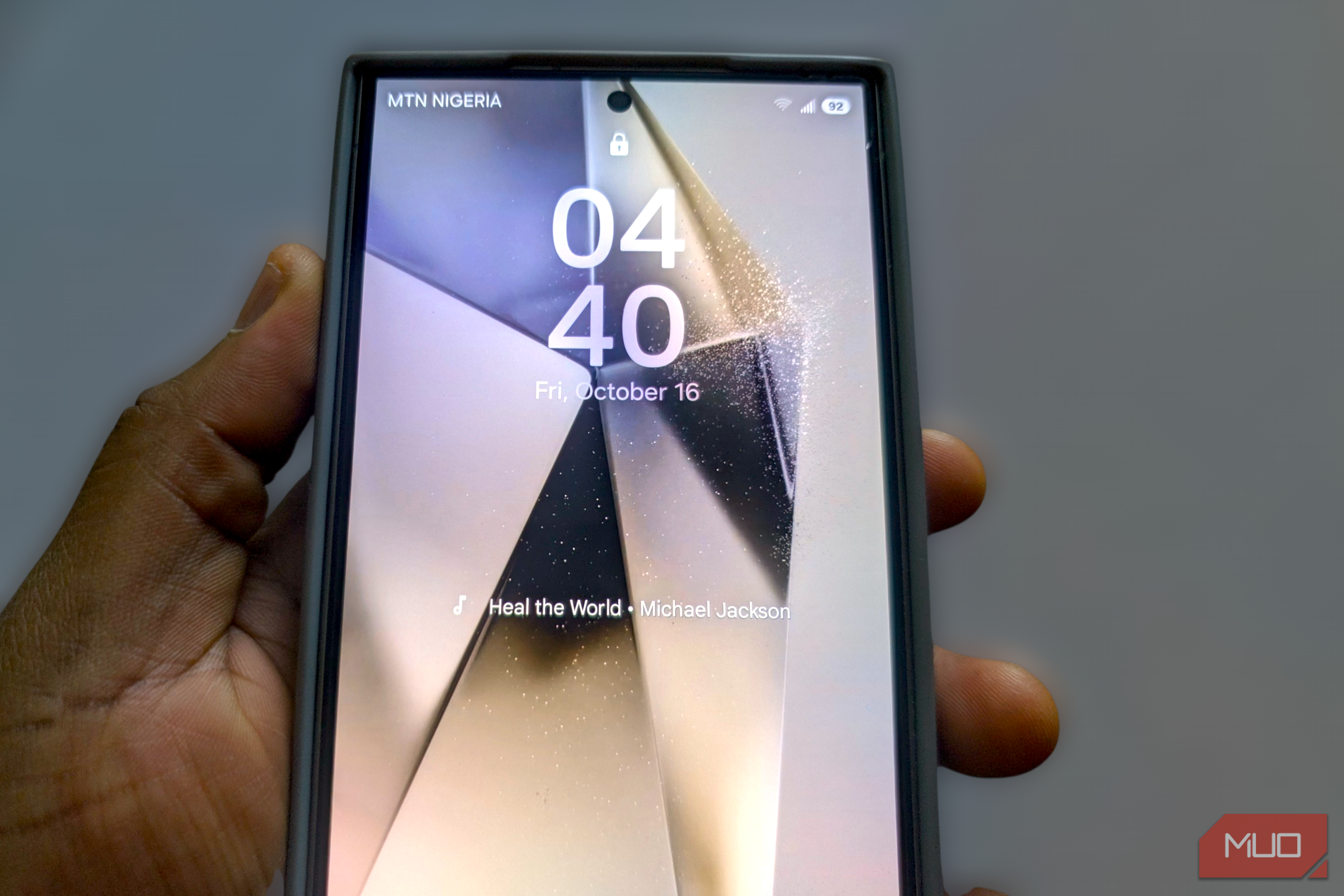
When it finds a match, the artist and song title can appear right on the lock screen. Recognition doesn’t stop at the lock screen. Ambient Music Mod automatically records identified tracks in Now Playing History, adding artwork where available and a timestamp for each detection.
After a short testing session, mine had already collected songs from Michael Jackson, Grover Washington Jr., Stevie Wonder, Bobby Caldwell, and Michael Bublé. The playlist itself isn’t important here; I just really liked that it assembled on its own while music played around me, including songs I probably wouldn’t have bothered identifying manually.
Inside History, you can favorite tracks for later or use the Summary tab to turn accumulated recognition data into statistics about artists, genres, and listening times. The project has also added support for more country databases alongside those summaries, which gives you some room to broaden recognition if your listening habits regularly wander outside the catalog you picked during setup.
There’s still room for an app such as Shazam, and you can even replace it with a private open-source music recognition alternative if that suits you better. Those tools make sense when you deliberately want an answer. Ambient Music Mod is better at preserving songs you might never have thought to identify in the first place.
The Pixel imitation has sensible limits
There’s a point where tinkering stops being clever


 Local recognition can only identify songs included in the downloaded database, and it’s designed for music playing around the phone rather than audio coming from the phone itself. Ambient Music Mod deliberately skips recognition while the device is already playing media. You can switch database regions, add extra country databases, and change how frequently recognition runs, which gives you some control over both coverage and how often the phone goes hunting for music.
There’s also an On Demand mode that uses Google’s online recognition engine for tracks outside the local database. My Galaxy S24 Ultra reported that feature as incompatible, and I left it there rather than treating the warning as a challenge. According to the developer, unsupported firmware may require root access and additional system changes before On Demand will work. One recommended Magisk overlay even comes with a warning that it has caused boot loops on some Samsung phones running One UI.
Since automatic recognition already delivers the main reason I installed Ambient Music Mod, risking a daily-use Galaxy for the last scrap of Pixel parity strikes me as a rotten bargain.
One less reason to envy the Pixel
After the initial bit of Android tinkering, the app mostly gets out of the way. Music starts playing, your Galaxy picks it up, and the track is waiting on the lock screen or tucked into History whenever you care enough to look.
For a Pixel feature I’d wanted on Samsung hardware for years, that’s close enough to the original that I no longer feel deprived of it.
Local recognition can only identify songs included in the downloaded database, and it’s designed for music playing around the phone rather than audio coming from the phone itself. Ambient Music Mod deliberately skips recognition while the device is already playing media. You can switch database regions, add extra country databases, and change how frequently recognition runs, which gives you some control over both coverage and how often the phone goes hunting for music.
There’s also an On Demand mode that uses Google’s online recognition engine for tracks outside the local database. My Galaxy S24 Ultra reported that feature as incompatible, and I left it there rather than treating the warning as a challenge. According to the developer, unsupported firmware may require root access and additional system changes before On Demand will work. One recommended Magisk overlay even comes with a warning that it has caused boot loops on some Samsung phones running One UI.
Since automatic recognition already delivers the main reason I installed Ambient Music Mod, risking a daily-use Galaxy for the last scrap of Pixel parity strikes me as a rotten bargain.
One less reason to envy the Pixel
After the initial bit of Android tinkering, the app mostly gets out of the way. Music starts playing, your Galaxy picks it up, and the track is waiting on the lock screen or tucked into History whenever you care enough to look.
For a Pixel feature I’d wanted on Samsung hardware for years, that’s close enough to the original that I no longer feel deprived of it.