Summary
I’ve added Ryobi tools one project at a time since we bought our first house, and the collection now tops 20 cordless tools across two battery platforms. A handful are the ONE+ tools I’d buy first if I started over. The trouble was I could no longer picture them all at once. Choosing a tool meant opening cabinets until I found something useful, and the first thing I found usually won over the right thing.
So I finally wrote everything down. Paired with my Home Depot order history, one sheet of paper changed how I start every project. To make inventory tracking even easier, I’m
self-hosted inventory app. It lets you add photos, warranty dates, and storage locations.Garage cabinets make a terrible catalog
Buying as needed builds a collection nobody planned
I never had a plan behind my Ryobi setup. Years ago, I picked up a basic kit with five or six tools, and I honestly couldn’t tell you which ones came in it anymore. I got everything after that because a project demanded it: a heat gun for frozen locks, a sander for a weathered bench, a stick scrubber for the garage floor.
Shop that way for a decade, and you end up with 18 ONE+ tools, four 40V yard tools, and nine batteries spread across several cabinets. Nothing is lost, exactly. It just stops being visible. That’s how a drill ends up driving lag bolts while the impact driver, the better tool for that job, sat two doors over.
A sheet of paper was enough to start
An inventory only has to answer one question
Dedicated inventory apps can hold photos and warranty dates, and I’ll get to one below. My first pass only had to answer one question before a project: what do I have that fits this job?
A single sheet handles that well. I jotted down the 18V tools, the 40V yard tools, the batteries, and the accessories that tend to vanish into drawers. It took minutes. It’s quick and a low bar. You can set up your game and add your written list to a spreadsheet or your smartphone’s note app. Just take a picture of your list and copy and paste directly from the image. Handwriting recognition is good enough these days and works 98% of the time, even if your writing isn’t the best.
Home Depot’s order history fills in the details
Model numbers and purchase dates I never had to copy
My paper list stays simple because Home Depot already keeps my records. The purchase history in my account shows the model number, date, and price for nearly everything I’ve bought. Confirming that my stick scrubber is the PCL1701B, or when a battery came home, takes under a minute in the app. In-store buys only appear when they’re tied to your account, so check that yours show up.
That record has gaps, though. I bought my angle grinder, tire inflator, and flashlight from the Direct Tools Factory Outlet, and the attachment kit for my oscillating multi-tool came straight from Ryobi. None of those purchases live in Home Depot’s system, which is why I need to consolidate into a better tracking system.
Seeing everything at once changed which tool I grab
The best tool for the job is easier to spot on paper
With everything on one page, matching tools to jobs got faster. The impact driver with a socket adapter takes the lag bolts. The lightweight 18V string trimmer is enough for the berm in my backyard, while the 40V trimmer handles real yard work. I take my stick scrubber out two to four times a year for the garage floor, and the handheld version covers everything smaller.
Accessories gain the most from being written down. Drill bits, hole saws, a clamp-on saw guide, and a 20-piece multi-tool set hide in drawers far more easily than a green tool on a shelf. Several of the accessories that made my budget tools more capable are exactly what a list keeps from becoming a second, invisible collection.
The battery list held the biggest surprise
My oldest pack is nearly 10 years old
Lining up purchase dates told me something I’d never checked. My oldest 18V pack is approaching 10 years old. It fits every ONE+ tool I own, which is exactly why its age never registered.
Lithium-ion packs lose capacity with age and charge cycles, so a decade-old battery won’t deliver what it did new. Knowing which pack is oldest lets you assign it to light jobs, like a flashlight, an inflator, or a quick cut with the multi-tool. Save newer packs, such as a 6.0Ah HP, for the circular saw and other tools that pull hard current. When the oldest one finally quits, I already know which Ryobi batteries I’d buy again.
HomeBox picks up where paper runs out
A free, self-hosted inventory built for home users
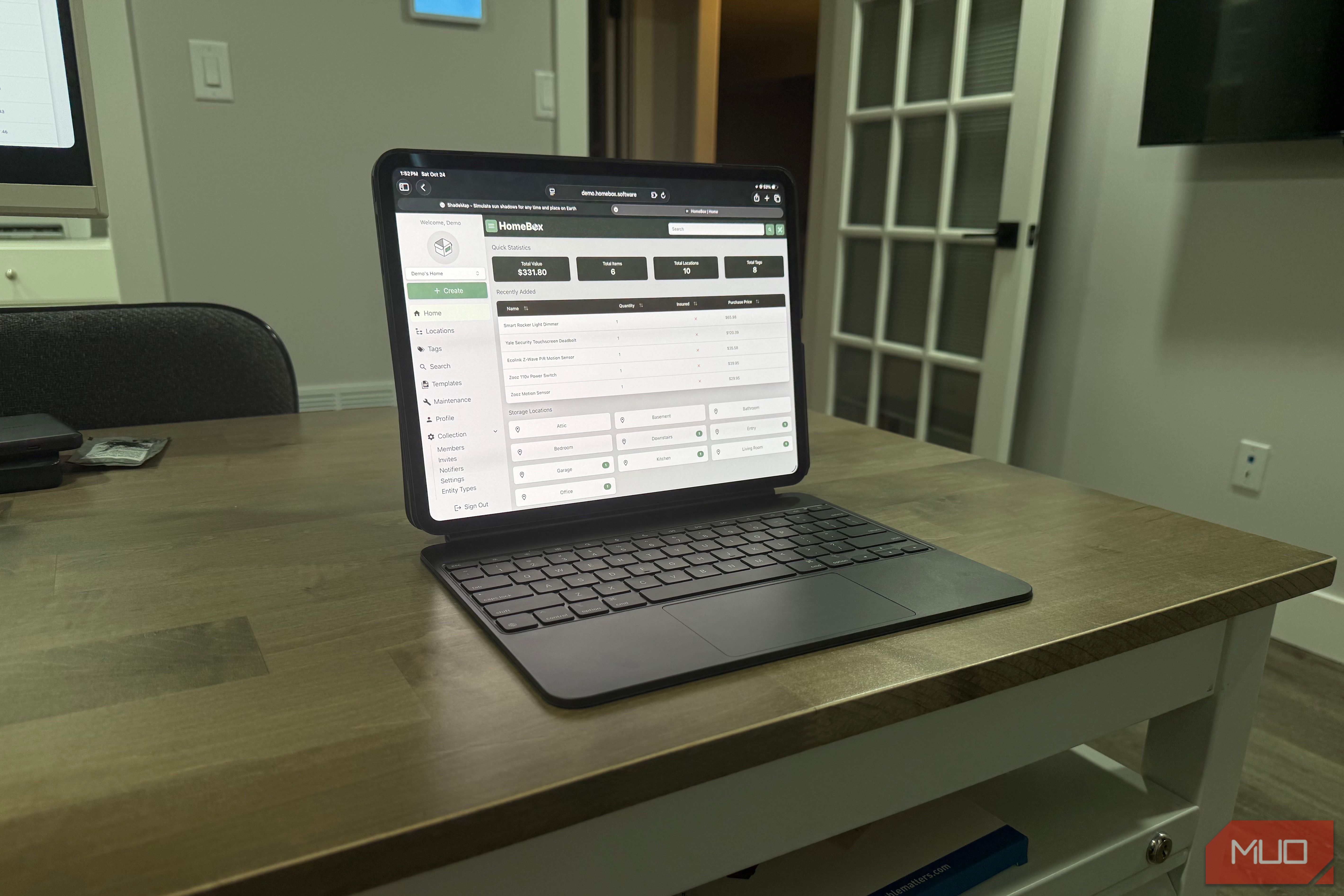
Paper can’t hold a photo, flag an expiring warranty, or follow you to the store. HomeBox covers all three without a subscription. It’s an open-source inventory system for home users, maintained by the sysadminsmedia team as a continuation of the original HomeBox project.
You host it yourself as a single Docker container on a home server, NAS, or spare Mac, and the developers say it idles below 50MB of memory. PikaPods offers a hosted version if you’d rather skip the setup.
Items sort into locations and tags, so every drill can sit under the cabinet it actually lives in. Custom fields can store battery capacity, and purchase and warranty tracking keeps dates and prices for those outlets, and Ryobi-direct buys Home Depot never recorded. Photos separate look-alike green packs; it can generate QR labels for cabinet doors, and the web interface works fine on iOS and Android. I’m working on setting it up my own on my spare Mac Mini.
 HomeBox
- Price model
- Free
- iOS compatible
- Yes
- Android compatible
- Yes
- Desktop compatible
- Yes The cheapest upgrade in my garage cost one sheet of paper Working faster in the garage didn’t take a new tool. It took seeing the ones I already had. One handwritten page, backed by Home Depot’s records, gave me that view and showed me which battery retires first. Start on paper before your next purchase, then move the list into HomeBox once you need photos, dates, and a spot on your phone. The tool you were about to order might already be sitting in a cabinet, and the pack worth replacing may be the one you’ve trusted longest.