Summary
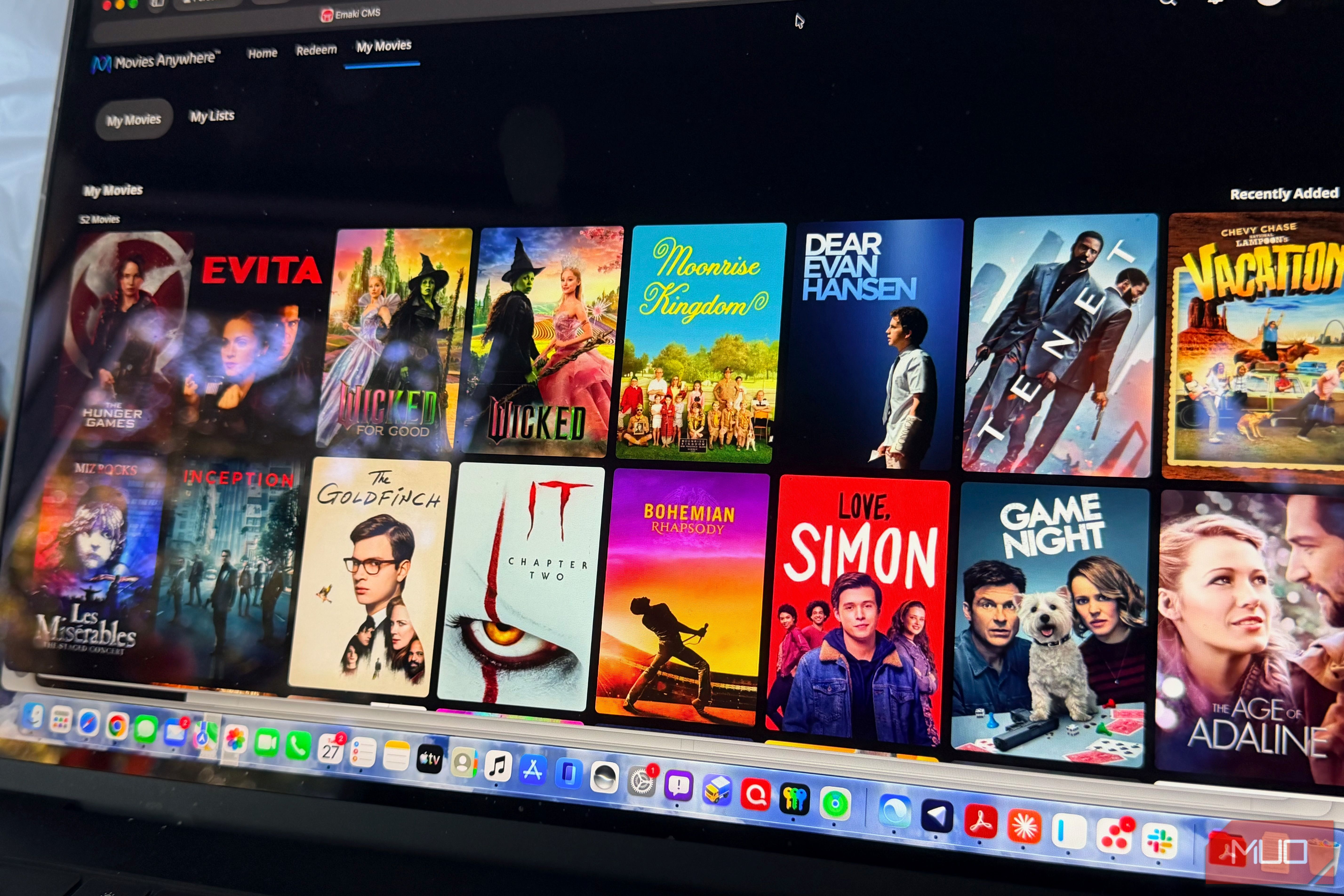
I’ve been buying movies digitally for a long time. Some of my oldest purchases go back more than 15 years to Vudu, back when it was still called Vudu. Since then, I’ve bought just over 100 movies on Apple, about 30 on the ever-practical Amazon Prime Video, and two on Google Play, which now lives inside YouTube. That’s a decent library. It’s also a mess. Every movie is locked to the store I bought it from, and I rarely remember which one. Movies Anywhere fixes a good chunk of that. It’s free, it took me about 10 minutes to set up, and it finally let me watch my Apple purchases on hardware Apple doesn’t make. Why buying digital movies leaves your library scattered My purchases were split across Apple, Prime Video, Google, and Vudu Buying a movie online feels like ownership until you try to watch it somewhere new. My Apple purchases play in the Apple TV app. My Prime purchases play in Prime Video. The two I bought on Google show up in YouTube, assuming I remember to look there. That gets old fast when you’re scrolling through three apps to find one movie. This happens to me often, especially when I’m trying to find something to watch on my Roku. Over the years, it’s also shaped where I buy things. I kept going back to Apple even when another store had a better price, because I wanted everything in one place. A Prime sale didn’t help much if the movie ended up in an app I barely opened. How Movies Anywhere syncs movies between Apple, Prime Video, and YouTube One free account links every store where you buy movies Movies Anywhere is a free digital locker run by Disney. You create an account, then link the stores where you buy movies. Once they’re linked, any eligible movie you own from a participating studio shows up in your Movies Anywhere library. The more useful part is that the sync runs both directions. If you’ve connected those accounts, an eligible movie bought on Apple also appears in Prime Video, YouTube, and Fandango at Home. You can watch it in whichever app you have handy. The connection screen currently lists seven retailers:
- Apple TV
- Prime Video
- Fandango (the former Vudu, now Fandango at Home)
- Google Play and YouTube
- Xfinity
- Verizon Fios TV
- DirecTV The last three require an active TV account with that provider, so most people will probably use the first four. You can also redeem the digital codes that come with Blu-ray and DVD purchases, so physical movies end up in the same library. Watch Apple TV movies on Roku and Android with Movies Anywhere Half of my Apple library now plays in Prime Video and YouTube I linked all four stores where I’ve bought movies: Apple, Prime Video, the now searchable Google Play, and Fandango. Once everything synced, my Movies Anywhere library showed 51 movies, all of them purchases from Apple. That’s roughly half of what I’ve bought there. The other half didn’t qualify, and neither did anything from my other three stores. Fifty-one movies is still a lot, and those are the ones that matter here. I can now watch them on Prime Video or YouTube, on my Roku Streaming Stick 4K or my Pixel 9 Pro XL, without ever opening an Apple app. Lionsgate finally joined Movies Anywhere For years, the list of participating studios stayed the same: Disney, Sony Pictures, Universal and Warner Bros. That covered many movies, but it left obvious gaps. Lionsgate filled one of them. Movies Anywhere began adding Lionsgate titles in June 2026, starting with 225 of the studio’s biggest films and adding about 100 more each month through early 2027. That brings in franchises like John Wick and The Hunger Games. Any eligible Lionsgate movie you own from a connected store moves into your library automatically once it becomes available. Apple recently put The Hunger Games on sale for $4.99, and I grabbed it. It now shows up in YouTube (with and without YouTube Premium) and Prime Video, not just Apple TV. Movies Anywhere limitations: Paramount, MGM, and US-only access James Bond is still stuck in Apple’s app The biggest limitation is right on the Movies Anywhere website, which warns that Paramount, MGM, and other non-participating studios are not eligible. Any movie from those studios stays locked to the store you bought it from. MGM’s absence is a little ironic. Amazon owns MGM, so Prime Video is a participating store while Amazon’s own studio stays out. For example, I have purchased all of the James Bond movies to date from Apple; unfortunately, those films still don’t show up on YouTube and Prime because of the weird restriction. Movies Anywhere is also limited to US residents age 13 and up. If you travel abroad or live outside the US, the shared library doesn’t come with you. It only applies to purchases, too. Rentals don’t sync. Movies Anywhere is worth setting up if you buy digital movies Movies Anywhere didn’t pull my entire collection together. Only about half of my Apple library qualified, and nothing new came over from my other stores. But it fixed what bothered me most. I can buy an eligible movie wherever it’s cheapest, and it shows up in every app I use. It costs nothing and takes a few minutes. If you’ve bought movies from more than one store, link your accounts and see what turns up.