Summary
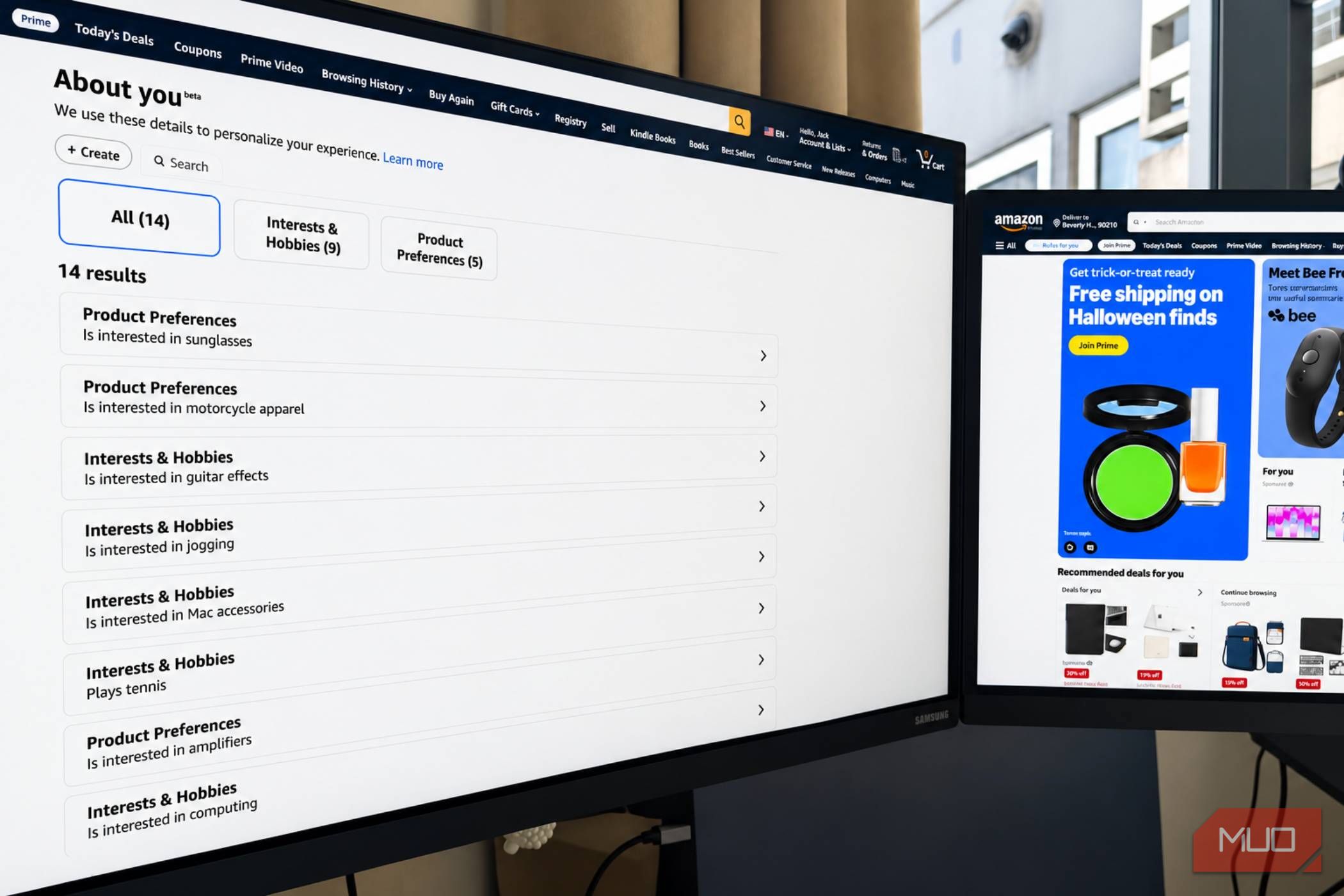
You may have wondered how Amazon’s algorithms make surprisingly specific guesses about your interests, hobbies, and lifestyle. A feature called About You stores those assumptions in one place and shows you the information it uses to personalize your shopping experience. I found some results highly accurate, even oddly specific, while others missed the mark completely. Your shopping habits reveal quite a lot Amazon has a surprisingly detailed profile of you On your About You page, Amazon lets you review personal details and preferences relating to your account, including activity such as purchases, searches, product reviews, Lists, and interactions with Alexa. It then uses this data to tailor product recommendations and create other shopping experiences. You can even help it along by entering your hobbies and interests into About You. I first learned about the About You feature in a recent Reddit discussion, where users pointed out profiles that correctly identified certain hobbies but also made some highly questionable (and often frankly hilarious) assumptions based on purchases. One person, for example, said Amazon believed they played Xbox competitively despite never owning an Xbox. Others were said to “cook meat with precision,” or “cultivate mushrooms extensively.” My account was pretty spot-on with its profiling, although I’ve never shown an interest in tennis, as it suggested. Thankfully, editing or removing an item is as easy as clicking on the suggestion and hitting Remove or Update. Check your profile on desktop or mobile Here’s how to find your Amazon About You page It takes just a few steps to access your About You page, though the steps can vary by Amazon site, account, and app version. On a desktop browser:
- Sign in to your Amazon account.
- Hover over your name near the top-right corner and select Account.
- Under Ordering and shopping preferences, select Your Shopping preferences.
- Scroll down and look for Manage your information. Select that option to view the information associated with your profile. In some regions (including my UK account), About You is nested directly under .In the Amazon Shopping app:
- Open the app and sign in.
- Tap the Me tab or the equivalent profile icon.
- Tap your name and look for About You. If you can’t find the option, try the app’s Account or Shopping preferences menus. Amazon’s interface can differ between regions, and the feature may not appear in every account. Your purchases can lead to some unusual assumptions What Amazon thinks it knows about you might surprise you Your About You page should display details about your interests, shopping preferences, household, or lifestyle, and most should make perfect sense. However, some may be perplexing, and you may wonder how Amazon arrived at them. Reddit users have shared examples ranging from inferred hobbies to oddly specific household habits. Some found that their profiles reflected purchases made years ago, while others suspected that Amazon had confused their interests with those of family members who shared their accounts. In my case, I can see how Amazon may have figured I was a tennis fanatic after buying several sports-related gifts for family members in the past. I have also shared accounts with partners in the past for accessing certain Amazon services, which could have further clouded the algorithm’s judgment. However, the suggestions aren’t meant to reflect who you are as a person, but to suggest what you might like to buy. Review and remove unwanted details You can correct what Amazon gets wrong Amazon’s About You page wasn’t devised for our entertainment; it was intended as an interactive tool for providing feedback, updating information, and removing details you don’t want used for personalization. The first thing I did when I visited the page was review the entries, look for anything outdated, inaccurate, or based on a purchase I made for someone else, and remove anything that looked amiss. However, keep in mind you’re only managing the information Amazon uses to shape your profile. It’s not the same as deleting your order history or stopping all data collection. Amazon’s account settings and privacy settings are a better way to review the bigger picture and control what data is stored. Make time to check what Amazon thinks it knows about you As a regular Amazon shopper, the platform’s About You page offers an interesting insight into how my ordinary shopping activity has become a detailed customer profile. And while some of it can miss the mark entirely or seem a little too personal, I like that it’s editable and interactive, so you can actually steer the data to make it more accurate. While I won’t be making a habit of checking the About You page every week, I can see myself visiting it before the holidays to generate gift recommendations that will appeal to me and my family members. However you choose to use it, knowing how your shopping activity shapes your online experience is a useful step toward making more informed choices about personalization and privacy.