Summary
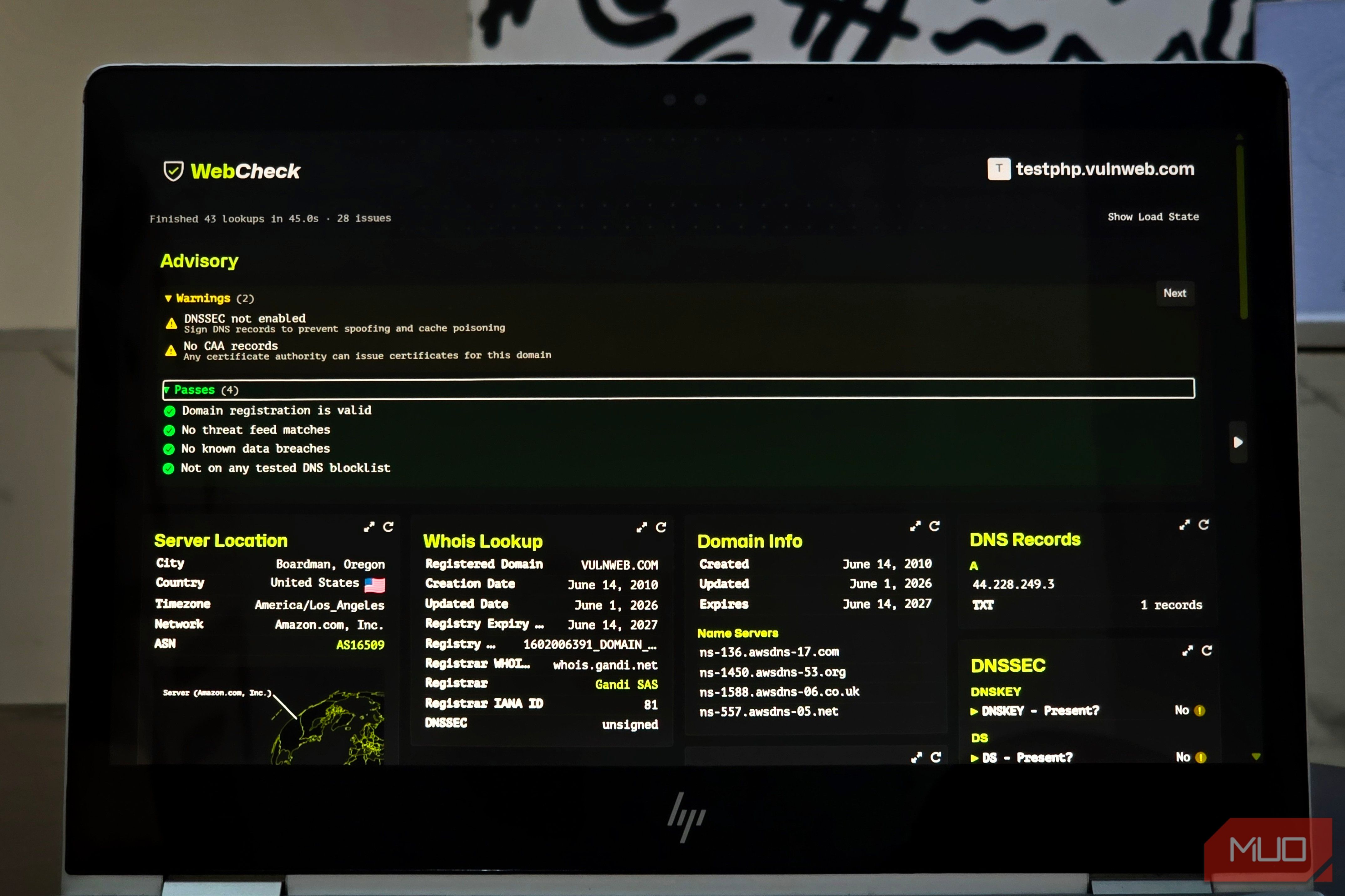
I fed testphp.vulnweb.com into Web-Check, and about 45 seconds later the page had ballooned into a sprawling report stuffed with DNS records, domain details, server information, security checks, archive history, and a handful of results that seemed perfectly happy to contradict one another. I chose that address deliberately because testphp.vulnweb.com is one of Invicti’s intentionally vulnerable test sites, set up specifically for people to point web and network scanners at. That makes it a much better guinea pig for Web-Check than some random site you don’t control, especially since the service goes beyond reading public DNS data and actively connects to the target during several of its checks. Firing those probes at whatever domain happens to cross your mind when you don’t have permission is not a habit I’d recommend cultivating. Anyway, that scan was a pretty good introduction to Web-Check, because its best trick is revealing just how chatty an ordinary domain can be when you know where to look. One URL turns into a very long receipt Even a test site leaves plenty lying around Web-Check’s home screen is about as bare-bones as it gets. You enter a URL, hit Analyze URL, and a stack of individual jobs begins working through the domain. My scan completed 43 lookups in exactly 45 seconds, though calling all 43 of them “finished” would be charitable accounting. Fifteen checks passed, eight were skipped, five timed out, and 15 flat-out failed. Even with that casualty rate, the report still had plenty to chew on. Web-Check resolved the site to 44.228.249.3 on Amazon’s network and geolocated the IP to Boardman, Oregon. It pulled registration details for vulnweb.com, identified its AWS Route 53 nameservers, listed its DNS records, checked DNSSEC and CAA configuration, dug through Internet Archive history, and ran a collection of reputation and security lookups. The DNS section is a perfect example of what this dashboard does best. Instead of making you open five different tabs to check details like IP records, nameservers, DNSSEC, and CAA records, Web-Check just lines them up side by side. During my scan, the domain pointed to a single IPv4 address, used AWS nameservers, had no DNSSEC signing, and published no CAA records. Web-Check also packages some of its key findings into a handy Advisory panel. My panel flagged the missing security records, but showed no malware or phishing matches, no breaches recorded by Have I Been Pwned, and no blocklist hits from the sources it checked. Those color-coded icons are great visual shortcuts, but remember: a passing grade here doesn’t mean a site is 100% safe. A dashboard still needs a human in the chair A green check only answers one question The test site gave Web-Check plenty of room to trip over its own shoelaces. Its SSL Certificate check timed out, and the separate TLS Connection check followed it into the ditch. A few rows farther down, though, the TLS Security Audit completed without complaint and returned a fairly detailed assessment of the server’s configuration. That isn’t quite as contradictory as it looks. The TLS Security Audit pulls an assessment from SSL Labs, while the other checks attempt their own connections, so one can succeed while another times out. The Open Ports result was another perfect example. Web-Check marked the test itself as successful, but the actual card said it couldn’t connect to any of the standard ports it tried. A few other checks that required interacting directly with the webpage also errored out or timed out. I didn’t take any of that as evidence that Web-Check is broken. A failed job could mean the target returned something the check didn’t expect, a third-party API declined to cooperate, or the hosted Web-Check instance hit one of its own constraints. More importantly, the dashboard tells you when a test failed instead of dressing an incomplete check in a suit and presenting it as a verdict. You also have to take the green lights with a grain of salt. This site is deliberately vulnerable, yet Web-Check found no matches in the malware and phishing sources it queried and no breach associated with the domain in Have I Been Pwned. That’s not really a contradiction. A vulnerable website isn’t necessarily malicious, and a missing breach record only means HIBP doesn’t have a recorded breach for that domain. That’s why checking whether a website is actually safe takes more than tallying green checkmarks and yellow triangles. Web-Check gives you individual pieces of evidence, and you still have to decide how much weight each one carries in the wider picture. I can also see myself getting plenty of mileage from it when troubleshooting a site I control. After moving a website to a new host, for example, you could check where DNS now points, whether the certificate made the trip intact, how redirects are behaving, and what headers the new server is sending without assembling a small parliament of browser tabs. The same setup could help when a domain you manage starts misbehaving, and you want a broad first look before digging into individual tools. Knowing what HTTP security headers are supposed to protect against also gives those warnings some context, rather than turning every colored badge into a five-alarm fire. At the very bottom of the page, Web-Check also points you toward specialist tools such as SSL Labs, VirusTotal, Shodan, and the Internet Archive if you need to dig deeper. You can also download the raw results as JSON if you want to inspect them elsewhere. You can bring the whole operation home Self-hosting gives you the interesting knobs Web-Check is open source on GitHub under the MIT license, so you aren’t stuck using just the public website. If you’re new to for free. The project supports Netlify, Vercel, Hostinger, Render, a standard local install, and Docker. The Docker route packages Web-Check into a single container serving the interface on port 3000, and you can get Docker running on Windows 10 or 11 first if you haven’t used containers before. Self-hosting also gives you server-side controls the public interface doesn’t expose. You can enforce which checks run, block particular hosts, restrict CORS, enable rate limiting, and change which ports Web-Check probes. Self-hosting also doesn’t make every lookup private. Active probes such as port scans and traceroutes come from your server, and browser-based checks run locally, but other checks still send the target domain or IP to outside services such as Google, Shodan, SSL Labs, and Have I Been Pwned. Web-Check itself doesn’t keep results between scans, though scanned URLs can still appear in your own proxy or platform logs. It also requires some maintenance. Web-Check doesn’t have a built-in user login system, so you shouldn’t just put your private instance out on the open web without adding some form of password protection or access control. Rate limiting is off out of the box, and only the latest release receives security fixes. You get a ton of control, but you’re also on the hook to keep the container updated and decide who gets to use it. The clues are easy; the judgment is yours I’m definitely keeping this site bookmarked for the next time a domain name gives me a reason to start digging. My test laid out dozens of clues in under a minute. After that, figuring out which ones actually matter is still up to you.